Shure Incorporated
12/36
1.
◦
◦
2.
◦
◦
◦
•
•
•
Tips to Improve Wireless System Performance
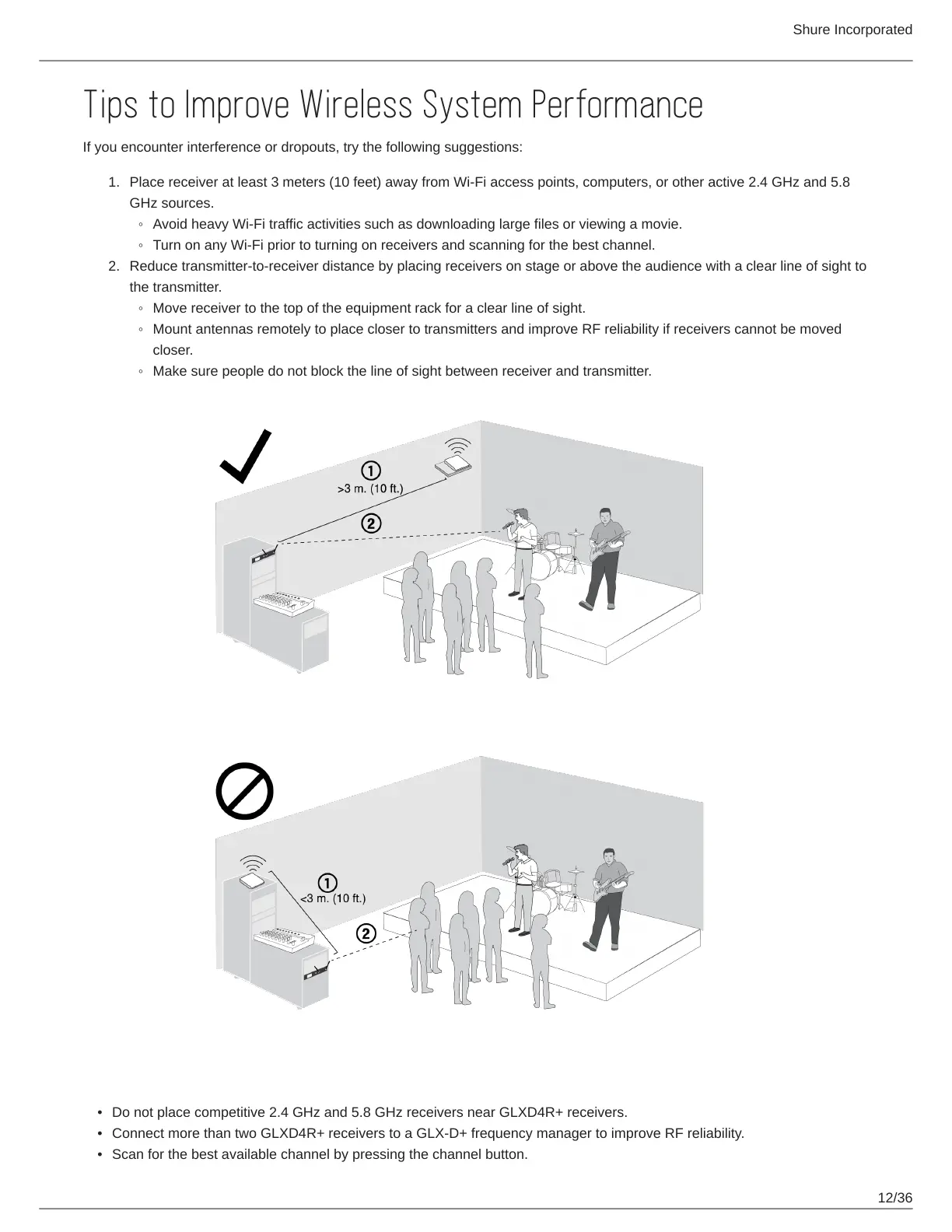
If you encounter interference or dropouts, try the following suggestions:
Place receiver at least 3 meters (10 feet) away from Wi-Fi access points, computers, or other active 2.4 GHz and 5.8
GHz sources.
Avoid heavy Wi-Fi traffic activities such as downloading large files or viewing a movie.
Turn on any Wi-Fi prior to turning on receivers and scanning for the best channel.
Reduce transmitter-to-receiver distance by placing receivers on stage or above the audience with a clear line of sight to
the transmitter.
Move receiver to the top of the equipment rack for a clear line of sight.
Mount antennas remotely to place closer to transmitters and improve RF reliability if receivers cannot be moved
closer.
Make sure people do not block the line of sight between receiver and transmitter.
Additional Tips
Do not place competitive 2.4 GHz and 5.8 GHz receivers near GLXD4R+ receivers.
Connect more than two GLXD4R+ receivers to a GLX-D+ frequency manager to improve RF reliability.
Scan for the best available channel by pressing the channel button.



 To Next Page