Shure Incorporated
6/14
The MOTIV App
Use the MOTIV app to change device settings and to record, edit, and share audio. The MVi device stores the most recently
used settings for quick setup each time you record.
Tip: Turn on Airplane Mode and Do Not Disturb to prevent interruptions to the recording caused by phone calls, text messages, or alerts.
Device Setup
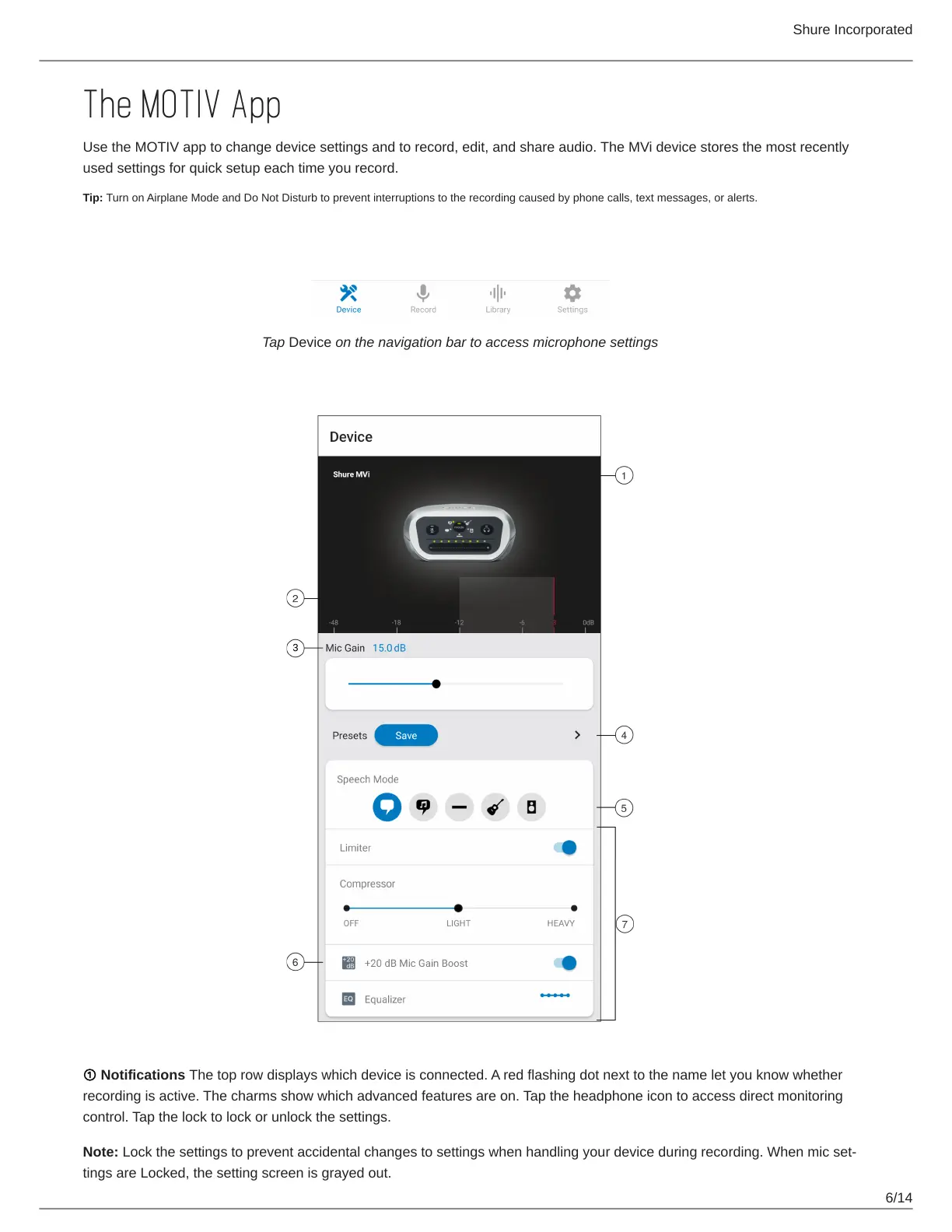
Tap Device on the navigation bar to access microphone settings
① Notifications The top row displays which device is connected. A red flashing dot next to the name let you know whether
recording is active. The charms show which advanced features are on. Tap the headphone icon to access direct monitoring
control. Tap the lock to lock or unlock the settings.
Note: Lockthesettingstopreventaccidentalchangestosettingswhenhandlingyourdeviceduringrecording.Whenmicset
tings are Locked, the setting screen is grayed out.



 To Next Page