Shure Incorporated
5/15
signed for use in sound reinforcement applications including public address, live music, studio recording, broadcast, and the
ater.
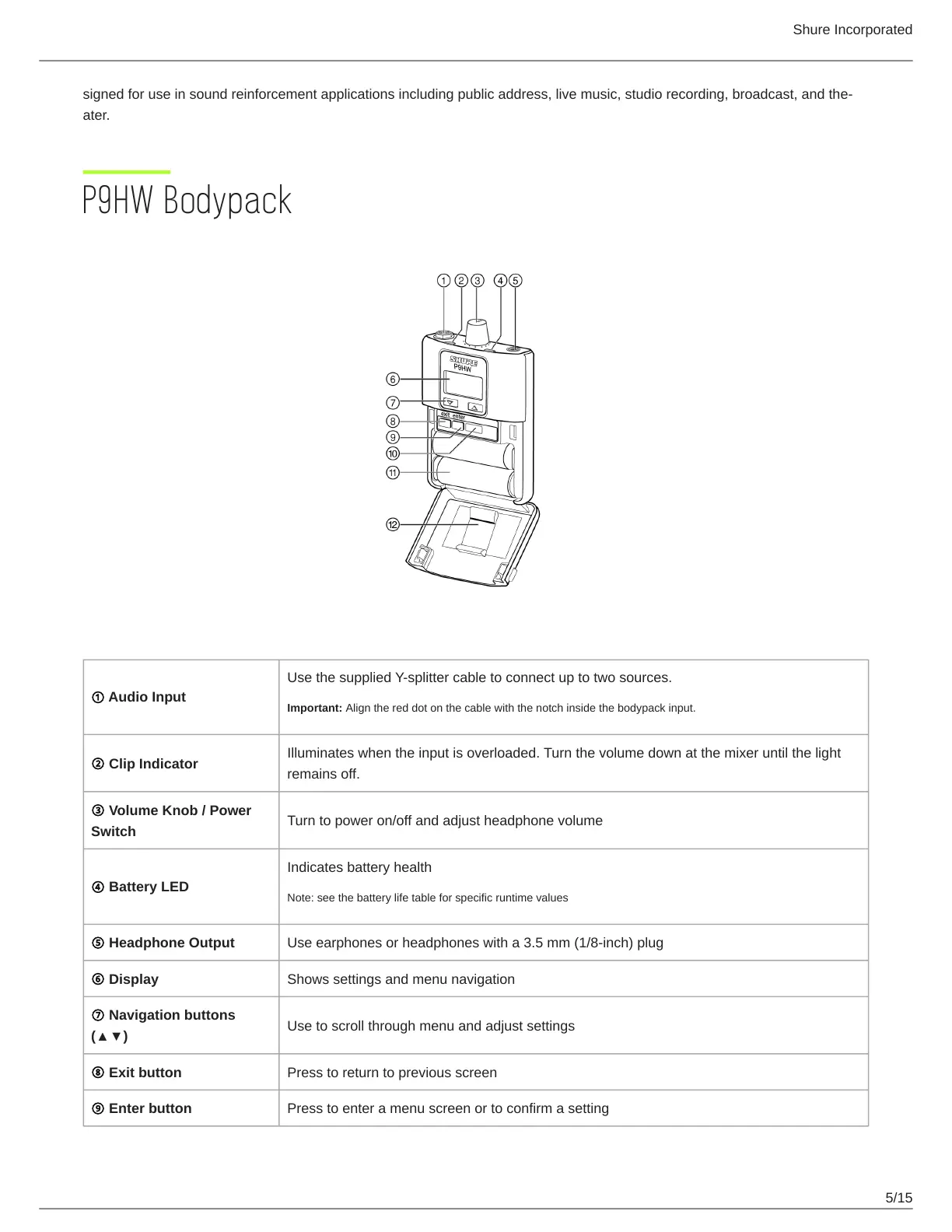
P9HW Bodypack
① Audio Input
Use the supplied Y-splitter cable to connect up to two sources.
Important: Align the red dot on the cable with the notch inside the bodypack input.
② Clip Indicator
Illuminates when the input is overloaded. Turn the volume down at the mixer until the light
remains off.
③ Volume Knob / Power
Switch
Turn to power on/off and adjust headphone volume
④ Battery LED
Indicates battery health
Note: see the battery life table for specific runtime values
⑤ Headphone Output Use earphones or headphones with a 3.5 mm (1/8-inch) plug
⑥ Display Shows settings and menu navigation
⑦ Navigation buttons
(▲▼)
Use to scroll through menu and adjust settings
⑧ Exit button Press to return to previous screen
⑨ Enter button Press to enter a menu screen or to confirm a setting


 To Next Page