Shure Incorporated
7/15
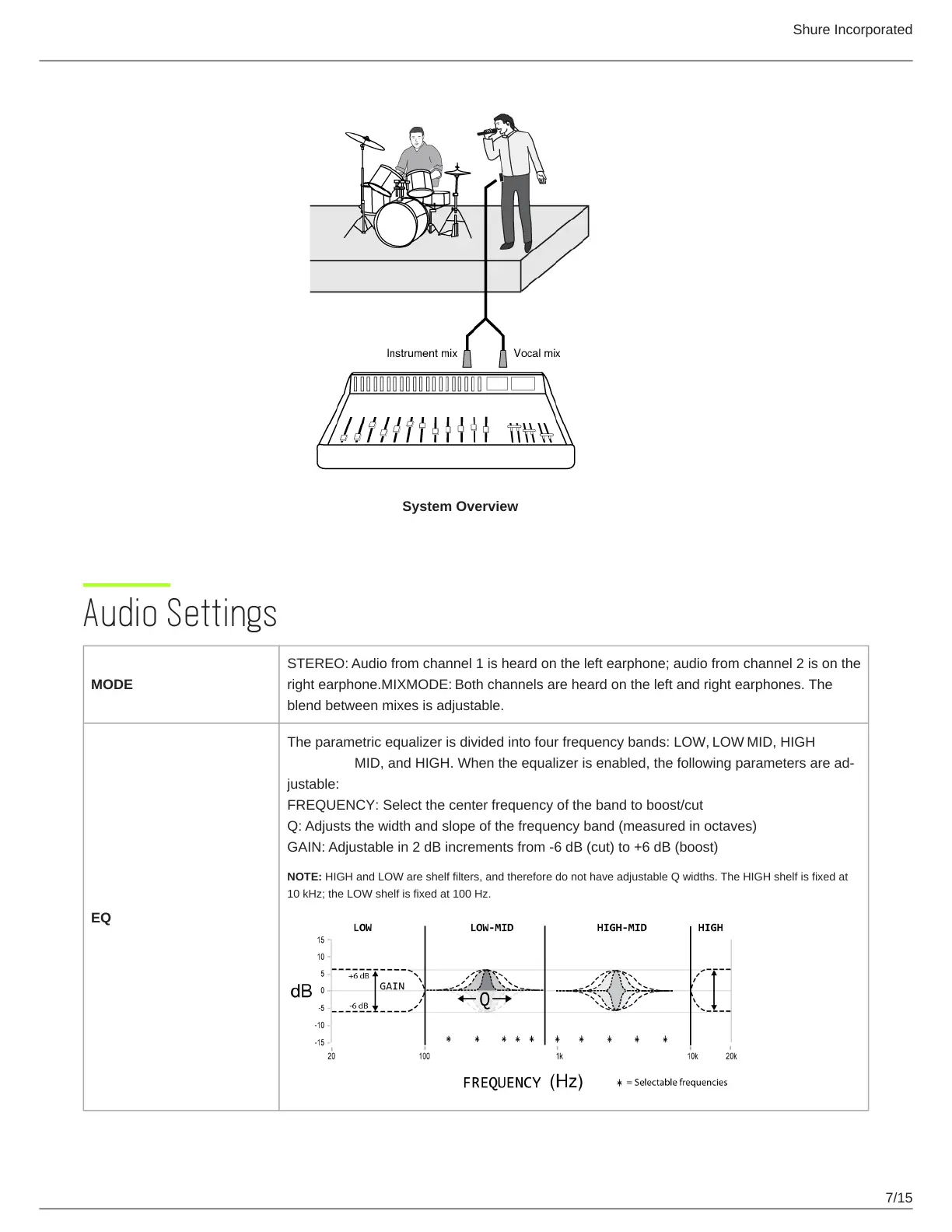
System Overview
Audio Settings
MODE
STEREO: Audio from channel 1 is heard on the left earphone; audio from channel 2 is on the
right earphone.MIXMODE: Both channels are heard on the left and right earphones. The
blend between mixes is adjustable.
EQ
The parametric equalizer is divided into four frequency bands: LOW, LOW MID, HIGH
MID, and HIGH. When the equalizer is enabled, the following parameters are ad
justable:
FREQUENCY: Select the center frequency of the band to boost/cut
Q: Adjusts the width and slope of the frequency band (measured in octaves)
GAIN: Adjustable in 2 dB increments from -6 dB (cut) to +6 dB (boost)
NOTE: HIGH and LOW are shelf filters, and therefore do not have adjustable Q widths. The HIGH shelf is fixed at
10 kHz; the LOW shelf is fixed at 100 Hz.


 To Next Page