Shure Incorporated
4/10
•
•
1.
2.
3.
Changing Sleeves
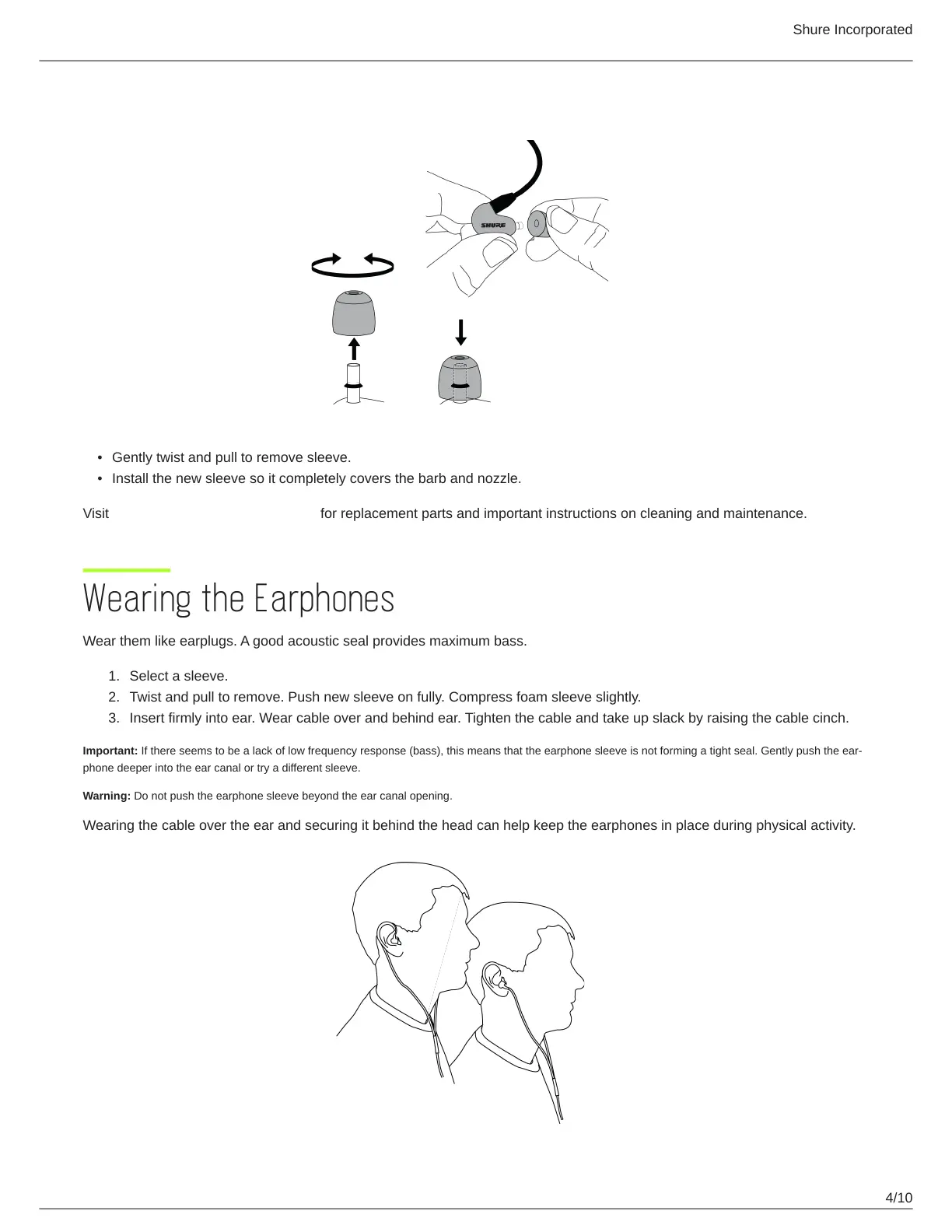
Gently twist and pull to remove sleeve.
Install the new sleeve so it completely covers the barb and nozzle.
Visit http://www.shure.com/earphones for replacement parts and important instructions on cleaning and maintenance.
Wearing the Earphones
Wear them like earplugs. A good acoustic seal provides maximum bass.
Select a sleeve.
Twist and pull to remove. Push new sleeve on fully. Compress foam sleeve slightly.
Insert firmly into ear. Wear cable over and behind ear. Tighten the cable and take up slack by raising the cable cinch.
Important: Ifthereseemstobealackoflowfrequencyresponse(bass),thismeansthattheearphonesleeveisnotformingatightseal.Gentlypushtheear
phone deeper into the ear canal or try a different sleeve.
Warning: Do not push the earphone sleeve beyond the ear canal opening.
Wearing the cable over the ear and securing it behind the head can help keep the earphones in place during physical activity.



 To Next Page