9
2/2 P
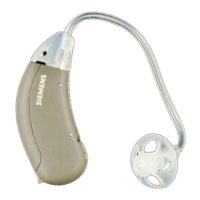
You can adapt to a changed
hearing situation by lightly
pressing the program button.
For instance, you are better able
to understand the person
you’re talking to even in
disturbing background noise.
You simply press the button
to choose between two
programs.
Program button
Your acoustician can adapt the two programs exactly to
your individual needs. In this way it is possible to take
account of different microphone characteristics.
A beep indicates which hearing program is selected.
One beep is when changing to microphone program “1” or
to “T” setting. Two beeps is when changing to microphone
program “2”.
If required, your hearing instrument specialist can switch the
beeps off.



 To Next Page