3
VAR Language: en; VAR issue date: 050307
Template 102x140 querleft page (3) of A31Finch en, A31008-H2920-A1-2-7619 (29.12.2005, 11:27)
© Siemens AG 2005, S_Finch_Main.fm
Getting started
Using the SIM card/battery
Your phone's display is delivered with
a protective film. Remove this film before
getting started. If the SIM card is credit
card-sized, snap out the smaller seg-
ment and trim any rough edges. Al-
ways switch off phone before remov-
ing the battery!
Only 3V and 1.8V SIM cards are sup-
ported. Please contact your service
provider if you have an older card.
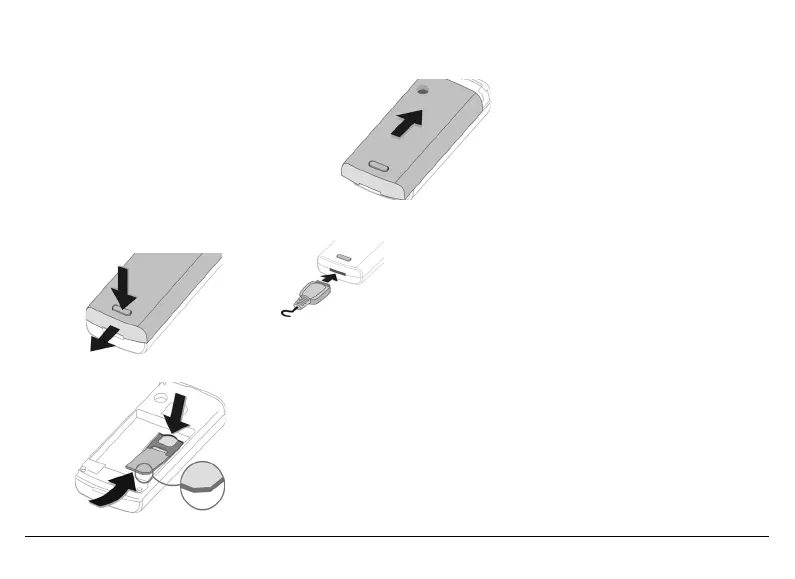
Release and open battery cover
Insert SIM card
To remove the SIM card push the card
here.
Insert the battery and close cover
Charge battery
The battery is not
fully charged when
delivered. Plug
charger cable into
the bottom of the
phone, plug power
supply unit into a mains power socket
and charge for at least two hours. The
power supply unit heats up when used
for long periods. This is normal and
not dangerous.
When charging is in progress
h is
displayed.
Charging time
An empty battery is fully charged after
about 2 hours. Charging is only possi-
ble within a temperature range of
+5 °C to +40 °C. If the temperature ris-
es/falls 5 °C above/below this, the
charge symbol flashes a warning. The
mains voltage specified on the power
supply unit must not be exceeded (see
also p. 11).
Only use the power supply unit provided!
Display while in service
Charge level display during operation
(empty - full):
adg.
A beep sounds when the battery is
nearly empty. The charge level of the
battery is only displayed correctly after
an uninterrupted charging/discharging
cycle. You should therefore not remove
the battery unnecessarily and where pos-
sible not terminate the charging process
early.
Security
§Menu§ ¢ m ¢ Security
¢ Select function.
The phone and SIM card are protected
against misuse by several security
codes.
Keep these confidential numbers in a safe
place where you can access them again if
required.
1
2
3
4
5
6


 To Next Page