EasyManua.ls Logo

Siemens artis - User Manual

Siemens artis
28 pages
Print Icon
To Next Page IconTo Next Page
Loading...
ARTIS
TM
ARTIS e2e
TM
User Guide
Behind-the-Ear System
s

Questions and Answers

  • J
    Joseph EatonJul 27, 2025
    What to do if Siemens artis Hearing Aid does not work?
    • S
      Sarah MitchellJul 27, 2025
      If your Siemens Hearing Aid isn't working, there are a few things you can check: 1. Ensure that the instrument is turned on. 2. Make sure the battery compartment is completely closed. 3. Replace the battery with a new one if it's dead. 4. Verify that the battery is inserted correctly, paying attention to the polarity.
  • V
    Victoria WhiteAug 2, 2025
    Why does my Siemens artis Hearing Aid whistle?
    • B
      Billy HortonAug 2, 2025
      Your Siemens Hearing Aid may be whistling due to several reasons. It could be improperly inserted in your ear; try reinserting it until it fits securely. The volume might be too high, so lower the volume control. It could also be clogged with wax or you may have excessive wax in your ears; clean the earmold or contact your Hearing Care Professional. Finally, there might be a crack in the earmold tubing, in which case you should see your Hearing Care Professional.
  • R
    rsotoAug 7, 2025
    How to fix weak sound on Siemens artis Hearing Aid?
    • P
      pattersonemilyAug 8, 2025
      If the sound from your Siemens Hearing Aid is weak, it could be due to a weak or dead battery; replace it with a new one. The instrument might be clogged, so clean the earmold. Also, check if the volume is too low and turn up the volume control.
  • R
    Robert GreenAug 14, 2025
    What to do if my Siemens artis has buzzing sound?
    • C
      conniepattersonAug 14, 2025
      If you're experiencing a buzzing or whistling sound with your Siemens Hearing Aid, it might be because the battery compartment isn't completely closed; gently close it. Also, a weak battery can cause this issue, so try replacing it with a new one.
  • A
    Amy Wilson DDSAug 20, 2025
    Why is the sound distorted on my Siemens Hearing Aid?
    • Y
      yfloresAug 20, 2025
      Distorted or intermittent sound in your Siemens Hearing Aid can be due to a couple of reasons. The volume control might be set too high, so try lowering it. Also, a weak battery can cause this issue, so replace the battery.

Summary

ARTIS BTE Hearing Instrument Models

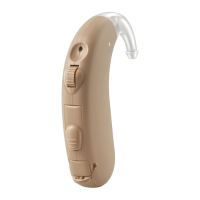
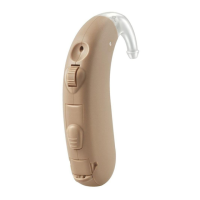
ARTIS S and ARTIS P Models

Details the ARTIS S and ARTIS P models, including battery type and key features.

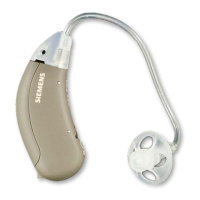
ARTIS SP Model and Features

Details the ARTIS SP model, its battery type, and its specific features.

Key Features of ARTIS BTE Instruments

Explains the common components and functionalities of the ARTIS BTE hearing instruments.

Battery Insertion and Removal

Battery Handling and Tips

Provides guidance on handling batteries and offers useful tips for battery management.

Inserting the Battery

Step-by-step instructions on how to correctly insert a battery into the hearing instrument.

Removing the Battery

Instructions on how to safely remove a battery from the hearing instrument.

Low Battery Indicator

Explains how the hearing instrument indicates a low battery status.

Battery Replacement Guidelines

Specifies when to change batteries and provides cautions regarding battery safety and disposal.

Battery Compartment Door Lock

Locking the Battery Compartment

Instructions on how to engage the battery compartment lock to prevent accidental removal.

Unlocking the Battery Compartment

Instructions on how to disengage the battery compartment lock.

Inserting and Removing the ARTIS BTE

Instrument Insertion Procedure

Step-by-step guide on how to properly insert the hearing instrument into the ear.

Practice Tips for Insertion

Offers advice and tips to help users practice inserting and removing the hearing instrument.

Turning the ARTIS BTE On and Off

Power Control via Battery Compartment

Explains how closing/opening the battery compartment controls the instrument's power.

Power Control via Program Button

Details how the program button can be used to turn the hearing instrument on and off.

Power-On Delay Feature

Explains the power-on delay feature that prevents feedback when inserting the instrument.

e2 e Wireless Technology

e2 e Wireless Functionality

Describes the ear-to-ear wireless technology, its benefits, and synchronization features.

Wireless Performance Considerations

Notes potential interference affecting wireless performance and how to mitigate it.

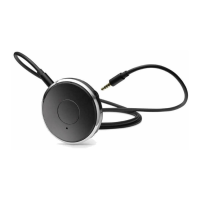
ePocket Accessory for e2 e Instruments

Wireless Remote Control (ePocket)

Explains the ePocket as a wireless remote control for program and volume adjustment.

ePocket Usage Notes

Provides important notes regarding ePocket usage, remote control units, and T-coil mode.

Using the Program Button

Program Selection and Beeps

Details how to select hearing programs using the button and how beep confirmation works.

Program Synchronization for Two Instruments

Explains how programs change simultaneously on both instruments when using a pair.

Directional Microphone System

Directional vs. Omnidirectional Modes

Explains the function of directional and omnidirectional modes for different listening environments.

Microphone System Programming

Describes how the directional microphone system is programmed for automatic or manual use.

Using the Volume Control

Manual Volume Adjustment

Instructions on how to manually adjust volume using the control wheel for compatible models.

Automatic Volume Adjustment

Explains that the instrument is often fully automatic, requiring no manual volume changes.

Volume Synchronization for Two Instruments

Notes how volume changes are synchronized when wearing two instruments.

Audio Input Functionality

Connecting External Audio Devices

Explains how audio input enables connection to external devices like FM systems or TVs.

Audio Shoe Compatibility

Specifies the requirement for using ARTIS-exclusive audio shoes marked with 'L' or 'M'.

Attaching and Removing Audio Shoes

Provides instructions on how to attach and detach audio shoes from the hearing instrument.

Audio Input Safety Instructions

Outlines safety requirements for connecting audio input to line-operated equipment.

Using the Telephone

Automatic Telephone Program (AutoPhone)

Explains the AutoPhone function that automatically switches to a telephone program.

AutoPhone Magnet Accessory

Describes the use of an AutoPhone magnet accessory to activate the function on certain telephones.

Magnet Safety Precautions

Warns about potential risks of magnets near electronics, storage media, and medical devices.

Maintenance and Care

Earmold Cleaning

Instructions for detaching and cleaning the earmold, cautioning against water on the instrument.

Professional Servicing and Care Tips

Recommends occasional professional checks and tips for using a dry aid kit.

Important Notes and Compliance

Environmental and Usage Precautions

Advises against extreme temperatures, humidity, hairspray, and operation in hazardous environments.

FCC Compliance and Modifications

Details FCC rules, compliance conditions, and the effect of unauthorized modifications.

Troubleshooting Tips

Troubleshooting Weak Sound

Addresses issues causing weak sound, such as battery or clogged earmolds, and their solutions.

Troubleshooting Whistling

Provides solutions for whistling, including improper seating or high volume control settings.

Troubleshooting Distorted or Intermittent Sound

Solutions for distorted or intermittent sound, often related to volume or battery issues.

Troubleshooting Instrument Not Working

Addresses issues where the hearing instrument does not work, such as power or battery problems.

Regulatory and Disposal Information

WEEE and CE Compliance

Details European Union directives (WEEE, CE) and compliance for the equipment.

Disposal and Contact Information

Provides EU disposal addresses and company contact information.

Siemens artis Specifications

General IconGeneral
BrandSiemens
Modelartis
CategoryHearing Aid
LanguageEnglish

Related product manuals