EasyManua.ls Logo

Siemens GMI Series - Page 35

Siemens GMI Series
46 pages
Print Icon
To Next Page IconTo Next Page
To Previous Page IconTo Previous Page
Loading...
Maintenance
&
Overhaul
«
Page
32
should
be
tagged
and
disconnected
,
the
relay
and
bracket
can
then
be
extracted
and
replaced
.
Replacement
of
the
Auxiliary
Switch
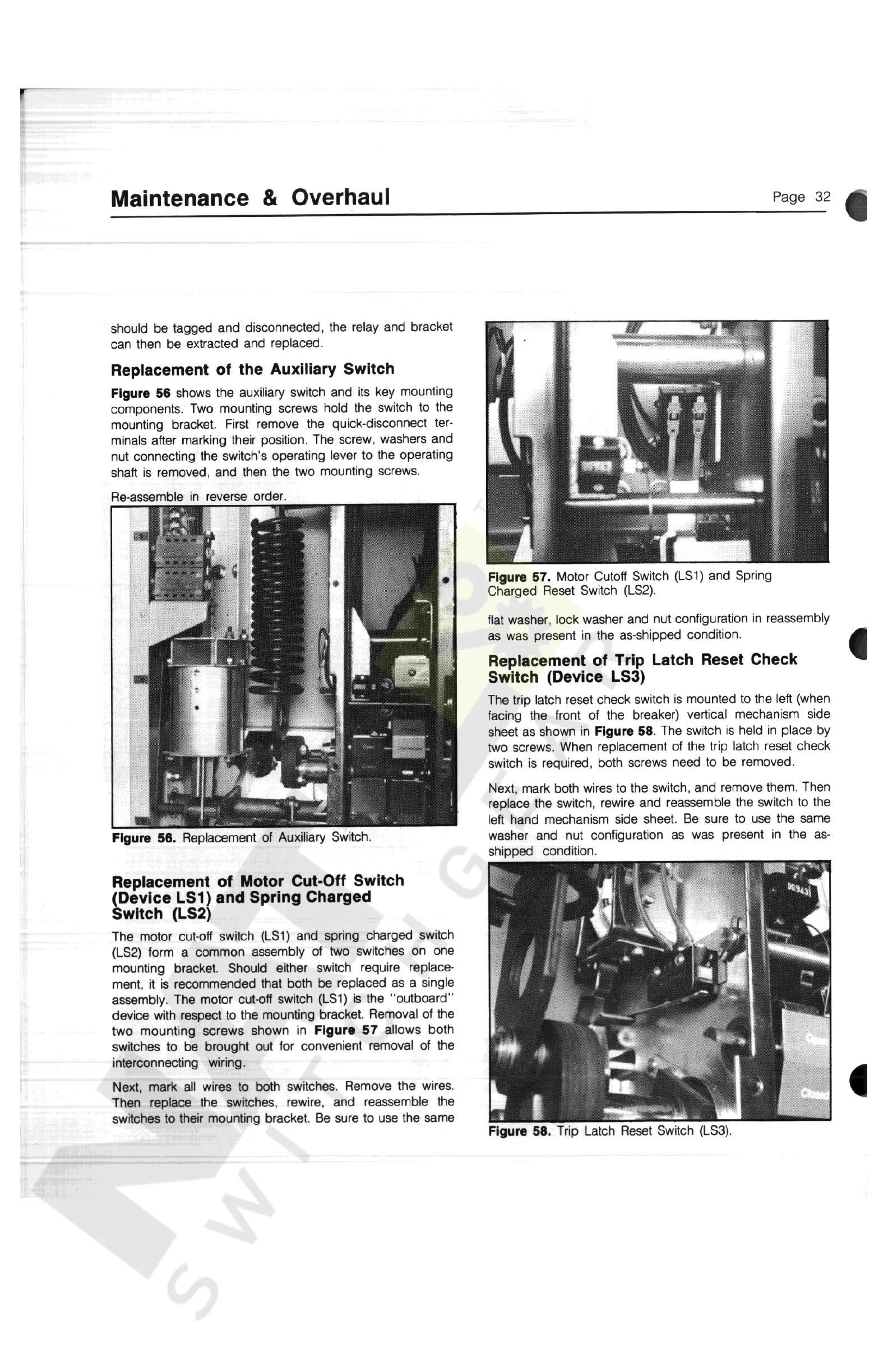
Figure
56
shows
the
auxiliary
switch
and
its
key
mounting
components
.
Two
mounting
screws
hold
the
switch
to
the
mounting
bracket
.
First
remove
the
quick
-
disconnect
ter
-
minals
after
marking
their
position
.
The
screw
,
washers
and
nut
connecting
the
switch
s
operating
lever
to
the
operating
shaft
is
removed
,
and
then
the
two
mounting
screws
.
Re
-
assemble
in
reverse
order
.
Figure
57
.
Motor
Cutoff
Switch
(
LS
1
)
and
Spring
Charged
Reset
Switch
(
LS
2
)
.
flat
washer
,
lock
washer
and
nut
configuration
in
reassembly
as
was
present
in
the
as
-
shipped
condition
.
Replacement
of
Trip
Latch
Reset
Check
Switch
(
Device
LS
3
)
The
trip
latch
reset
check
switch
is
mounted
to
the
left
(
when
facing
the
front
of
the
breaker
)
vertical
mechanism
side
sheet
as
shown
in
Figure
58
.
The
switch
is
held
in
place
by
two
screws
.
When
replacement
of
the
trip
latch
reset
check
switch
is
required
,
both
screws
need
to
be
removed
.
Next
,
mark
both
wires
to
the
switch
,
and
remove
them
.
Then
replace
the
switch
,
rewire
and
reassemble
the
switch
to
the
left
hand
mechanism
side
sheet
.
Be
sure
to
use
the
same
washer
and
nut
configuration
as
was
present
in
the
as
-
shipped
condition
.
«
Figure
56
.
Replacement
of
Auxiliary
Switch
.
Replacement
of
Motor
Cut
-
Off
Switch
(
Device
LS
1
)
and
Spring
Charged
Switch
(
LS
2
)
The
motor
cut
-
off
switch
(
LS
1
)
and
spring
charged
switch
(
LS
2
)
form
a
common
assembly
of
two
switches
on
one
mounting
bracket
.
Should
either
switch
require
replace
-
ment
,
it
is
recommended
that
both
be
replaced
as
a
single
assembly
.
The
motor
cut
-
off
switch
(
LS
1
)
is
the
"
outboard
"
device
with
respect
to
the
mounting
bracket
.
Removal
of
the
two
mounting
screws
shown
in
Figure
57
allows
both
switches
to
be
brought
out
for
convenient
removal
of
the
interconnecting
wiring
.
Next
,
mark
all
wires
to
both
switches
.
Remove
the
wires
.
Then
replace
the
switches
,
rewire
,
and
reassemble
the
switches
to
their
mounting
bracket
.
Be
sure
to
use
the
same
i
Figure
58
.
Trip
Latch
Reset
Switch
(
LS
3
)
.
Courtesy of NationalSwitchgear.com

Other manuals for Siemens GMI Series

Related product manuals