
 Need help?
Do you have a question about the Siemens Iq500 ED HSB Series and is the answer not in the manual?
Read manual, keep safe, do not connect if damaged. Use only as intended.
Appliance use by children/reduced abilities, warnings on fire, hot surfaces, and electric shock.
Warnings about injury from moving pans and suffocation from packaging.
Environmentally compatible packaging materials can be recycled by type.
Tips for using less energy: match pan size, use lids, flat bases, little water, lower power.
Description of control panel layout, touch fields, indicators and symbols.
Remove packaging and wipe the hob surface with a damp cloth.
Benefits of induction technology: time saving, energy saving, easy cleaning, heat control.
List of recommended cookware available on the official website.
Instructions for setting up the Home Connect function upon first use.
How to switch the hob on by touching the main switch.
Procedure to switch off the hob by touching the main switch.
How to select power levels from 1 to 9 for cooking zones.
General tips for cooking, preheating, using lids, and monitoring.
How to assign functions to the Favourite button using the Home Connect app.
Guidance on placing cookware correctly on the combiZone.
Steps to activate and set power for combiZone.
How to deactivate the combiZone function.
Programme cooking time for zones and automatic switch-off.
Activate a clock function that operates independently of cooking zones.
How to activate the powerBoost function for faster heating.
How to deactivate the powerBoost function.
Tips for using shortBoost, activation, and deactivation.
How to activate and deactivate the Keep-warm function.
How to activate, deactivate, and use automatic childproof lock.
How to activate and deactivate the Pause function.
Description of available basic settings and their values.
Step-by-step guide to access and navigate basic settings.
How to cancel changes made in basic settings without saving.
Procedure for testing and interpreting cookware suitability on the hob.
Steps to install and set up the Home Connect app on a mobile device.
Requirements and steps to connect the appliance to the Wi-Fi network.
Explanation of the Wi-Fi indicator status and its meaning.
How to change hob settings remotely using the Home Connect app.
Enabling automatic confirmation of settings when near the hob.
How to update the appliance's software via the Home Connect app.
Information on using remote diagnostics for customer service.
Details on data transmission for Home Connect initial registration.
How to adjust extractor hood behaviour and settings via the hob.
Explanation of settings for automatic fan start-up and run-on.
Recommended and unsuitable cleaning products and hob cleaning procedure.
How to clean the hob frame and surround.
General warnings regarding troubleshooting and contacting customer service.
Table of faults, causes, and troubleshooting steps for display errors.
Explanation of normal noises like buzzing, crackling, hissing, fan sounds.
Instructions for environmentally friendly disposal of the old appliance.
Information on contacting customer service and finding appliance identification numbers.
Details on free/open source software and declaration of conformity.
Recommended settings for melting chocolate for testing purposes.
Recommended settings for heating and keeping lentil stew warm.
Recommended steps and settings for preparing Béchamel sauce.
Recommended steps for cooking rice pudding with and without a lid.
Recommended steps and settings for cooking rice.
Recommended steps and settings for roasting pork loin.
Recommended steps and settings for preparing crêpes.
Recommended steps and settings for deep-fat frying frozen chips.
This document describes the Siemens ED...HSB.. Induction Hob, a modern cooking appliance designed for domestic use. It offers a range of features for efficient and convenient cooking, along with safety guidelines and maintenance instructions.
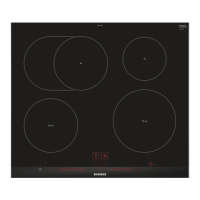
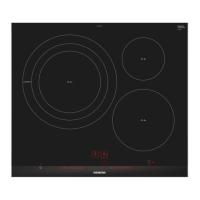
The Siemens Induction Hob utilizes induction technology for cooking, which generates heat directly in the cookware, leading to faster cooking times, energy savings, and easier cleaning compared to conventional hobs. The appliance features multiple cooking zones, some of which can be combined using the combiZone function for larger cookware.
Power Levels and Boost Functions: The hob offers 17 power levels, from 1 to 9 with intermediate values, allowing precise control over cooking intensity. For rapid heating, the powerBoost function can be activated for any cooking zone, significantly reducing the time needed to heat large quantities of water. Additionally, the shortBoost function provides quick heating for pans, though it's not recommended for frying pans to avoid coating damage.
Time-Setting Options: The hob includes a Switch-off timer that automatically turns off a cooking zone after a set time, and a separate Timer function that operates independently of the cooking zones, useful for general timing tasks.
Keep-warm Function: A dedicated Keep-warm function allows users to melt chocolate or butter and keep meals warm at a low temperature.
Childproof Lock: To prevent accidental activation by children, the hob is equipped with a Childproof lock that can be manually switched on and off. An Automatic childproof lock can also be configured to activate every time the hob is switched off.
Pause Function: The Pause function allows users to temporarily stop and resume active cooking processes for up to 10 minutes, retaining all settings. This is particularly useful for cleaning the control panel during cooking.
Home Connect Integration: The hob is Home Connect compatible, enabling control and monitoring via a mobile device through the Home Connect app. This integration allows for remote control of functions, adjustment of basic settings, and access to exclusive services and offers. It also supports Automatic presence detection, allowing confirmation of settings from a mobile device without direct interaction with the hob, provided the user is nearby.
Hob-based Hood Control: For compatible extractor hoods, the hob can control the fan and lighting settings. Users can assign the hood function to a Favourite button for quick access to fan settings (including automatic mode) and lighting control.
Control Panel: The hob features a touch-sensitive control panel with clearly labeled symbols for various functions, including the main switch, cooking zone selection, power level adjustment, timer functions, and special features like combiZone and boost. The control panel should be kept clean and dry, and cookware should not be placed near displays or buttons to prevent overheating of the electronics.
QuickStart: If cookware is placed on a cooking zone before switching on the appliance, the hob automatically detects it and selects the cooking zone, allowing for quick power level selection.
ReStart: After switching off the appliance, if it's switched back on within four seconds, the hob will operate with the previously set settings.
Cooking Recommendations: The manual provides a comprehensive table of recommended power levels and cooking times for various foods, including melting, heating, defrosting, poaching, boiling, steaming, braising, roasting, and deep-fat frying.
Favourite Button: The Favourite button (✩) can be assigned two frequently used functions or cooking settings, allowing for quick access with a short or long press.
Basic Settings: The hob's basic settings can be configured to suit individual needs, including childproof lock activation, audible signal volume, and assignment of time-setting functions to the control panel.
Cookware Test: A Cookware test function is available to assess the suitability and quality of cookware for induction cooking, ensuring optimal performance.
Initial Cleaning: Before first use, any leftover packaging should be removed, and the hob surface wiped with a damp cloth. Recommended detergents are available on the Siemens website.
Cleaning the Hob: The hob should be cleaned after every use to prevent cooking residues from burning on. Heavy soiling should be removed with a glass scraper, and the hob cleaned with a suitable agent for glass ceramic when cold. For sugar stains, rice starch, plastic, or aluminum foil, the hob should be cleaned immediately without waiting for it to cool.
Cleaning the Hob Surround: The hob frame should be cleaned with hot soapy water and a soft cloth if it becomes dirty or stained. A glass scraper should not be used on the frame.
Software Updates: If connected to Home Connect, the appliance's software can be updated for optimization, troubleshooting, or security. Updates can be downloaded automatically and installed via the Home Connect app.
Remote Diagnostics: Customer Service can access the appliance remotely for diagnostics if connected to the Home Connect server and if Remote Diagnostics is available in the user's country.
Troubleshooting: The manual provides a troubleshooting guide for common faults, including display issues, overheating, and noises. Users are advised to consult this information before contacting after-sales service.
Disposal: The appliance is designed for environmentally friendly disposal, with packaging materials being recyclable. Information on current disposal methods is available from specialist dealers or local authorities.
 General
| Type | Induction Hob |
|---|---|
| Control Type | Touch Control |
| Features | PowerBoost, QuickStart, ReStart |
| Number of Cooking Zones | 4 |
| Total Power | 7400 W |
| Boost Function | Yes |
| Residual Heat Indicator | Yes |
| Child Safety Lock | Yes |
| Timer | Yes |
| Automatic Pan Detection | Yes |
| Power Slide Control | Yes |
| Dimensions (W x D x H) | 592 x 522 x 51 mm |
| Installation Type | Built-in |
| Color | Black |
| Material | Glass Ceramic |



 To Next Page