11
SMART 7KT0310 Manual
Configuration
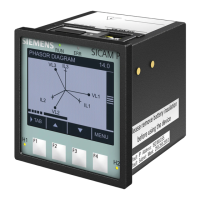
Thereare4dedicatedkeyslabelledasF1,F2,F3,F4.Usethese4keystoreadmeter
parameters.Simplypressthesekeystoreadtheparameters.
Thekeyshavemultipleassignments.Functionassignmentsandkeylabelingchange
accordingtothecontextofoperatorinput.
Ashortpressonthekeytriggersthefunctiononce.Holdingthekeydownforlonger
switchesontheautorepeatfunctionafterapproximately1s.Thefunctionofthekeyis
triggeredrepeatedlywhilethekeyishelddown.Autorepeatisuseful,forexample,for
fastincrementingofvalueswhenparameterizingthedevice.
For reading serial number
PressF3keyfor5sec.todisplay8-digitserialnumberonlyfor5sec.at5thlineofdisplay
Automatic / manual mode
PressF4keyfor3secondstotogglebetweenAutomaticandManualmode.
Note:Bydefault,unitoperatesinautomaticmode.
Inautomaticmodeonlinepagesscrollautomaticallyattherateof5secondsperpage.
Inautomaticmodewhenanykeyispressed,unittemporarilyswitchestomanualmodeandtheappropriatepageis
displayed.Ifanykeyisnotpressedfor5sec,unitresumesautomaticmode.
Password to start conguration
WhenthemeterisbroughtintothecongurationmodebypressingkeysF3+F4,therstpagethatisdisplayedisthe
passwordpagewhichshowsthepassword0000.Enterthepassword1000whichisthedefaultfactor-setpassword
bypressingtheF1keytomovecurserleftorrightbyonedigitatatimeandF2orF3keysforincreasingordecreasing
parametervalues.Afteryouenterthepasswordof1000,pressF4keytogotothenextpagewhichisthepassword
changepageandcontinuewithparameterization.
For the conguration setting mode
PressF3+F4keysfor3secondstoenterorexitfromtheCongurationmenu.
UseF1keytomovecurserleftorrightbyonedigitatatime
UseF2orF3keysforincreasingordecreasingparametervalues
PressF2+F4keytogobacktopreviouspage



 To Next Page
 Loading...