7
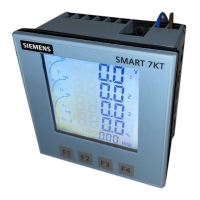
SMART 7KT0310 Manual
Assembly
Installation
For installing the meter
Preparethepanelcutoutwithproperdimensionsasshownbelow.
FRONT PANEL DESCRIPTION
OUTLINE
Dimensions (in mm)
PANEL CUTOUT
Dimensions (in mm)
50
5
96
1. Insert unit into the panel 2. Positiontheclamps(asshowninthe
gure)andpushthesameintotheslots
intheirrespectivelocations.
3. Push/Slideall4clampstowardsthepanel
evenlytillthelowestpossibletoothof
theclampisengaged.Ensure the meter
is properly tightened and it does not
move.
PANEL
GASKET
UNIT
1
2
3
4
Base clamp
position
Base clamp
SLIDING
SLIDING
CLAMP
Note:Terminalscrewtighteningtorque:0.7N-mto0.8N-m(6In-Lbto7In-Lb)
Thedistancetobemaintainedbetweentwometerswhile
mountingonapaneldoorshouldbeatleast100mm.
100 mm
100 mm 100 mm
100 mm
Mounting distance










 To Next Page

