en Getting to know your appliance
22
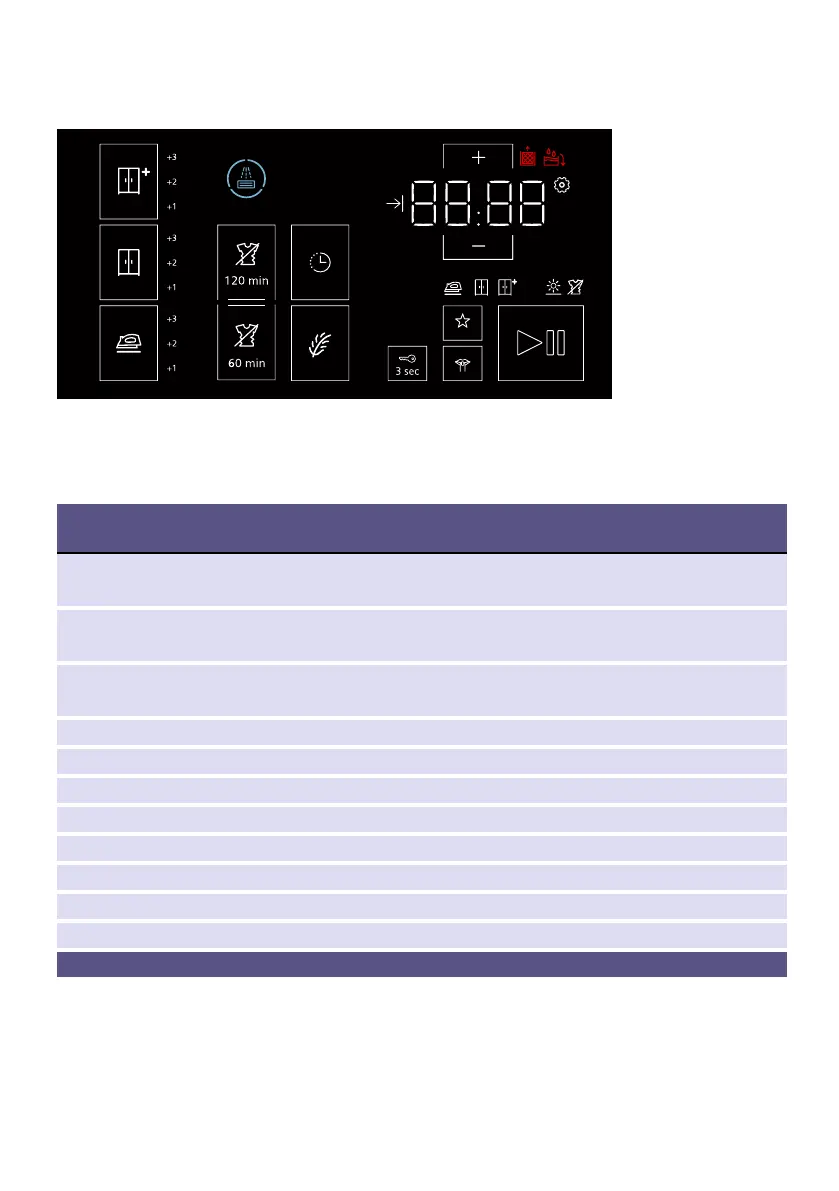
Touch display
Note: Lightly touch the outlined boxes on the touch display to select the settings
you require. The selected settings will be highlighted on the touch display. Touching
a box repeatedly allows you to change or disable the selected setting.
Buttons on the touch
display
Explanation
Ò
+1; +2; +3
Dryness level: Cupboard Dry Plus
Drying degree can be finely adjusted
»
+1; +2; +3
Dryness level: Cupboard Dry
Drying degree can be finely adjusted
S
+1; +2; +3
Dryness level: Iron Dry
Drying degree can be finely adjusted
Ý 120 min/60 min Anti-Crease
B "Ready in" time
¼ Selection buttons
P Low-Heat Drying
w 3 sec Childproof lock
â Favourite programme
ç Quiet drying with no audible button tones or "programme end" signal
Ü Start and Pause
Detailed description of the symbols from ~ Page 27.


 To Next Page