(home) Press to open the ROKU menu. (Not available)
Press to play backward faster.
Press to play forward faster.
Press to view the next photo.
Press to view the previous photo.
.
Press to stop the photo playback.
Press to pause the photo playback.
Press to start the photo playback.
USB Operation
Press to select the picture mode.
Press to change TV channels.
source.
Press to set the sleep timer.
(aspect ratio).
Press to enter a digital sub-channel number.
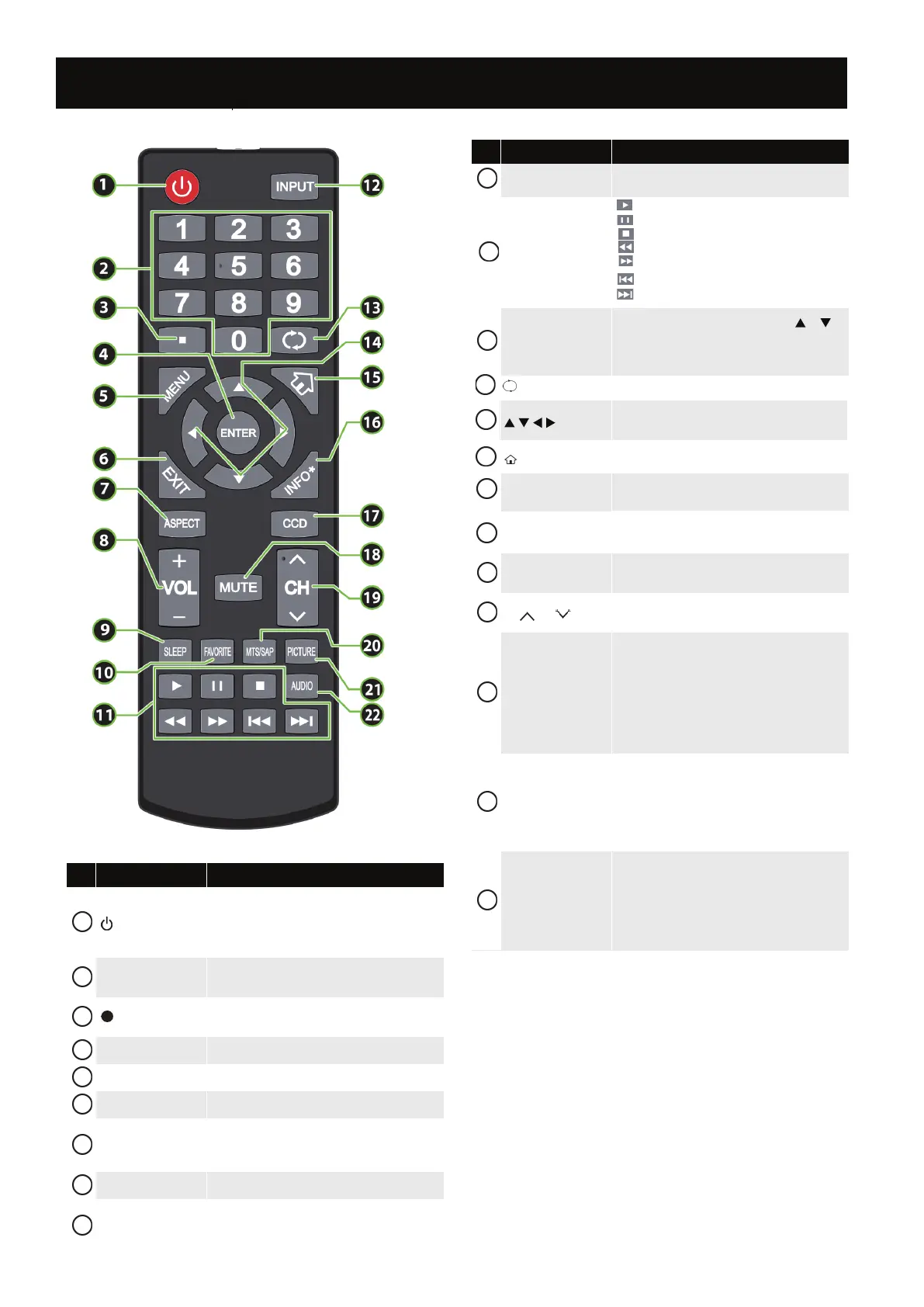
# Button Description
(power)
Press to turn your TV on or o (standby mode).
Numbers
Press to enter channel numbers and the parental
control password.
ENTER Press to conrm selections or changes.
MENU Press to open the on-screen menu.
EXIT Press to close the on-screen menu.
ASPECT
Press to change how the picture looks on the screen
VOL+/– Press to increase or decrease the volume.
SLEEP
1
2
3
4
5
6
7
8
9
FAVORITE
Press to open the
Favorite
INPUT
Press to open the INPUT SOURCE list, press or on
the remote control to select the video input source,
then press ENTER
(return) In TV mode, press to return to the previous channel.
Press to navigate in on-screen menus and to adjust
settings.
INFO*
Press to display TV status information, such as the
channel number, channel name (if available), or signal
CCD
Press to turn closed captioning on or o. You can select
CC O, CC On, or CC On When Mute
MUTE
Press to mute the sound. Press again to restore the
sound.
CH /CH
MTS/SAP
Press to select the audio mode for an analog program.
You can select:
• Mono—Select this option if there is noise or
static on weak stereo broadcasts.
• Stereo—Select this option for programs
broadcast in stereo.
• SAP—Select this option to listen to a
PICTURE
AUDIO
# Button Description
10
11
12
13
14
15
16
17
18
19
20
21
22
Press to select the picture mode.
Press to select the sound mode.
Press to stop the photo playback.Press to stop the photo playback.
secondary audio program, if available.
Remote Control
8


 To Next Page
 Loading...