EasyManua.ls Logo

Sigma 6000+ - Page 30

Sigma 6000+
42 pages
Print Icon
To Next Page IconTo Next Page
To Previous Page IconTo Previous Page
Loading...
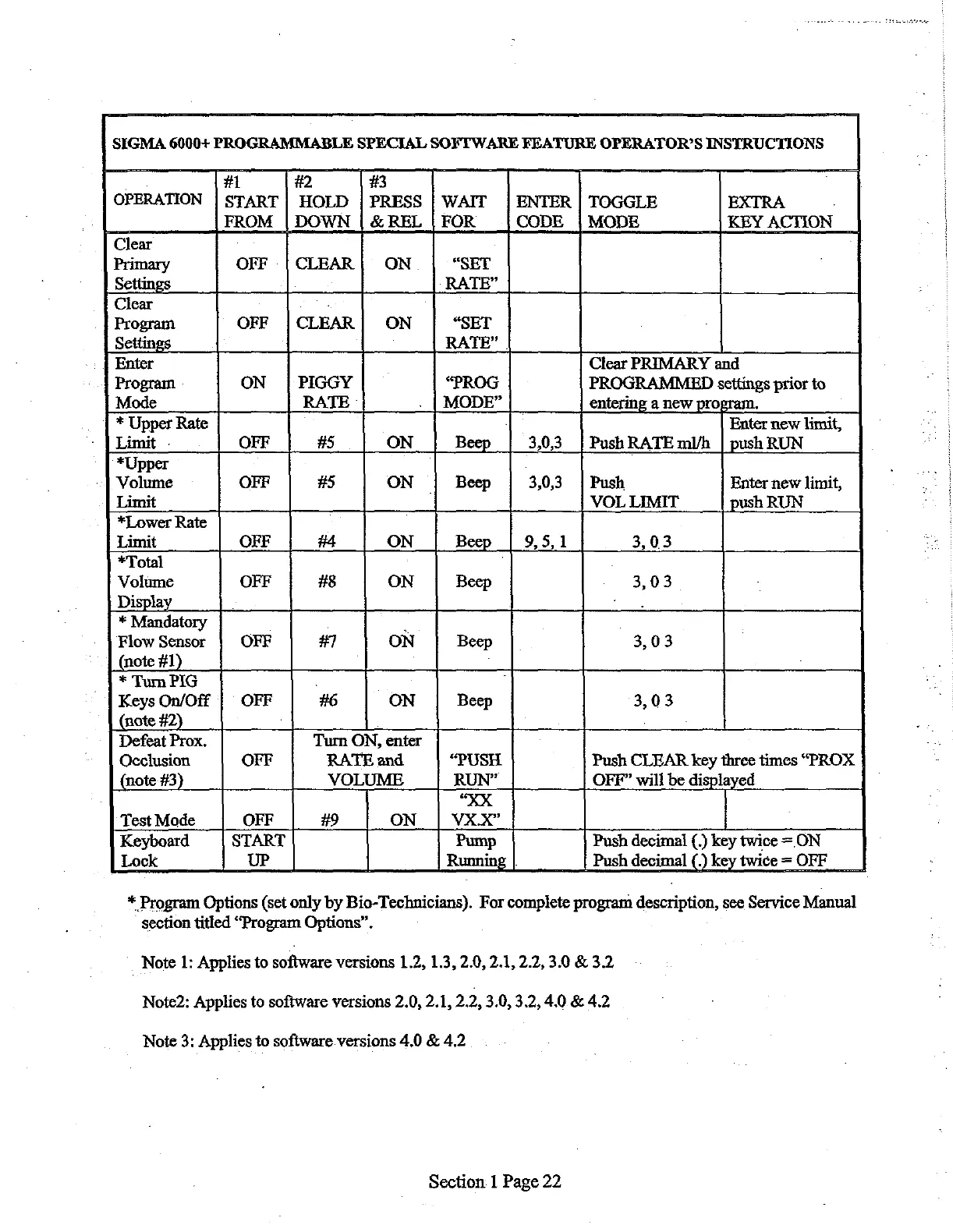
SIGMA
6000+
PROGRAMMABLE
SPECIAL
SOFTWARE
FEATURE
OPERATOR’S
INSTRUCTIONS
.
#1 #2
#3
OPERATION
|
START
|
HOLD
|
PRESS
|
WAIT
|
ENTER
|
TOGGLE
EXTRA
.
FROM
|
DOWN
|
&
REL
|
FOR
CODE
|
MODE
KEY
ACTION
Clear
Primary
OFF
|
CLEAR
|
ON
“SET
Settings
RATE”
Clear
:
Program
OFF
|
CLEAR
|
ON
“SET
Settings
RATE”
|
Enter
Clear
PRIMARY
and
Program
ON
|
PIGGY
“PROG
PROGRAMMED
settings
prior
to
Mode
RATE
.
|
MODE”
entering
a
new
pro;
.
*
Upper
Rate
]
Enter
new
limit,
Limit
-
OFF
#5
ON
Beep
3,03
|
Push
RATE
ml/h
|
push
RUN
*Upper
.
Volume
OFF
#5
ON
Beep
3,0,3
|
Push
Enter
new
limit,
Limit
:
VOL
LIMIT
push
RUN
*Lower
Rate
Limit
OFF
#4
ON
Beep
9,
5,1
3,03
*Total
]
Volume
OFF
#8
ON
Beep
3,03
Display
*
Mandatory
.
Flow
Sensor
OFF
#7
ON
Beep
3,03
(note
#1)
*
Tum
PIG
.
:
Keys
On/Off
|
OFF
#6
ON
Beep
3,03
(note
#2)
`
Defeat
Prox.
Turn
ON,
enter
Occlusion
OFF
RATE
and
“PUSH
Push
CLEAR
key
three
times
“PROX
(note
#3)
VOLUME
RUN”
OFF”
will be
displayed
“XX
Test
Mode
OFF
#9
ON
VX.X”
Keyboard
START
Pump
Push
decimal
(.)
key
twice
=
ON
Lock
UP
Running
Push
decimal
(.)
key
twice
=
OFF
*
Program
Options
(set
only by
Bio-Technicians).
For
complete
program
description,
see
Service
Manual
section
titled
“Program
Options”.
:
Note
1:
Applies
to
software versions
1.2,
1.3,
2.0,
2.1,
2.2,
3.0
&
3.2
Note2:
Applies
to
software
versions
2.0,
2.1, 2.2,
3.0, 3.2,
4.0.&
4.2
Note
3:
Applies
to
software
versions
4.0
&
4.2
Section
1
Page
22

Related product manuals