EasyManua.ls Logo

Sigma 6000+ - Troubleshooting Guide

Sigma 6000+
42 pages
Print Icon
To Next Page IconTo Next Page
To Previous Page IconTo Previous Page
Loading...
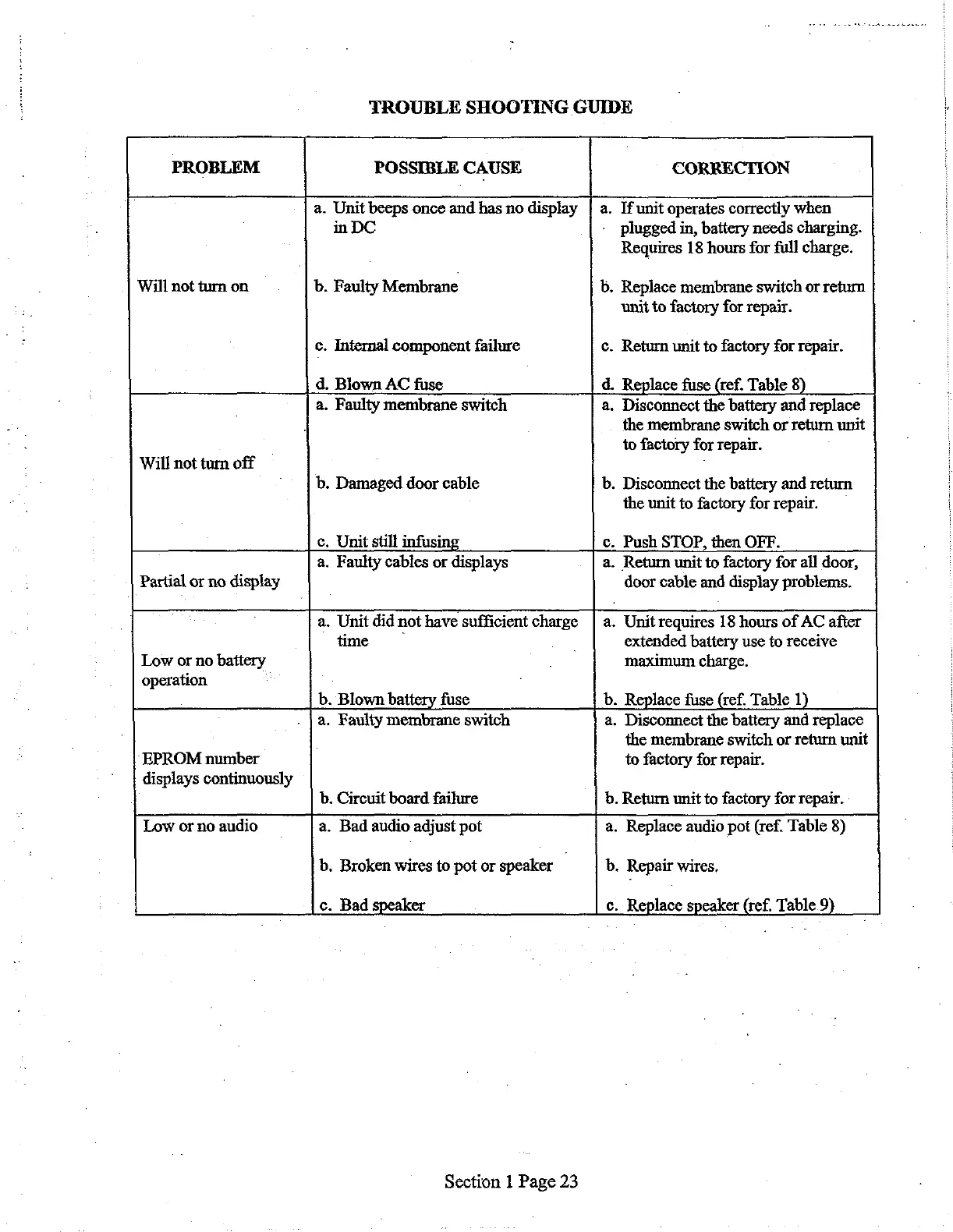
TROUBLE
SHOOTING
GUIDE
a.
Bad
audio
adjust
pot
.
Broken
wires
to
pot
or
speaker
|
.
Bad
speaker
PROBLEM
POSSIBLE
CAUSE
CORRECTION
.
Unit
beeps
once
and
has
no
display
|
a.
If
unit
operates
correctly
when
in
DC
plugged
in,
battery
needs
charging.
Requires
18
hours
for
full
charge.
Will
not
turn
on
.
Faulty
Membrane
b.
Replace
membrane
switch
or
return
unit
to
factory
for
repair.
c.
Internal
component
failure
c.
Return
unit
to
factory
for
repair.
.
Blown
AC
fuse
d.
Replace
fuse
(ref.
Table
8)
.
Faulty
membrane
switch
a.
Disconnect
the
battery
and
replace
the
membrane
switch
or
return
unit
to
factory
for
repair.
Will
not
turn
off
.
Damaged
door
cable
b.
Disconnect
the
battery
and
return
the
unit
to
factory
for
repair.
.
Unit
still
infusing
c.
Push
STOP,
then
OFF.
.
Faulty
cables
or
displays
a.
Return
unit
to
factory
for
all
door,
|
Partial
or
no
display
door
cable
and
display
problems.
à.
Unit
did
not
have
sufficient
charge
|
a.
Unit
requires
18
hours
of
AC
after
time
^
extended
battery
use
to
receive
Low
or
no
battery
maximum
charge.
operation
.
Blown
battery
fuse
b.
Replace
fuse
(ref.
Table
1)
.
Faulty
membrane
switch
a.
Disconnect
the
battery
and
replace
the
membrane
switch
or
return
unit
EPROM
number
to
factory
for
repair.
displays
continuously
.
Circuit
board
failure
b.
Return
unit
to
factory
for
repair.
Low
or
no
audio
a.
Replace
audio
pot
(ref.
Table
8)
b.
Repair
wires.
c.
Replace
speaker
(ref.
Table
9)
Section
1
Page
23

Related product manuals