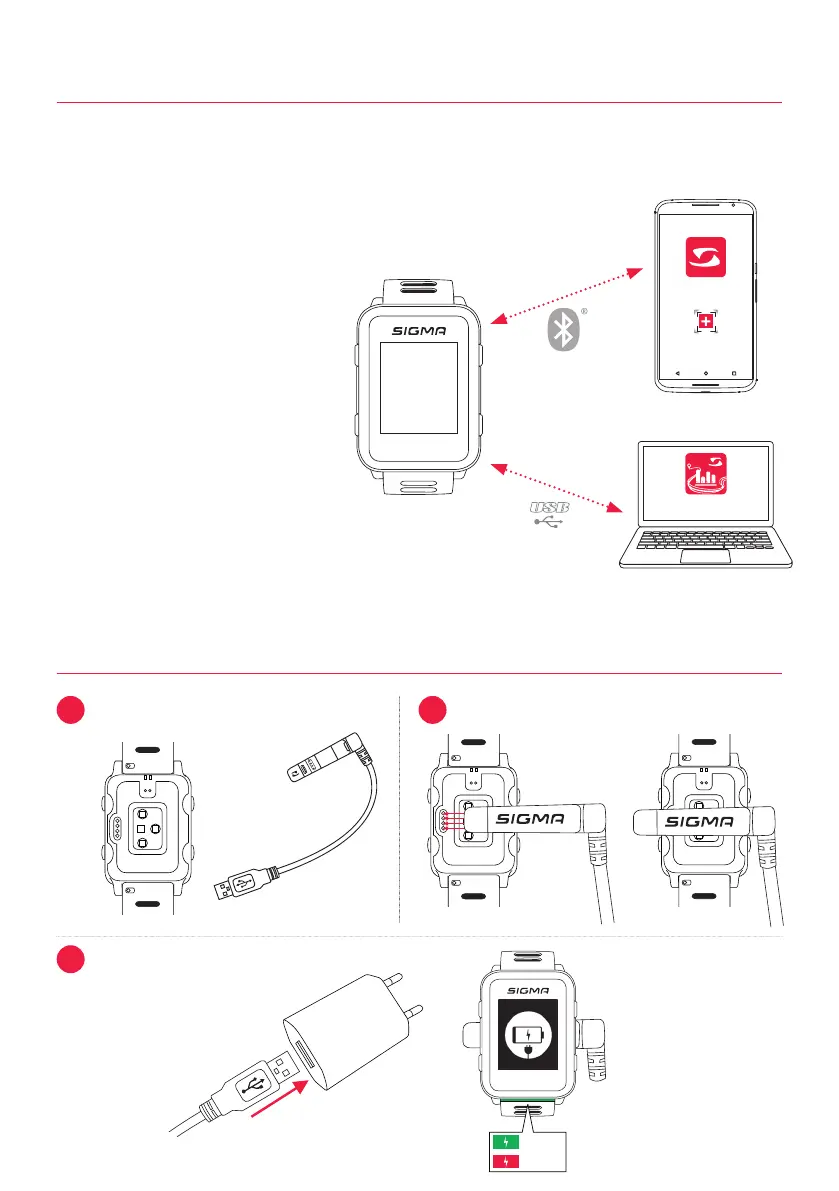
Gerät hinzufügen
SIGMA LINK
DATA
CENTER
1
> 95%
< 75%
2
3
BLE sensors / ANT+ sensors
► Go into area where no other sensors
are active
► Activate sensors
► In the watch, go to Settings > Connection >
Sensors > Search sensors
► Available sensors are displayed
► Start pairing in the watch
► Sensor is paired
Connect smart phone
► Only one smart phone can be paired
at a time
► Turn on Bluetooth in the smart phone
► In the watch go to Settings > Connection >
Smart phone > Find new smart phone
► In the app, initiate pairing, for this go to
the LINK app on “My devices”
If you use a sensor that offers both ANT+ and BLE, you will get this sensor twice during the search.
You only need to connect the sensor to the watch once! If the connection to the sensors break off
during the training, you can restore it via the quick menu:
► Press the “+” button for 2 s
► Select “Search sensor”
► The watch now searches for all connected sensors and connects them
1.8 Charging the device
1.7 Connecting sensors / smart phone
6


 To Next Page