1
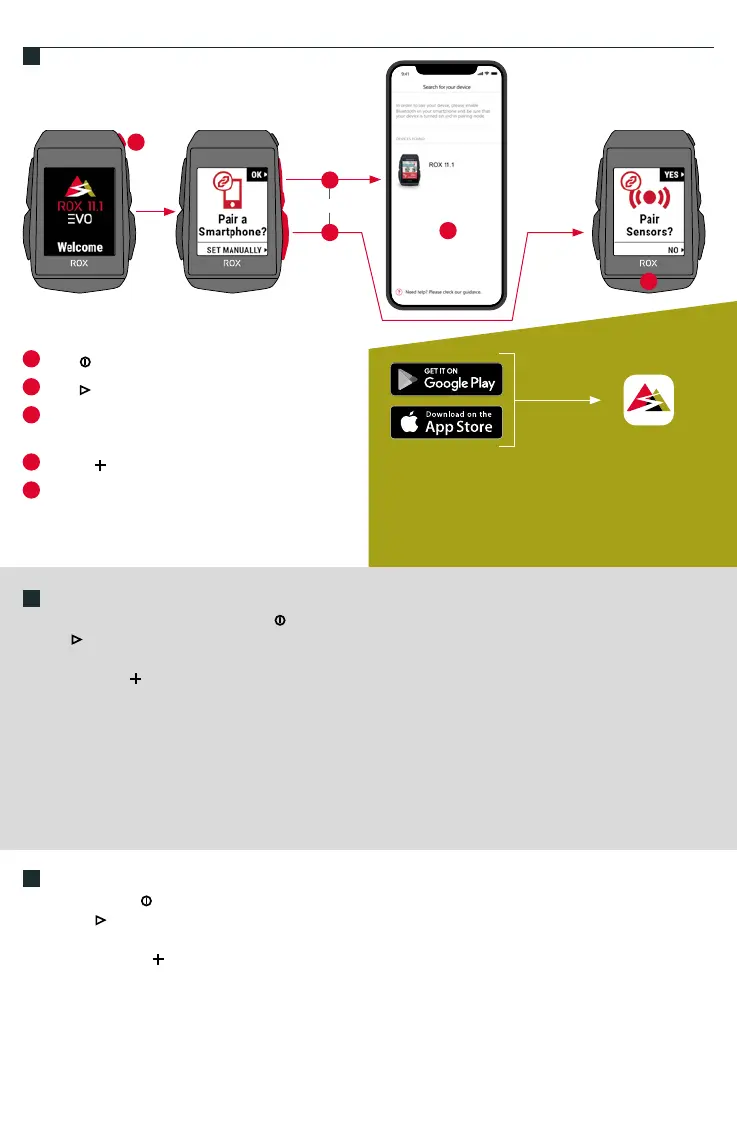
Press
MENU Button for 5s to Wake-Up.
2
Press START to pair your Smartphone.
3
Download SIGMA RIDE App and follow App
instructions to congure your device.
4
Or press button to set device manually.
5
Pair sensors and nish initial settings.
ES
1. Para activarlo, mantén presionada la tecla durante 5 seg.
2. Pulsa para enlazarlo a tu smartphone.
3. Descárgate la app SIGMA RIDE y congura el dispositivo siguiendo las instrucciones de la propia app.
4. O pulsa la tecla “ ” para congurar manualmente el dispositivo.
5. Enlaza los sensores para completar la conguración inicial.
CONSEJO: la APP te da muchas opciones para congurar y personalizar tu ROX 11.1.
Encontrarás más información sobre las funciones de la app en la página “SIGMA RIDE App”.
PT
1. Pressione o botão por 5s para acordar.
2. Pressione para emparelhar seu Smartphone.
3. Baixe o aplicativo SIGMA RIDE e siga as instruções do aplicativo para congurar seu dispositivo.
4. Ou pressione botão “ ” para denir o dispositivo manualmente.
5. Emparelhe os sensores e conclua as congurações iniciais.
DICA: o aplicativo oferece muitas funções para congurar e personalizar o ROX 11.1.
Para obter mais informações sobre as funções do aplicativo, consulte a página “Aplicativo SIGMA RIDE”.
1
2
3
4
or
5
SIGMA RIDE App
The app offers you many functions for setting up and
customising the ROX 11.1. For more information on the
app‘s functions, see the “SIGMA RIDE app” page.
TIP
FIRST START
EN



 To Next Page