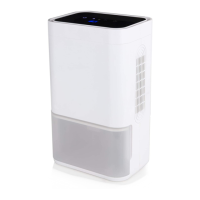
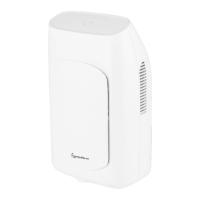
The Signature Compact Portable Dehumidifier (models S44020/S44021) is designed to reduce humidity in indoor environments, helping to prevent issues like mildew and dampness. This appliance is intended for domestic use and offers a compact and portable solution for moisture control.
Function Description:
The dehumidifier operates by drawing in moist air, removing excess water vapor, and then expelling dry air. When the water tank is full, the unit automatically switches off, and a yellow LED illuminates to indicate that the tank needs emptying. The S44021 model also includes a removable filter for improved air quality and easier maintenance. The device is controlled via a simple ON/OFF button, which also serves as an indicator light (green LED when on).
Important Technical Specifications:
- Description: Dehumidifier
- Models: S44020 / S44021
- Power Supply (input/output): AC100-240V 50/60Hz / DC 9V; 2.5A
- Voltage: 220-240V
- Frequency: ~50Hz
- Power Consumption: S44020 - 23W / S44021 - 40W
- Power Output: 9V
Usage Features:
- Getting Started: Before first use, remove the appliance from its packaging, place it on a firm, level surface, and plug it into the mains supply using the provided power adapter.
- Operation: Connect the power adapter to the dehumidifier and a wall socket. Press the ON/OFF button to switch the dehumidifier on. A green LED light will indicate that the unit is operating, and a light breeze of dry air will be felt from the air outlet. To switch off, press the ON/OFF button again.
- Water Tank Management: The dehumidifier features a water tank (9) and a hydraulic cut-off (8). When the tank is full, a yellow LED will illuminate, and the unit will automatically shut down. To empty the tank, first turn off and unplug the dehumidifier. Pull out the water tank, remove the rubber plug on the water displacement hole (5), and empty the water. Replace the rubber plug securely and reinsert the water tank before turning the unit back on.
- Portability: The device includes a handle (1) for easy transport, making it convenient to move from one location to another.
- Safety Precautions:
- Always ensure the appliance is placed on a firm, level, and heat-resistant surface, away from curtains, furniture, or combustible materials.
- Do not immerse cords, plugs, or any part of the appliance in water or other liquids.
- Do not pull the plug out by the cord.
- Switch off and unplug the appliance when not in use, before cleaning, or before moving it.
- Do not use the appliance outdoors or near explosive/combustible gases.
- Avoid long-term direct solar radiation.
- Do not place the item directly below a mains socket outlet.
- Use in a well-ventilated area.
- Do not operate with wet hands.
- Do not install in washhouses or other places with excessive water and moisture.
- Do not turn on or off by inserting or pulling out the plug.
- Do not place objects on the air conditioner or put anything into the air inlet (7) and air outlet (2).
- Do not use insecticide spray or other flammable substances near the dehumidifier.
- If the supply cord or appliance is damaged, stop using it immediately and seek professional advice.
- Do not attempt to dismantle or repair any part of the unit; this should only be done by a qualified service agent.
- Keep wires orderly to prevent tripping hazards.
- Close supervision is necessary when used by or near children. Children aged 8 and above, and persons with reduced physical, sensory, or mental capabilities, can use the appliance if supervised and instructed on safe use and associated hazards. Cleaning and user maintenance should not be done by children without supervision.
- Take care when used near pets.
Maintenance Features:
- Cleaning the Exterior: Before cleaning, ensure the appliance is disconnected from the power supply and has cooled down completely. Do not use abrasives or harsh cleaning solutions. Do not immerse the appliance in any liquid. Clean the outside of the appliance with a damp, lint-free soft cloth. Do not clean with water directly, but wipe with a semi-wet soft cloth. If the air conditioner is dirty, scrub with neutral detergents.
- Filter Cleaning (S44021 ONLY): Ensure the water tank is completely empty or removed from the unit. The filter (4) is located at the rear of the unit. Slide it out from the bottom, rinse it under water until clean, and then dab with a dry cloth. Allow it to dry thoroughly before replacing.
- Storage: Turn off and unplug the appliance, and ensure it has been drained. To prevent mildew, allow the unit to stand and dry after draining. Store in a cool, dry place, out of the reach of children.
- Troubleshooting: The manual provides a troubleshooting guide for common issues such as the appliance not working (check power, plug, time settings, water pan, fuse), minimal cooling/heating effect (check air inlet/outlet, other heat sources, temperature settings), and shaking/noise (check if the body is inclined or ground is uneven).
Product Components:
- Handle
- Air outlet
- AC Power Socket
- Filter (S44021 only)
- Water Displacement Hole
- ON/OFF Button/Indicator
- Air Inlet
- Hydraulic Cut-Off
- Water Tank
The product comes with a 12-month guarantee from the date of original purchase, covering defects due to faulty materials or workmanship. An extended 2-year guarantee is available upon online registration within 28 days of purchase at www.signaturebrand.co. The guarantee is valid only in the UK and Eire. The appliance is designed for household use only and should not be used for commercial purposes. It complies with relevant EU directives, including Electromagnetic Compatibility, Low Voltage, Restriction of Hazardous Substances, and Eco-Design of Energy Related Products. For customer support, contact +44 (0) 333 220 6062.


 To Next Page
 General