
 Need help?
Do you have a question about the signia Insio primax and is the answer not in the manual?
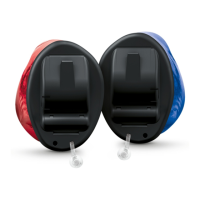
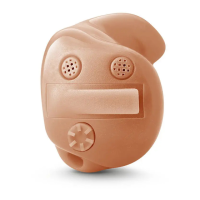
Describes customized models worn directly in the ear canal or bowl.
Recommends familiarizing yourself with controls and their location on the instrument.
Details components of In-the-Ear hearing instruments, including microphone and battery compartment.
Details components of In-the-Canal and Completely-in-canal instruments, including removal cords.
Explains brief and long presses for program change, volume, and standby/turn on.
Describes rotating the wheel forward to increase and backward to decrease volume.
Lists available hearing programs (1-6) and refers to changing them.
Explains important features like Power-on delay, AutoPhone, TwinPhone, Tinnitus therapy, Telecoil, and e2e wireless functionality.
Provides guidance on battery sizes, handling tips, and general care.
Details the process of removing and inserting hearing aid batteries, including cautions.
Explains options for powering instruments on and off via battery compartment or push button.
Provides instructions on how to insert and remove instruments, including side labeling and ear canal tips.
Explains how to adjust volume and change hearing programs using controls or remote.
Advises on phone use, telephone programs, and automatic program switching for phone calls.
Details how to use hearing instruments with audio induction loops via telecoil program.
Provides instructions for drying, storing, and cleaning hearing instruments daily.
Discusses professional cleaning, maintenance, and replacement of parts like wax protection.
Covers safety information, document symbols, and troubleshooting common issues.
 General
| Product Line | Insio |
|---|---|
| Model | primax |
| Tinnitus Therapy | Yes |
| Wind Noise Management | Yes |
| Battery Type | Zinc-Air |
| Channels | 48 |
| Directional Microphones | Yes |
| Feedback Cancellation | Yes |
| Own Voice Processing (OVP) | Yes |
| Wireless | Yes |
| Compatible with Signia App | Yes |
| Noise Reduction | Yes |






 To Next Page