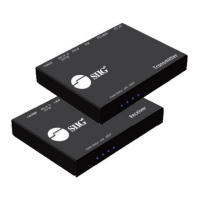
Need help?
Do you have a question about the SIIG CAT5e and is the answer not in the manual?
Explains the product's purpose and cost-effectiveness for transmitting HD video/audio over CAT5e/6 cables.
Lists key features like extended transmission, local output, compliance, bandwidth, and cascading capabilities.
Lists all items included in the product package for setup and operation.
Describes the rear panel layout, identifying ports, indicators, and their functions.
Details the function and settings of the DIP switch for video, audio, and EDID modes.
Provides a visual diagram showing how the transmitter and receiver are connected in a typical setup.
Outlines safety guidelines and step-by-step instructions for physically installing the hardware.
Lists the pin assignments for the HDMI connector on the transmitter for technical reference.
Provides recommendations for CAT cable types and shielding for optimal performance.
Details how to get technical support, warranty coverage, and the RMA process.
Provides company background, product portfolio, and FCC compliance statement.
This document describes the HDMI over CAT5e Transmitter with HDMI Loop-Out, an installation guide for a device designed to extend high-definition video and audio signals over long distances using CAT5e/6 cables. The primary function of this transmitter is to provide a cost-effective solution for distributing HDMI signals to multiple locations, making it suitable for various setups where displays are spread out or require extended cable runs.
The HDMI over CAT5e Transmitter with HDMI Loop-Out serves as a central hub for your HDMI source, taking an input HDMI signal and converting it for transmission over standard CAT5e/6 Ethernet cables. This allows for significantly longer cable runs than traditional HDMI cables, which are typically limited in length. The device also includes a local HDMI output, referred to as a "loop-out," which enables you to connect a local display directly to the transmitter, mirroring the signal being sent over the CATx cable. This is particularly useful for monitoring the source content or for setups where a local display is required near the source.
The core technology behind this device involves extending HDMI video and audio transmission to displays over CAT5e/6 cable cabling. It is compliant with HDMI Deep Color and 3DTV standards, ensuring that it can handle modern high-quality video formats. Furthermore, it is HDCP and DVI compliant, which means it can work with protected content and integrate with DVI-based systems using appropriate adapters. The device supports pure, unaltered, uncompressed 7.1 channel digital HDMI transmission over the CATx cable, preserving the integrity of both video and audio signals. It also supports embedded EDID (Extended Display Identification Data) and EDID learning from the connected HDMI display, which helps ensure optimal compatibility and resolution settings between the source and the display. The EDID learning feature is crucial for resolving potential compatibility issues by allowing the transmitter to communicate the display's capabilities back to the source.
The transmitter offers several features that enhance its usability and flexibility in various installation scenarios. One key feature is its ability to extend HDMI signals over CAT5e/6 cables, with specified transmission distances depending on the resolution. This allows for greater flexibility in placing displays far from the HDMI source. The local HDMI output is a significant convenience, providing a direct connection for a display near the transmitter, which can be used for monitoring or as part of a multi-display setup.
The device includes a DIP switch for configuring different operational modes, which is essential for optimizing performance based on the specific setup. These modes include:
The device also features an audio output, a 3.5mm audio jack, allowing you to plug in local stereo speakers. This is useful for setups where audio needs to be played back locally at the transmitter's location. The RJ-45 Out port is designed for linking to the next transceiver or receiver in a cascading setup, providing scalability for larger installations. The presence of an HDMI In LED indicates when the HDMI source is powered on and working properly, offering a quick visual status check.
For installation, the process involves connecting all devices, including displays and speakers, to the transmitter. The HDMI source connects to the HDMI In port, a local HDMI display connects to the HDMI Out, and local stereo speakers can be connected to the Audio Out. The CAT5e cable connects the RJ-45 Out to the next transceiver or receiver. Finally, the included power adapter is plugged into the Power Jack, and all devices are powered on.
The installation guide provides important safety guidelines and recommendations for maintaining the device and ensuring its longevity. It advises against attempting to service the unit yourself, emphasizing the importance of professional handling for repairs. Proper ventilation and air circulation are crucial for the device's operation, and it should not be used near water to prevent damage. Keeping objects that might damage the device at a safe distance and placing the unit on a stable surface are also recommended.
For cleaning, the guide specifies not to use liquid or aerosol cleaners. Instead, it advises unplugging the power to the unit before cleaning, suggesting a dry cloth or similar method to prevent electrical hazards and damage to the components. The manual also stresses the importance of using only the power adapter and accessories that came with the unit, as using incompatible accessories could lead to malfunction or damage.
Regarding cable recommendations, the guide suggests using T568B CAT cable for the best performance and shielded STP (Shielded Twisted Pair) cables to avoid EMI (Electromagnetic Interference) problems. For resolutions greater than 1080i or 1280x1024, a CAT6 cable is recommended, highlighting the importance of cable quality for optimal signal transmission at higher resolutions. These recommendations are key to ensuring stable and high-quality video and audio transmission over long distances, minimizing potential issues related to signal degradation or interference.
 General
| Category | Extender |
|---|---|
| Frequency | 100 MHz |
| Cable Type | CAT5e |
| Connector Type | RJ45 |
| Standards Compliance | IEEE 802.3 |
| Type | CAT5e Extender |

 To Next Page