The Silent Beacon (Model SB2.0) is a second-generation Bluetooth® enabled personal safety device designed to provide peace of mind by allowing users to make phone calls and send alerts in emergency situations. It connects to a smartphone, tablet, or Bluetooth™ device via the Silent Beacon Application.
Function Description
The Silent Beacon serves as a personal safety device that can be used to make phone calls and send alerts to pre-selected emergency contacts. It features a main alert button and a secondary button, both of which can be used to trigger alerts or access other functions. The device is designed to be worn on the wrist using a universal 18mm wristband, or it can be attached to a keychain or multipurpose clip. It includes a microphone for two-way communication with emergency contacts and a speaker for audio output. The device also incorporates multicolored LED lights to indicate its status and alert modes.
Important Technical Specifications
- Model Number: SB2.0
- Bluetooth Version: BT 2.1 & 5.0
- Dimensions: 44mm x 38mm x15mm
- Weight: <18 g
- Operating Environment: -10 °C to +60 °C (when charging: 0 °C to +45 °C); Up to 95% RH non-condensing
- Microphone: Omni Directional Microphone
- Sound Quality: DSP noise reduction; echo cancellation; tone control; narrowband and wideband audio (selectable per phone type)
- Battery Type: Lithium ion
- Battery Capacity: 180 mAh, nominal
- Battery Talk Time: Up to 6 h at -10 °C to +60 °C
- Battery Charge Time: Charging from AC power adapter: from 0 to 80% of full capacity in 25 minutes. Charging from car charger: from 0 to 80% of full capacity in 25 minutes, provided the charger has USB fast charge termination. Charging from a PC's USB port: from 0 to 80% of full capacity in 60 mins. In this case, the charge current is limited to 100mA.
- Battery Life: Minimum 500 charge cycles (over 6 years when used for 4 hours a day)
- Battery Standby Time: At least 100h at -10 °C to +60 °C
- Shelf Life: Holds a charge for at least 6 months in the "off" state before recharge is required
- Material: Silent Beacon is made from non-hazardous plastics
- Connectivity: AC power socket, using supplied USB-C cord (wall plug not included). PC USB port, using supplied USB-C to USB cable. Car cigarette lighter socket, using car charge adapter (not included).
- Bluetooth Profiles: Headset (HSP 1.1), Hands-free (HFP 1.5), Device Identification (DIP 1.3).
Usage Features
- QuickStart Guide:
- Locate the USB-C cord and connect it to the USB port on the Beacon to fully charge the device (approximately 3 hours).
- Turn on the Beacon by pressing the secondary button for 2 seconds. The LED will light up and change color, and the Beacon will vibrate.
- Open the Silent Beacon App and navigate to the Beacon tab. Choose the correct model image and follow the onscreen instructions.
- Main Alert Button: A larger button used to place an emergency phone call and send GPS location to emergency contacts via text message, push notification, and email. To activate, press for 2 seconds. To deactivate, hold down for 1 second.
- Secondary Button: A smaller button located on the lower right of the Beacon with four functions:
- Power On: Hold down for 2 seconds.
- Check-in (previously called nudge): Tap 3 times rapidly within 2 seconds. This sends a customized message along with GPS location to emergency contacts.
- Footsteps: Hold down for 3 seconds. This feature allows loved ones to track the user's location.
- Beacon Status: One tap of the button. Shows if the device is connected (blue or red) or not connected (red).
- Pressing Both Buttons:
- Power Off: Hold both buttons for 5 seconds. The Beacon will blink purple.
- Reset: Hold both buttons for 20 seconds. This will erase pairing information and require re-pairing with the App.
- Multicolored LED: The LED lights indicate various statuses:
- Pairing Mode / Start Up:
- Flashing Blue for 2 seconds: Beacon connected to the App.
- Flashing Red for 2 seconds: Beacon disconnected from the App.
- Status Check:
- Blue for 1 second: Beacon connected to the App.
- Red for 1 second: Not connected to smartphone/tablet or out of range.
- Alert Modes:
- Blinking Red: Device in an Alert Mode and transmitting your emergency.
- Solid Green: Unit is fully charged.
- Pulsing Green: Beacon is being charged.
- White Pulsing: A check-in message is being sent.
- Blinking Blue for 1 minute: Beacon Finder is activated.
- Yellow light every 5 minutes: Battery needs to be recharged.
- Blinking Yellow then Red: One of your Contacts is in an Emergency.
- Connecting to App:
- Turn on the Silent Beacon by pressing both buttons for 5 seconds.
- Open the Silent Beacon Application and navigate to the Beacon section.
- Follow the onscreen instructions to connect.
- Once connected, it will ask to Pair "Silent Beacon 2.0" to your phone.
- Once Paired, check to make sure you have the most up-to-date firmware.
- Adding a Phone Call Contact: Within the Silent Beacon Application, add emergency contacts via the "Contacts" page. You can add 911 or emergency personnel, or other specific people not stored in your contacts.
- Placing a Phone Call: Select the App toggle for a primary contact within the Emergency Contacts settings. Once you have gone into Emergency Alert Mode, you will be able to send and receive phone calls through the Silent Beacon.
- Check Pairing Status: View the Beacon image inside the App. Blue LED means paired, Black if paired. Tap the button on the Silent Beacon to see pairing status. Blue LED means paired, Red means not.
- Powering On/Off: Pressing both Buttons for 5 seconds will initially turn on the Silent Beacon. You will see the LED light up and change color, hear an audio sequence, as well as feeling the Beacon vibrate, letting you know this was successful. When you are not in an emergency, you can turn off your Beacon by holding both buttons for 5 seconds.
- Find Your Beacon: Within the Beacon section of the App, there is a feature called "Find your Beacon" that will illuminate when the Silent Beacon is connected. If you lose your Silent Beacon, you may select the "Find" icon within Bluetooth range to help you find it. The Silent Beacon will also blink blue and vibrate to help you locate it. The range finder icon lets you know if you are getting closer or further from the Beacon.
- Battery Status: Check the status of your battery within the Beacon section of the App. If your battery gets to 5%, it will vibrate, and orange LEDs will flash to let you know it needs to be recharged. When connected to a power source, the LEDs will glow green to let you know it is charging. Once the battery is fully charged, the light will stay lit until removed from the USB Cable.
- Firmware Updates: Firmware updates are released to improve security, performance, and functionality. Consult the firmware update portion of the App for more information.
- Device Bluetooth Connectivity: The longest range (under perfect conditions) when sending an Alert from the Silent Beacon to your smartphone is approximately 800 feet. The sound from the Silent Beacon will slowly deteriorate as you move further away from your compatible smartphone, tablet or Bluetooth device. To restore sound quality, move back into range.
Maintenance Features
- Care & Maintenance: Protect your Silent Beacon and accessories as you would any other type of sensitive electronic equipment. Clean with a dry cloth if needed. Avoid getting moisture or liquids into any buttons, ports, or other open areas, including the Micro-USB port and speaker/microphone holes.
- Charging Your Beacon: Connect the included USB-C cable into the USB port on the bottom of the Beacon and the other end into a power source. The LED lights will blink green while charging and glow green when fully charged. If using while charging, the LED will display the lights from the current alert mode. Charge time from a PC or car 12-Volt socket is much longer than with an AC power outlet.
- Factory Resetting Your Beacon: To reset the Silent Beacon, hold both buttons down for 30 seconds. The LEDs will cycle colors, the restart chime will begin, and the Beacon will vibrate. This will erase its connection if Beacon resets. All information on the Beacon will be erased, requiring you to go through the pairing process again inside the Silent Beacon App.

 Need help?
 General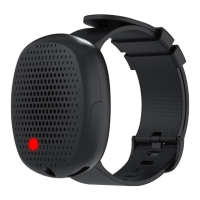

 To Next Page