28 GB/IE
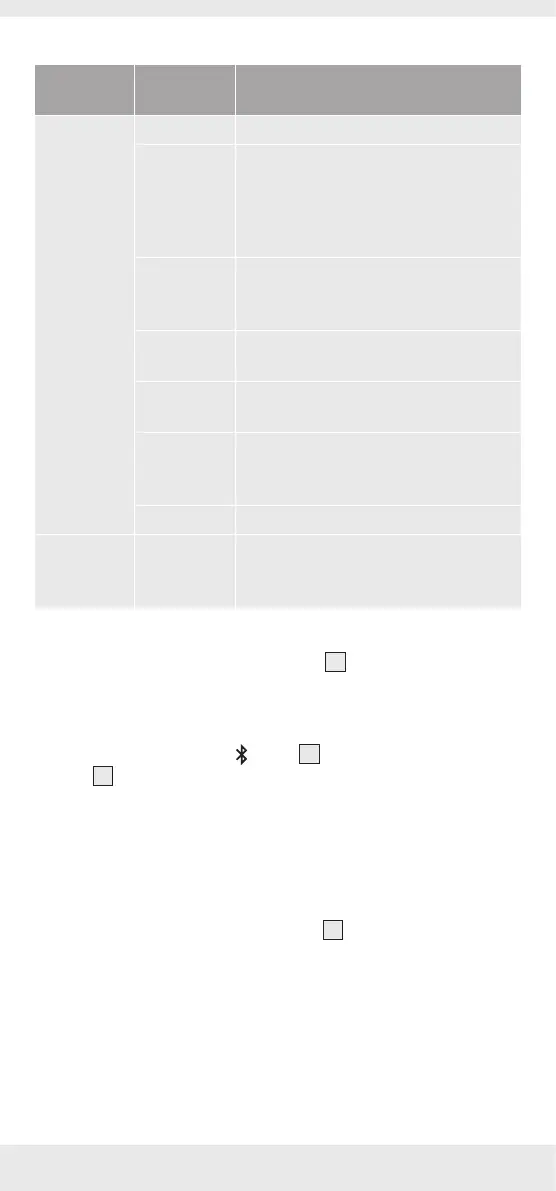
LED behaviour table
Power
ON/OFF
Status LED color
Power ON Power ON LED flashes once per sec. white
Bluetooth
connection
Bluetooth pairing mode: LED flashes
once per sec. white
Bluetooth paired: After Bluetooth
pairing, the LED flashes white approx.
every 5 sec.
TWS
connection
TWS primary unit:LED flashes
approximately every 5 seconds white
Secondary unit: LED soild white
PartyPlay
connection
Primary unit:LED soild white
Other unit:LED breathing white
AUX
connection
Solid green
Charging A light bar lights up to display the
battery capacity level 25%-50%-75%-
100% respectively
Low battery LED flashes white
Power OFF Charging A light bar lights up to display the
battery capacity level 25%-50%-75%-
100% respectively
Establishing a Bluetooth
®
connection:
Remove all plugs from the AUX-in jack
3
before you attempt to
establish a Bluetooth
®
connection.
Switch on the playback device and make sures its Bluetooth
®
mode
is on.
On the product press the
button
9
for 2 seconds until the
LED
7
flashes white and a signal tone sequence sounds. The
product will now attempt to connect to the playback device (e.g.
smartphone or computer).
The product identification on the playback device will be
“RHYTHM BLAST“. On the playback device “ACCEPT“ the
connection. Please note the requirements of the software on the
playback device.
Once the connection is made the LED
7
flashes white once every
5 seconds and a signal tone sequence sounds.
The maximum range of the connection is approx. 10 m,
but this may be reduced due to the geometry of the space
(obstructing furniture, walls, etc.).
The playback device must support Bluetooth
®
standard 5.3
otherwise you may not be able to use all the functions.


 To Next Page
 Loading...