GB/IE22
Toggling between
weighing units
Press the U button
7
to toggle to
another weighing unit.
In normal weighing mode, you
can choose between grams (g),
pounds:ounces (lb:oz) and ounces
(oz).
You can choose between millilitres (ml),
fluid ounces (fl’oz) and cups (CUP) in
the modes for determining the volume.
NOTES:
If you select gram (g) in normal
weighing mode, fluid ounces (fl’oz)
cannot be displayed in volume mode.
If you select pounds:ounces (lb:oz) or
ounces (oz) in normal weighing mode,
millilitres (ml) cannot be displayed in
volume mode.
The volume of flour can only be
expressed in cups (CUP).
Tare function/Reset
Briefly press the on/off switch /Z
5
.
The LC display
4
shows 4horizontal
lines for a short moment. The value 0 is
then displayed.
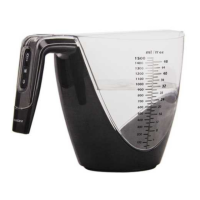
If the foodstuff have been already
placed in the measuring jug
1
, the LC
display
4
will still read 0.
Place the item you wish to weigh in the
measuring jug
1
. The LC display
4
will show the weight of the item you are
weighing.
Pressing the on/off switch
/Z
5
will change the LC display
4
from the
reading to “0”. The letter T will appear
in the lower left corner of the LC display
4
.
To display the weight of the foodstuff
item again, briefly press the on/off
switch
/Z
5
again. The letter T goes
off and the reading will change back to
the total weight of the foodstuff.
If you remove the foodstuff item after
using the tare function, a negative value
is displayed. Briefly press the on/off
switch
/Z
5
to reset the scale to 0.
mCAUTION! Do not – especially
when using the tare function – exceed
the maximum permitted weighing
value. Otherwise, the product may be
damaged.
Changing the battery
Replace the battery as soon as “
Lo
” is
displayed or if the product cannot be
switched on anymore.
Loosen the screw of the battery
compartment cover
8
, using a
screwdriver.
Remove the battery compartment
cover
8
.
Remove the used button cell.
Insert a new CR2032 button cell. The
positive pole (+) must point outwards.
Replace the battery compartment
cover
8
.
Secure the battery compartment
cover
8
with the previously loosened
screw.






 To Next Page