11GB/IE/NI
Charging the battery
B
[8]
[]
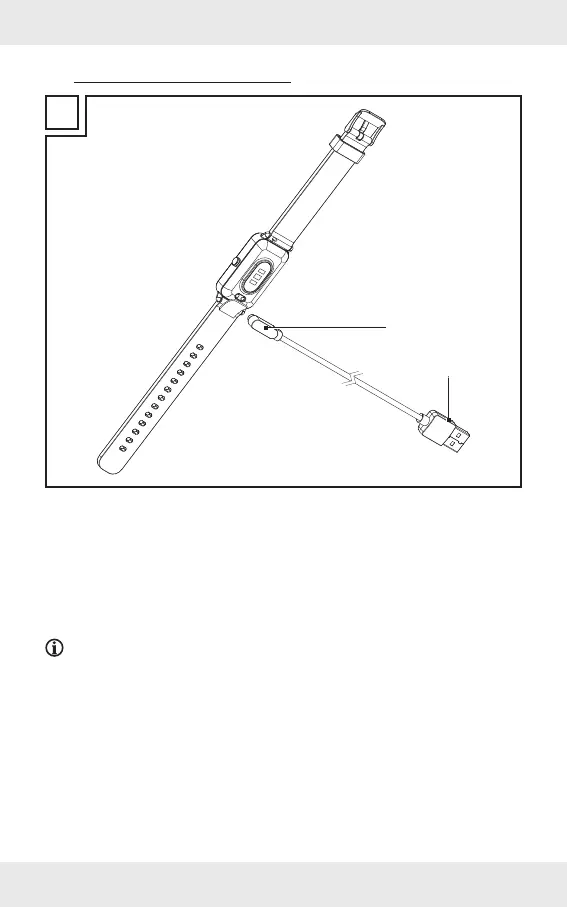
1. Connect the USB Type A plug [8] to a free USB port on your computer or to a USB
power adaptor (not included).
2. Connect the charging adaptor [] to the charging contacts [5] on the back of the
product. The charging adaptor is held in place magnetically.
3. The start of the charging process is shown on the display [2].
4. When the battery is fully charged: Disconnect the charging adaptor [] from the
product and the USB Type A plug [8] from the USB port.
NOTES:
The charging adaptor [] can only be used in the position shown in figure B.
Make sure that the charging pins [9] correctly engage with the charging
contacts [5].
The product turns on automatically as soon as it is connected with the USB port.
The product cannot be operated during charging.
The charging status is shown on the display [2].
A charging cycle (charging current: approx. 120 mA) takes approx. 2 hours.


 To Next Page