14 GB/IE/NI
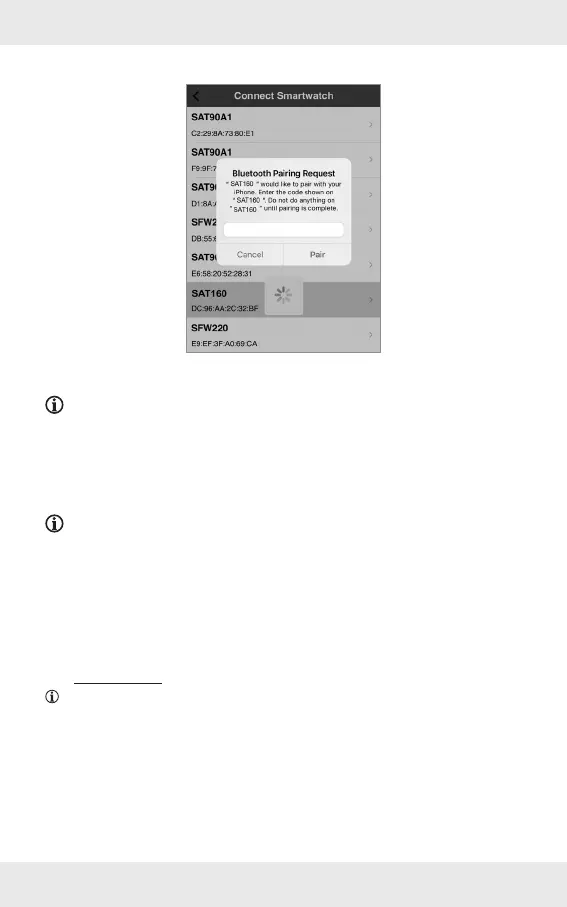
7. Connect to the product: Tap SAT160.
8. Enter the 6-digit key in the app to complete the pairing process. Tap Pair.
NOTE: Different smartphones will prompt a different Bluetooth-pairing user
interface.
Further settings: Refer to the
complete instruction manual.
NOTE: You can download the complete user manual in the app. Select the link to
the Device user manual in the app’s Setting tab.
The product redirects to the Lidl website.
Type in the IAN number 409471_2207 to search for the user manual.
Download the user manual.
Disposal
NOTE: Before passing on, disposing of or returning the product to the
manufacturer: Delete all data from the product. Use the app menu item
Reset smartwatch to erase all data from the product’s memory (also refer to
“Reset smartwatch” in the full operating instructions).
Packaging:
The packaging is made of environmentally friendly materials, which may be disposed of
through your local recycling facilities.


 To Next Page