SilverCrest SCW 5 A2
English - 25
The SETUP menu will be highlighted. Press the On/Off/Mode button [2] multiple times
to select the MORE menu and then press the record button [9] to confirm.
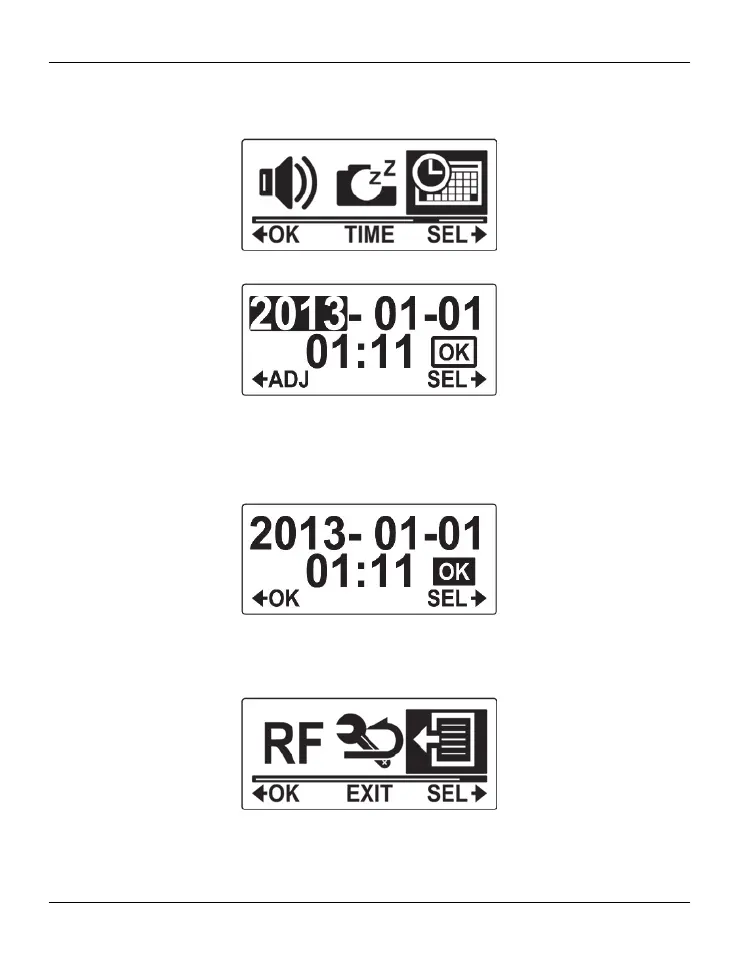
Press the On/Off/Mode button [2] multiple times until the TIME menu is highlighted.
Press the record button [9] to open the TIME menu.
Next you can set the year, month, day, hours and minutes in sequence. Select the
variable that you want to set by pressing the On/Off/Mode button [2]. Press the record
button [9] to increase the value stepwise.
After all settings have been entered, press the On/Off/Mode button [2] to select “OK”.
Press the record button [9] to confirm.
To exit the MORE menu, press the On/Off/Mode button [2] multiple times until the EXIT
item is highlighted and then press the record button [9] to confirm.
Next you can use the On/Off/Mode button [2] to select an operating mode.



 To Next Page