SilverCrest SCW 5 A2
English - 47
Connecting a remote control (not included in the package)
This menu lets you connect a remote control (not supplied) to your camcorder. The following
section describes how to establish a connection with the standard remote control. Please also
see the remote control User Manual. A remote control lets you start or stop video recordings
and take pictures.
You can order the remote control and consumables like adhesive pads
from our hotline or by e-mail (see page 77).
To connect the remote control to the camcorder, proceed as follows:
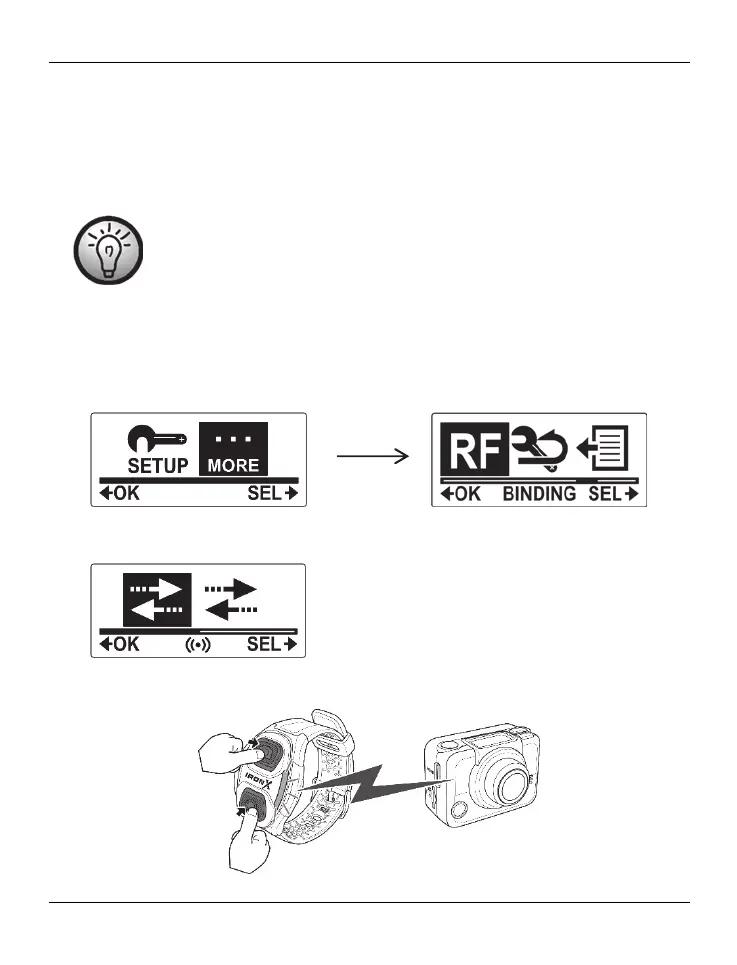
Press the On/Off/Mode button [2] multiple times to select the MORE menu and then
press the record button [9] to confirm.
Press the On/Off/Mode button [2] multiple times until the BINDING menu is
highlighted. Press the record button [9] to open the BINDING menu.
The camcorder will start seeking the remote control for 30 seconds and indicates it on
the display [1] as follows:
Within the next 30 seconds, press both buttons (Video and Photo button) on the remote
control



 To Next Page