SilverCrest SCW 5 A2
English - 33
Setting the video resolution
The resolution determines the size of the recording in pixels. As a general rule: the higher the
resolution, the more storage space is required. To set the video resolution, proceed as
follows:
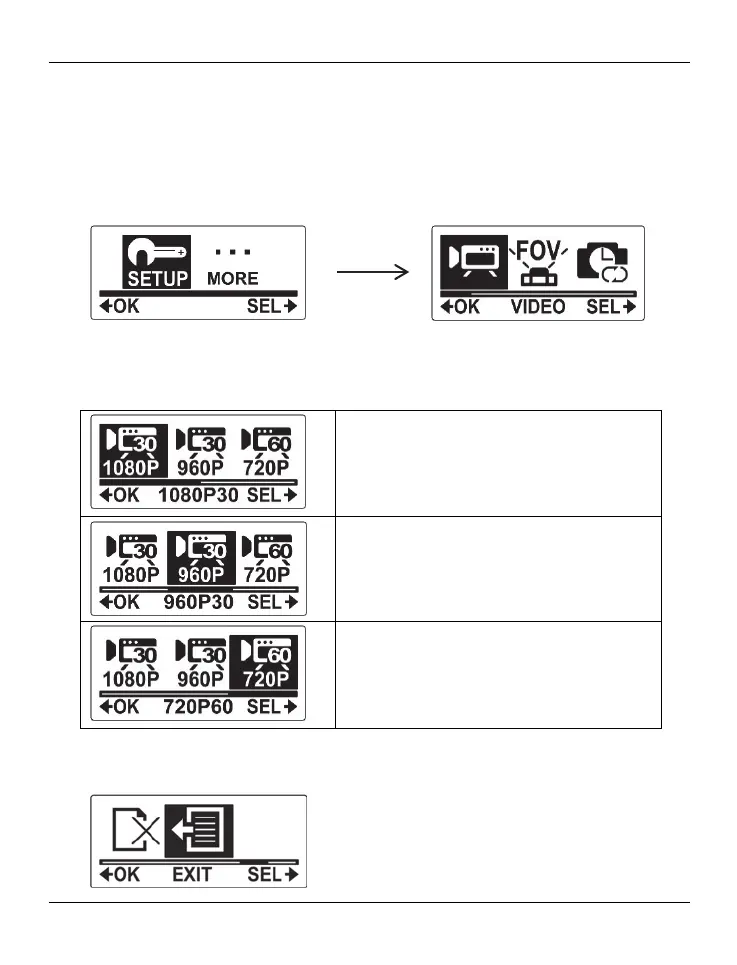
Press the On/Off/Mode button [2] multiple times to select the SETUP menu and then
press the record button [9] to confirm.
The VIDEO menu will be highlighted. Press the record button [9] to open the VIDEO
menu.
Press the On/Off/Mode button [2] to select an option. The following settings are
available:
1080p – 1920 x 1080 (30 fps)
960p – 1280 x 960 (30 fps)
720p – 1280 x 720 (60 fps)
Press the record button [9] to confirm your selection.
To exit the SETUP menu, press the On/Off/Mode button [2] multiple times until the EXIT
item is highlighted and then press the record button [9] to confirm.



 To Next Page