SilverCrest SCW 5 A2
English - 27
No. Icon* Description
25
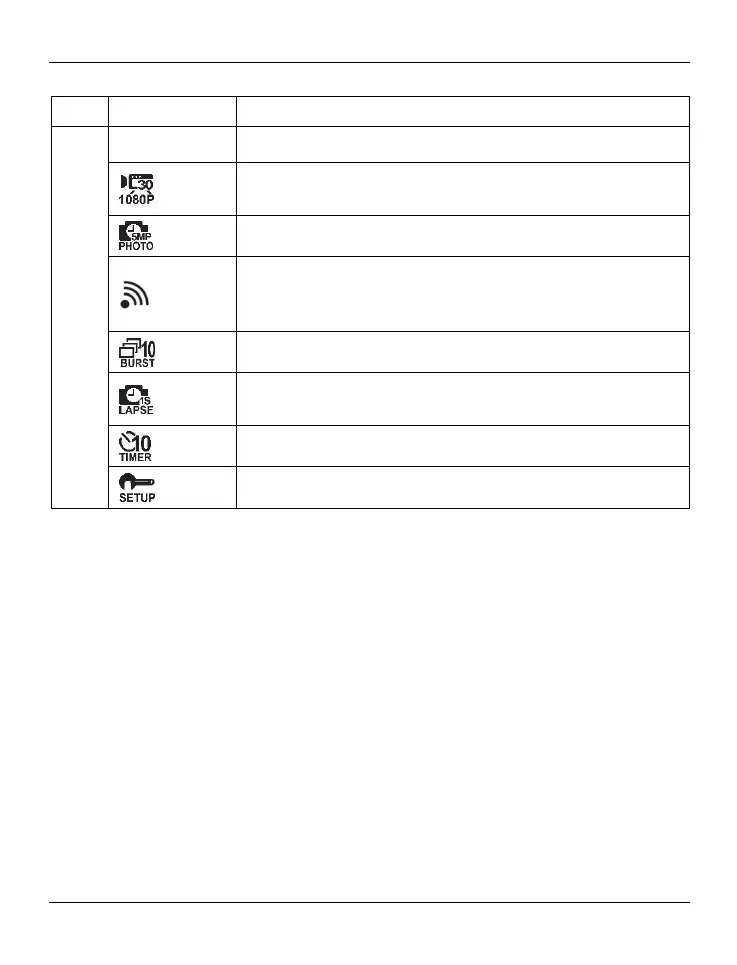
Shows the operating mode currently selected.
Video mode: Use this mode for video recording. This icon also
resumes the current video recording settings.
Photo mode: Use this mode for taking pictures.
WiFi Mode: In this operating mode you can enable or disable
the WiFi function. While WiFi is enabled, you can control the
camcorder from the SilverCrest Action Camcorder App.
Burst mode: Use this mode to take a series of 10 pictures.
Time-lapse mode: Use this mode for time-lapse picture or video
recording. This icon also resumes the current settings.
Self-timer: Use this mode for self-timer shots.
Setup: Use this mode to customise the camcorder settings.
* The icons may vary depending on the selected setting.



 To Next Page