14 GB
Filling the water tank
Fig. Step
J
1. Open the water tank cover[].
2. Remove the water tank[] from the product.
K
1. Turn the water tank[] over so that the lid[] faces upwards.
2. Turn the lid[] in anticlockwise direction.
3. Remove the lid[] from the water tank[].
4. Fill the water tank[] up to theMINmarking with water.
5. Pace the lid[] on the water tank[].
6. Turn the lid[] in clockwise direction.
7. Turn the water tank[] over so that the lid[] faces downwards.
8. Open the water tank cover[].
9. Insert the water tank[] into the product.
INFO: As soon as the water tank[] is inserted, water flows from the water tank into
the water tank base[].
Operation
m
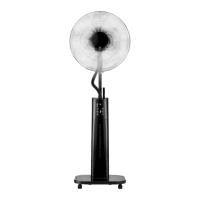
WARNING! Do not point the product at mains sockets or electrical appliances when using the
humidifier function.
o Place the product on a flat, stable ground.
o Connect the mains plug [] to a suitable mains socket.
o Switching on the product: Press [] or [].
Function overview
INFO:
o The indicators [], [], [], [], [], [] and the indicator for the level[]
go out after 30seconds without pressing any button.
o Press one of the buttons [], [], [], [], [], or [] on the product to
light up the indicators.
(Fig.B, C)
Button Indicator Function
[] []
Press or to switch the product on or off.
[]
[]
Press repeatedly or to start/set/stop the cooling style.
[] []
o Normal mode
[]
o Natural mode
[]
o Sleeping mode





 To Next Page