59 GB/IE
You can configure the following basic settings for the
multi-function thermometer: temperature unit (Celsius /
Fahrenheit), date, time and Bluetooth
®
.
To switch on the device press the
ON / OFF / MEASURE button
8
.
Press the S button
6
for five seconds.
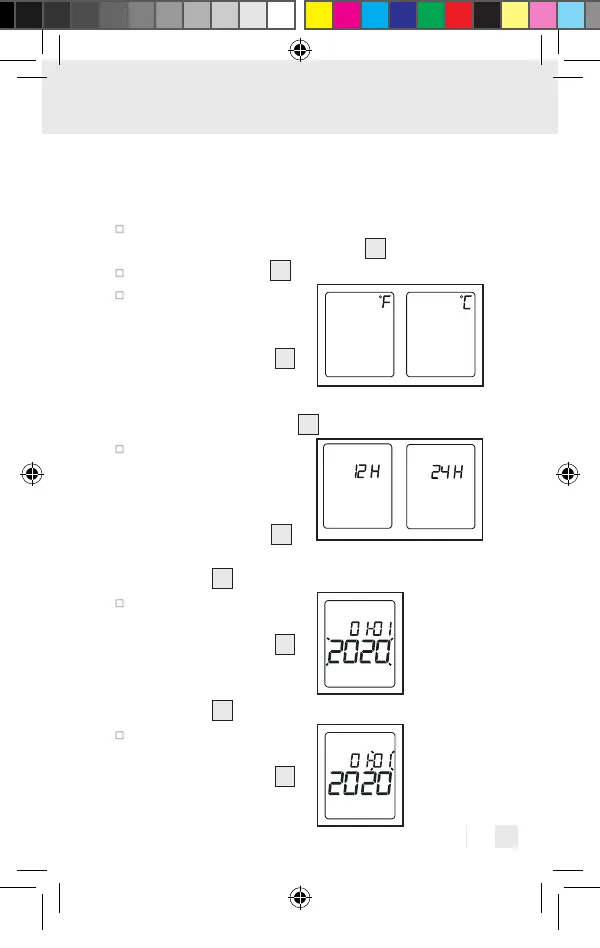
The current set
temperature unit ap-
pears on the display.
Using the S button
6
select the temperature
unit (°F or °C). Confirm by
pressing the M button
7
.
The time format will
appear on the display.
Select the time format
(12 hour or 24 hour)
using the S button
6
.
Confirm by pressing the
M button
7
.
The year display will
flash on the display.
Using the S button
6
select the current year.
Confirm by pressing the
M button
7
.
The month display will
flash on the display.
Using the S button
6
391893_2201_V4.0_silv_Multifunktionsthermometer_Content_OS_DE_GB_FR_NL_PL_CZ.indd 59391893_2201_V4.0_silv_Multifunktionsthermometer_Content_OS_DE_GB_FR_NL_PL_CZ.indd 5903.05.22 08:4103.05.22 08:41



 To Next Page