70 GB/IE
Measuring object temperatures
To switch on the multi-function thermometer, press
the ON / OFF / MEASURE button
8
for one
second.
Then press the M button
7
and the S button
6
at the same time for 3 seconds to change to the
object temperature mode.
appears on the
LC display.
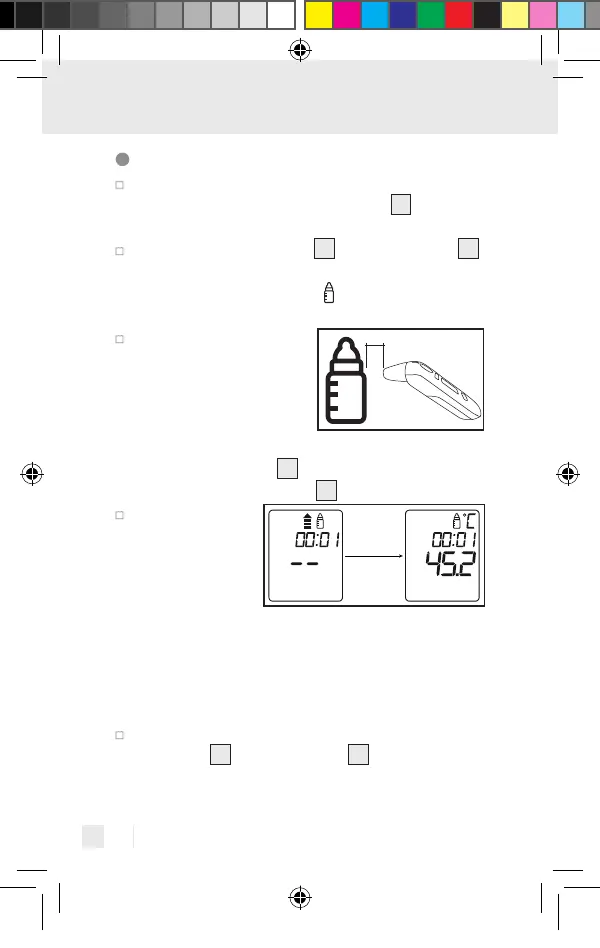
Point the sensor tip
towards the object or
the liquid to be meas-
ured (never immerse in
liquids!) at a distance of
3 cm and press the ON / OFF /
MEASURE button
8
or the MEASURE button
(forehead measurement)
5
for 1 second.
Release the
selected button.
The measured
value appears
on the display
and the end of measurement is indicated with a
short beep (when the key tone is activated).
When the measurement type symbol stops flash-
ing, the next measurement can be taken. This takes
approx. 5 seconds.
To leave object temperature mode, hold down the
M button
7
and the S button
6
at the same time
391893_2201_V4.0_silv_Multifunktionsthermometer_Content_OS_DE_GB_FR_NL_PL_CZ.indd 70391893_2201_V4.0_silv_Multifunktionsthermometer_Content_OS_DE_GB_FR_NL_PL_CZ.indd 7003.05.22 08:4103.05.22 08:41


 To Next Page
 Loading...