This document describes the SILVERFOX 2246BN/2246EBN Facial Chair, a product designed for professional use in salons or homes, offering various adjustments for user comfort and operational efficiency.
Function Description:
The SILVERFOX 2246BN/2246EBN Facial Chair is an integral structure comprising a control box, motor, wooden parts, hardware, plastic components, and leather upholstery. The control box manages the operation of the motors and the hand controller, facilitating several adjustments. These include angle adjustment of the backrest, lifting adjustment, and angle adjustment of the seat cushion and footrest. The chair is designed to provide a stable and comfortable experience, with safety features such as a photoelectric detector switch to prevent crushing during operation.
Important Technical Specifications:
- Power: AC 100-120V or AC 220-240V or AC 100-240V, 50/60Hz
- Maximum Power: 300W
- Environment Temperature: 0°C ~ +40°C
- Relative Humidity: 30% ~ 90%
- Lifting Rated Load: 200kg
- Package Size: 140×78×58cm
- Rotary Angle: -120° ~ +120°
- Dimensions (approximate):
- Height (min/max): 520mm / 840mm
- Length (flat): 1810mm
- Backrest angle: 82°
- Footrest angle: 85°
- Seat angle: 20°
Usage Features:
The chair offers comprehensive control through various interfaces:
- Key Switches (Standard Configuration): Located on the chair itself, these buttons allow for:
- Backrest Adjustment: Moves up/down, increasing/decreasing angle at a constant speed.
- Height Control: Moves seat up/down, increasing/decreasing height at a constant speed.
- Seat Adjustment: Seat inclines backward, height increases/decreases at a constant speed.
- Footrest Adjustment: Legrest moves up/down, angle decreases/increases at a constant speed.
- Safe-lock button: Pressing for about three seconds illuminates a red light, disabling all buttons except itself. Pressing again for three seconds deactivates the safe-lock.
- One-key reset button: Automatically moves the backrest to maximum, seat cushion angle to flat, footrest to minimum, and bed height to a preset position.
- Memory position setting (M1/M2): After adjusting the chair to a desired position, press "M1" or "M2" for 2-3 seconds until a "beep...beep...beep" sound confirms the position is set.
- Hand Controller (Optional Configuration): Provides similar controls to the key switches, including:
- Backrest up/down
- Whole bed up/down
- Seat cushion up/down
- Footrest up/down
- Memory position setting (SET, M1, M2)
- Power indicator
- One-key reset
- Heating function indicator and control (for models with heating)
- Lighting adjustment: Short press the dedicated button to enter lighting adjustment mode (buttons blink). Use M1 to change color (16 modes) and M2 to adjust brightness (12 gears). Press the button again or wait 10 seconds to exit.
- Foot Controller (Optional Configuration - 2246EBN only): Offers basic controls for:
- Backrest up/down
- Whole bed up/down
- Seat cushion up/down
- Footrest up/down
- Memory position setting (SET, M1, M2)
- Adjustable Headrest: Can be unlocked by turning a switch to the right, adjusted for height, and then locked by turning the switch to the left.
- Photoelectric Detector Switch: A safety device that stops the backrest from declining if an obstacle is detected, preventing crushing. Users are advised not to block the sensor.
- Emergency Switch: Allows immediate stopping of the bed in unexpected situations.
Installation Guidelines:
- Placement: Position the product in a clean, dry, and cool environment, considering the overall layout, daylighting, or artificial lighting of the salon or home.
- Inspection: Upon opening the carton, verify the product's integrity and completeness of accessories. Contact the distributor for any issues.
- Stability: Place the chair on a firm and flat ground. While no extra screws are needed for fastening due to the design's inherent stability, rough ground may require adjusting the four plastic feet (M10×30) and nuts (M10) on the bottom panel using a hexagon open-end wrench to ensure stability.
- Power Connection: Properly connect the product's plug to a power supply.
Operation Cautions:
- The foot extender should be disassembled before the bed is lowered to its lowest position.
- Do not sit or jump on the backrest/footrest to avoid the risk of falling or fracturing the backrest/footrest joint.
- Operation should be performed by trained professionals.
- Ensure no objects are within the stroke range during operation.
- Continuous motor operation should not exceed 2 minutes ON, followed by 18 minutes OFF.
Maintenance Features:
- Cleaning: After each treatment, use only a neutral solution to clean dust or stains from leather, metal, and other parts. Disinfecting solutions containing alcohol, acid, or alkaline substances are forbidden, as they can shorten component lifespan.
- Lubrication: Lubricate moving parts regularly (once a year).
- Storage: After use, keep the upholstery flat at 180°.
- Headrest: If the headrest gets stuck, apply lubricating oil.
- Cushion Replacement:
- Seatrest: Adjust legrest and backrest as shown, then pull up the end of the seatrest (near the legrest) and push it forward to remove.
- Backrest: Pull up the end of the backrest (near the seat cushion) and push it forward to remove.
- Fixed Footrest: Pull up the end of the fixed footrest (near the movable footrest) and pull it upwards to remove.
- Movable Footrest: Pull out the plastic cover, use a screwdriver to fix the buckle, and replace.
- Headrest: Pull out the plastic cover, use a screwdriver to replace the pillow bracket.
- Rotary Table Block Replacement: Loosen the screws of the handle rubber sleeve and pull it out. Pull out the plastic screws and remove the seat covers. Loosen the screws, pull the Quick Clip and the rotary table block out of the Fillister. Rotate the Quick Clip to remove the broken rotary table block and replace it.
Troubleshooting:
The manual provides a troubleshooting guide for common issues:
- Motor not working normally:
- Check power cord connection.
- Replace hand or foot controller if poor quality.
- Replace control box if poor quality.
- Contact maintenance for motor tail rupture or damaged motor.
- Reset emergency switch if pressed.
- Abnormal Sound:
- Add lubricating oil to rotating parts (hinge, POM sets, gas lift).
- Replace motor if quality issues are suspected.
If problems persist after these steps, contact the maintenance center or supplier.
Environmental Responsibility:
Old or defective appliances should not be disposed of with domestic garbage; they should be taken to public collection points.
This manual is for reference only, and specifications are subject to change without prior notice.

 Need help?
 General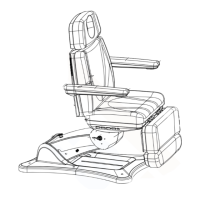

 To Next Page