6. Operation Instruction
2246BN/2246EBN
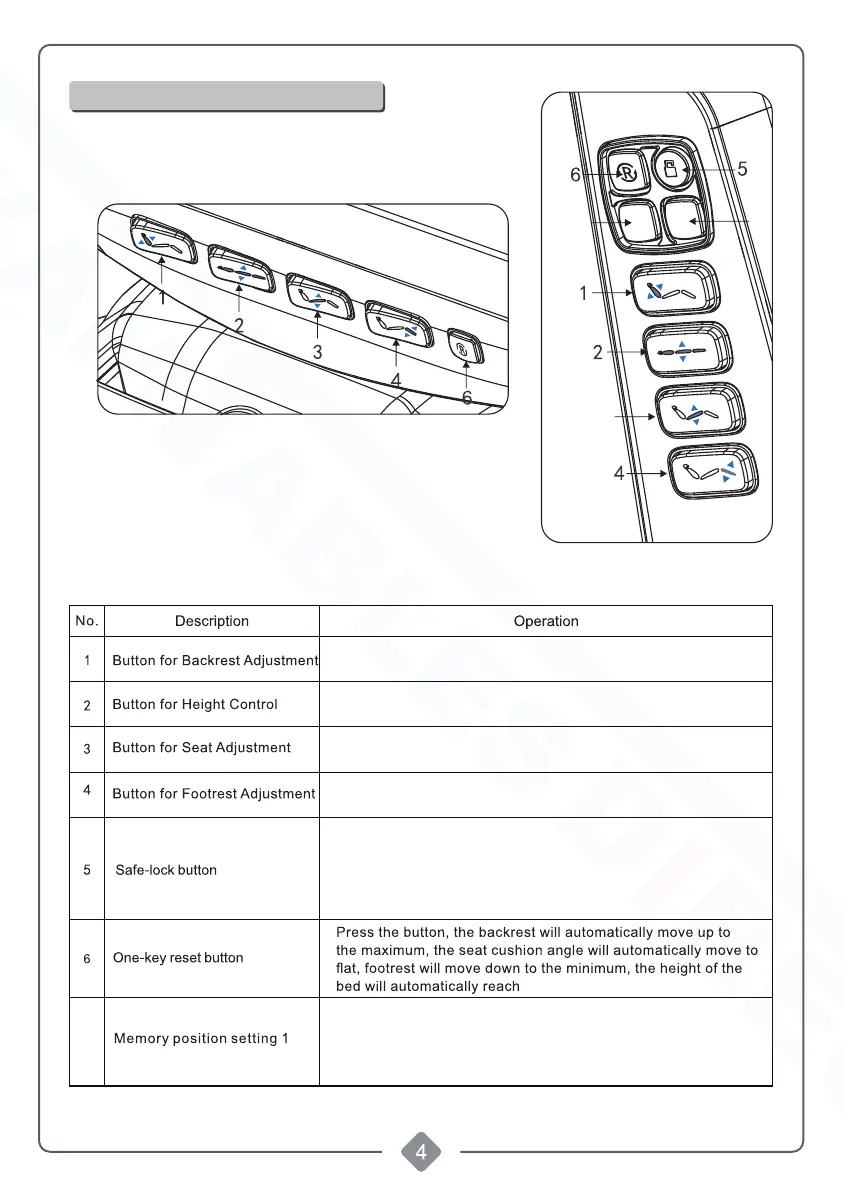
Standard Configuration (Key Switches)
3
7
8
7
to the setting Positionto the setting Position
M1
M2
Press button right (left), backrest moves up (down),
angle increases (decreases) at a constant speed.
Press button right (left), seat moves up (down),
height increases (decreases) at a constant speed.
Press button right (left), seat inclines backward.
height increases (decreases) at a constant speed.
Press button right (left), legrest moves up (down),
angle decreases (decreases) at a constant speed.
Memory/Programmable postion setting: After adjusting the chair
to the requested position, press "M1" button for 2~3seconds,
when there is sound of "beep...beep...beep", it means the position
is set successfully.
Keep pressing the "safe-lock button" for about three seconds
lighting up the red light around the button, all the buttons can
not be operated except safe-lock button. Keep pressing the
safe-lock button for about three seconds again, the red button
lights go out, all the buttons return to normal operation status.
Shop tables & accessories at


 To Next Page