Case Storage CS380
5
Installation Chart
have all components collected
check that all components do not have compatibility problems with each other or with the case
if possible, assemble the components outside the case first to make sure they are working
keep the motherboard manual ready for reference during installation
prepare a Philips screwdriver
1
2
3
4
5
Before you begin, please make sure that you
01
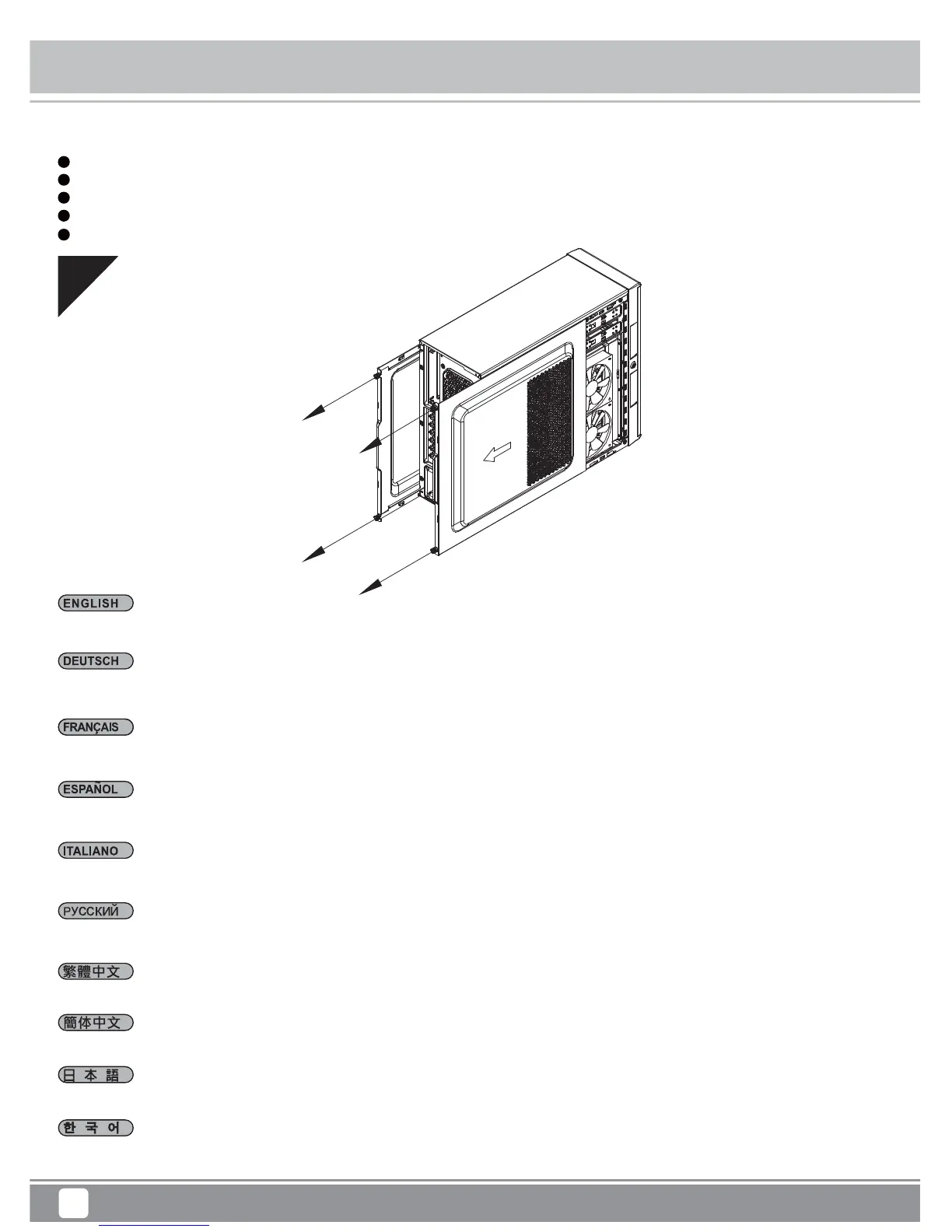
Lösen Sie die beiden Schrauben an den linken und rechten Seitenwänden, nehmen Sie die Seitenwände ab
Desatornille dos tornillos de los paneles izquierdo y derecho para quitarlos
Per rimuovere i pannelli laterali allentare, per entrambi, le due viti di serraggio
Loosen two screws from both left and right side panels to remove them
Отвинтите по два винта, крепящих левую и правую боковых панели, и снимите панели
鬆開左右側板的兩顆螺絲,取下側板
松开左右侧板的两颗螺丝,取下侧板
왼쪽과 오른쪽 사이드 패널에서 두 개씩 나사를 풀어 사이드 패널을 제거합니다
両方の左右パネルからネジ2本を緩めて、 取り外します
Desserrez les vis des deux panneaux latéraux pour les retirer




 To Next Page