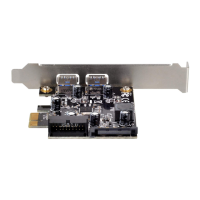
Attention
1. In windows 7 or previous version, please install the ASM3142 driver to enjoy the SuperSpeed USB 3.2 performance.
2. User should not install the driver of ECU02-E, because Windows 8 or 8.1 has supported ECU02-E.
3. User should be checked whether the Ubuntu/Linux or Mac OS has included XHCI function, if computer system supports
XHCI function then it can support ECU02-E without driver installed.
1. Unter Windows 7 oder älteren Versionen installieren Sie bitte den ASM3142-Treiber zur Realisierung von USB-3.2-
Super-Speed-Leistung.
2. Nutzer sollte den Treiber von ECU02-E nicht installieren, da Windows 8 oder 8.1 ECU02-E unterstützt.
3. Nutzer sollten Ubuntu/Linux oder Mac OS auf XHCI-Funktion prüfen; falls das Computersystem XHCI unterstützt, kann
die ECU02-E automatisch ohne Installation eines Treibers genutzt werden.
1. Sur Windows 7 ou les versions précédentes, veuillez installer le pilote ASM3142 pour bénéficier des performances de
l'USB 3.2 SuperSpeed.
2. L'utilisateur ne doit pas installer le pilote de l'ECU02-E, car Windows 8 ou 8.1 prend en charge l'ECU02-E.
3. L'utilisateur doit vérifier si le système d'exploitation Ubuntu/Linux ou Mac OS inclut la fonctionnalité XHCI ; si le système
d'exploitation de l'ordinateur prend en charge la fonctionnalité XHCI, alors il peut prendre en charge l'ECU02-E sans
installation de pilote.
1. En Windows 7 o versiones previas, por favor instale el controlador ASM3142 para disfrutar del rendimiento USB 3.2
SuperSpeed
2. El usuario no debería instalar el controlador del ECU02-E, porque Windows 8 o 8.1 soporta ECU02-E.
3. El usuario debería comprobar si su Ubuntu/Linux o Mac OS ha incluido la función XHCI, si el sistema soporta la función
XHCI entonces podrá usar el ECU02-E sin un controlador instalado.
1. Su Windows 7 o versione precedente, installare il driver ASM 3142 per usufruire delle prestazioni USB 3.2 SuperSpeed.
2. L'utente deve installare il driver di ECU02-E, poiché Windows 8 o 8.1 dispone di supporto per ECU02-E.
3. L'utente deve verificare se la funzione XHCI è inclusa su Ubuntu/Linux o Mac OS; se il sistema del computer supporta
la funzione XHCI, allora può supportare ECU02-E senza installazione di driver.
1. В Windows 7 и в более ранних версиях, пожалуйста, установите драйвер ASM3142, чтобы в полной мере оценить
работу SuperSpeed USB 3.2.
2. Пользователь не должен устанавливать драйвер ECU02-E, потому что Windows 8 или 8.1 поддерживает ECU02-E.
3. Пользователь должен проверить, включена ли функция XHCI в случае использования Ubuntu/Linux или Mac OS,
если компьютерная система поддерживает функцию XHCI, то она поддерживает работу с ECU02-E без установки
драйвера.
1. 若您使用Windows 7或舊版作業程式,請先安裝ASM3142驅動程式,以便享受高速USB 3.2的傳輸速度。
2. ECU02-E已支援Windows 8 or 8.1,所以使用者不需要再安裝任何驅動程式即可使用。
3. 當你使用ECU02-E前,使用者請先確認您的Ubuntu/Linux 或是 Mac OS是否支援XHCI功能,若已有XHCI功能,則不用
安裝驅動程式即可使用。
1. ใน Windows 7 หรือเวอร์ชั่นก่อนหน้า โปรดติดตั้งไดรเวอร์ ASM3142 เพื่อให้ได้สมรรถนะระดับ SuperSpeed USB 3.2
2. ผู้ใช้ไม่ควรติดตั้งไดรเวอร์ของ ECU02-E เนื่องจาก Windows 8 หรือ 8.1 สนับสนุน ECU02-E อยู่แล้ว
3. ผู้ใช้ควรตรวจสอบว่า Ubuntu/Linux หรือ Mac OS มีฟังก์ชั่น XHCI ไว้หรือไม่ หากระบบคอมพิวเตอร์รองรับฟังก์ชั่น XHCI เครื่องจะรองรับ
ECU02-E โดยไม่ต้องติ
ดตั้งไดรเวอร
ไทย



 To Next Page
 Loading...