5
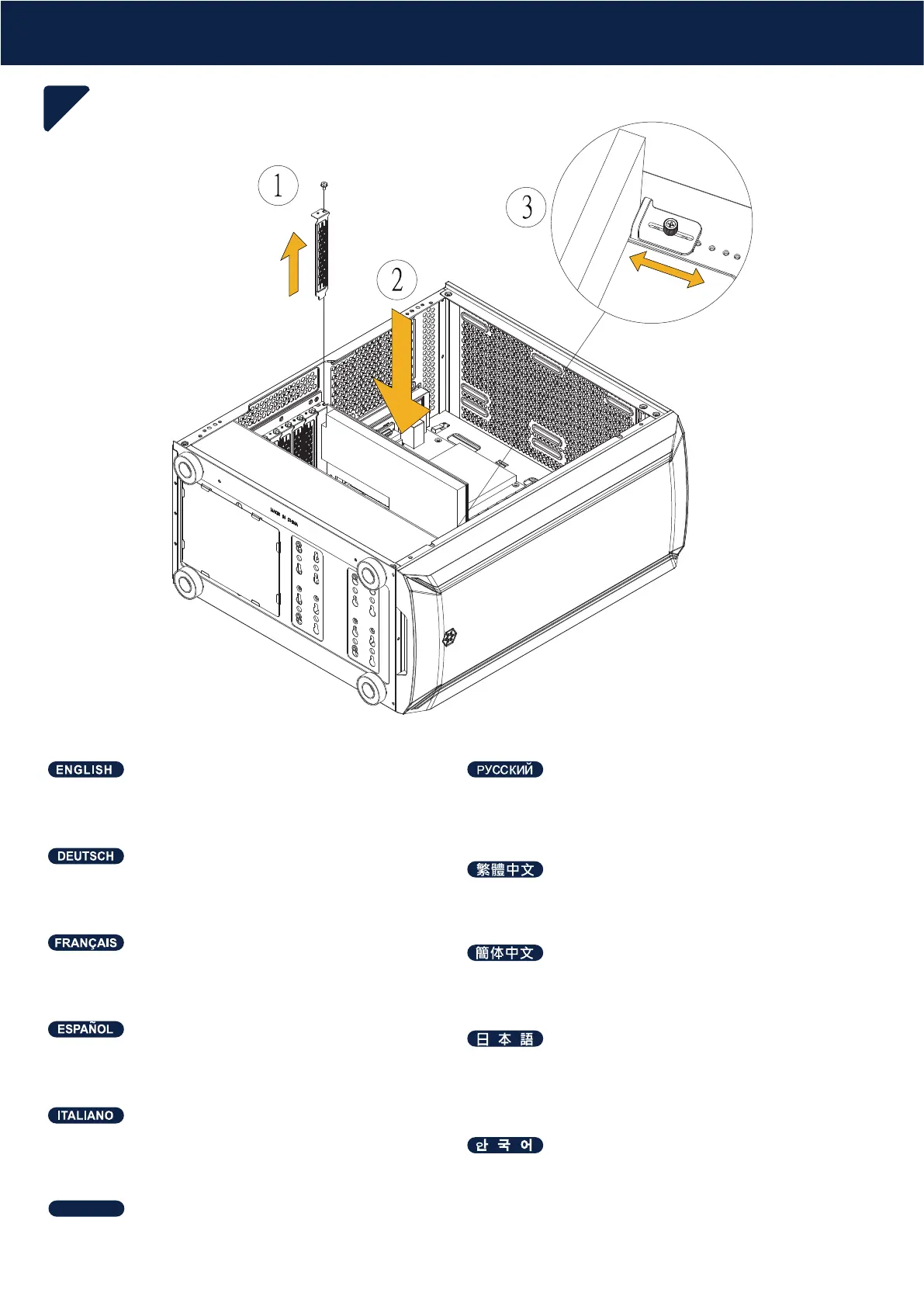
Graphics card and graphics card bracket installation
Please adjust the position of the graphics card bracket according
to the size and installation position of the graphics card
Установка видеокарты и кронштейна видеокарты
Пожалуйста, отрегулируйте положение кронштейна для
видеокарты в соответствии с размером и местом
установки видеокарты
Installation von Grafikkarte und Grafikkartenhalterung
Bitte passen Sie die Position der Grafikkartenhalterung
entsprechend der Größe und Installationsposition der Grafikkarte an
安裝顯卡及顯卡支架
請依顯卡尺寸及安裝位置,調整顯卡支架的位置
Instalación de la tarjeta gráfica y el soporte de la tarjeta gráfica
Por favor, ajuste la posición del bracket de las tarjetas gráficas
según el tamaño y la posición de instalación de la tarjeta gráfica
グラフィックス カードとグラフィックス カード ブラケットの取り付け
グラフィックスカードブラケットの位置は、グラフィックスカー
ドのサイズおよび取り付け箇所に従って調整します
Installation de la carte graphique et du support de carte graphique
Veuillez ajuster la position du support de la carte graphique en
fonction de la taille et de la position d'installation de la carte graphique
安装显卡及显卡支架
请依显卡尺寸及安装位置,调整显卡支架的位置
Installazione della scheda grafica e della staffa della
scheda grafica
Regolare la posizione della staffa per scheda grafica in base alle
dimensioni e alla posizione di installazione della scheda grafica
그래픽 카드 및 그래픽 카드 브래킷 설치
그래픽 설치 위치 및 크기에 따라 그래픽 카드 브래킷의
위치를조절하십시오.
การติดตั้งการ์ดจอและขายึดการ์ดจอ
โปรดปรับตำแหน่งของโครงยึดการ์ดจอตามขนาด และตำแหน่ง
การติดตั้งการ์ดจอ
ไทย
INSTALLATION GUIDE





 To Next Page