7
1
2
3
Installation Guide
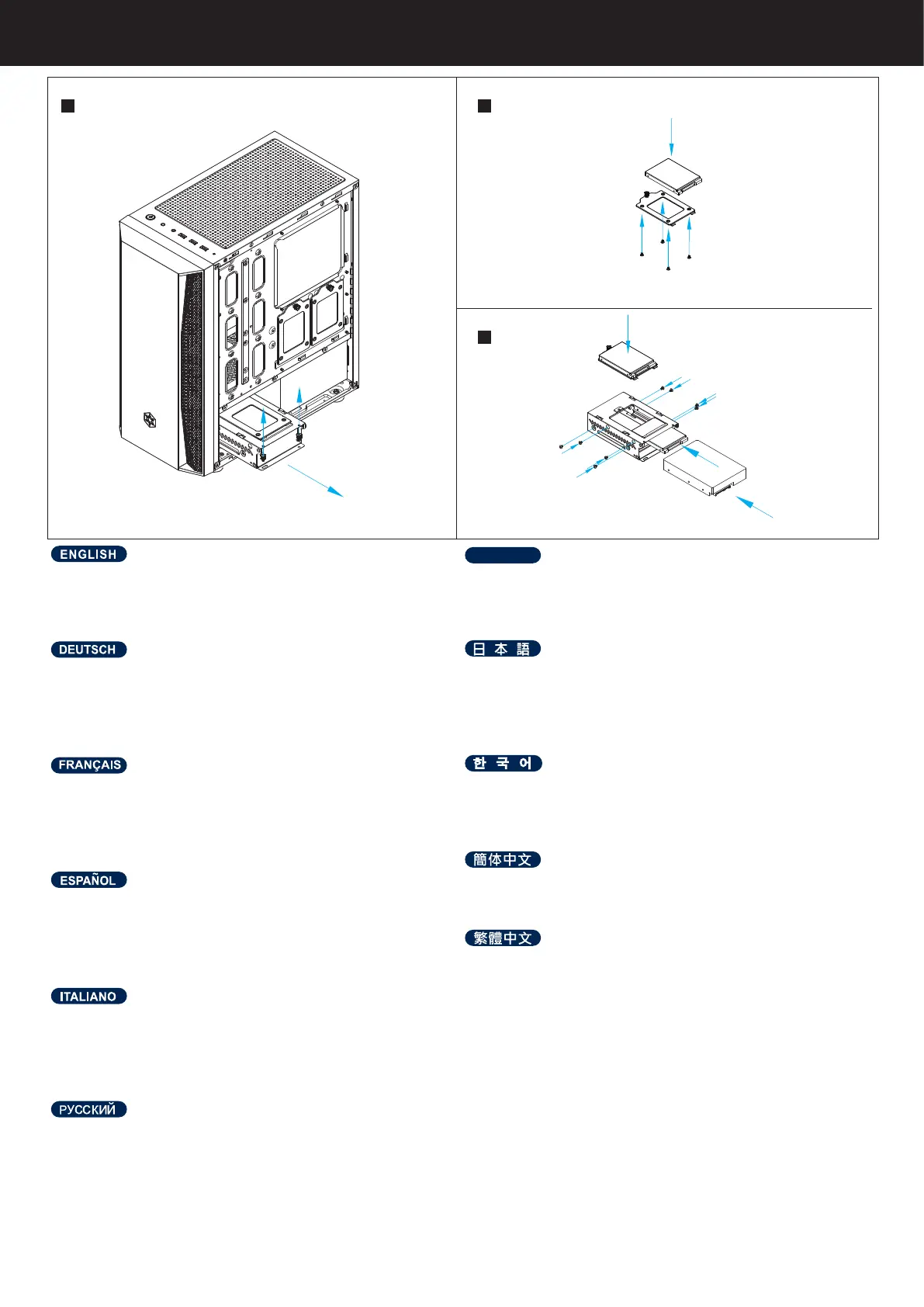
Storage device installation
Install 3.5” and 2.5” devices into the drive trays,
then insert them into the bottom drive cage
Installieren Sie 3,5- und 2,5-Zoll-Geräte in den
Laufwerkschächten und stecken Sie sie dann in
den unteren Laufwerkskäg
Installez les périphériques 3,5” et 2,5” sur les
plateaux de lecteurs, puis insérez-les dans la cage
de lecteur inférieure
Instale los dispositivos de 3,5” y 2,5” en las bahías
para dispositivos, luego insértelos en la carcasa
para dispositivos inferior
Installare dispositivi da 3,5” e 2,5” nei cassetti del
disco rigido, quindi inserirli nella gabbia inferiore
dell'unità
Установите устройства 3,5”и 2,5” в лотки для ди
сков , затем вставьте их в нижнюю корзину
ติดตั้งอุปกรณ์ 3.5” และ 2.5” ลงในถาดใส่ไดรฟ์
จากนั้นเสียบเข้า ไปที่โครงไดรฟ์ด้านล่าง
3.5”および 2.5”デバイスをドライブトレイにイ
ンストール後、こ れを底部ドライブケージに挿
します。
드라이브 트레이에 3.5” 장치와 2.5” 장치를 설치
하고 , 하단 드라이브 케이지에 삽입합니다
安装 3.5”及 2.5”装置于硬盘架
安裝 3.5”及 2.5”裝置於硬碟架
ไทย





 To Next Page