7
1.3.2 Regulation
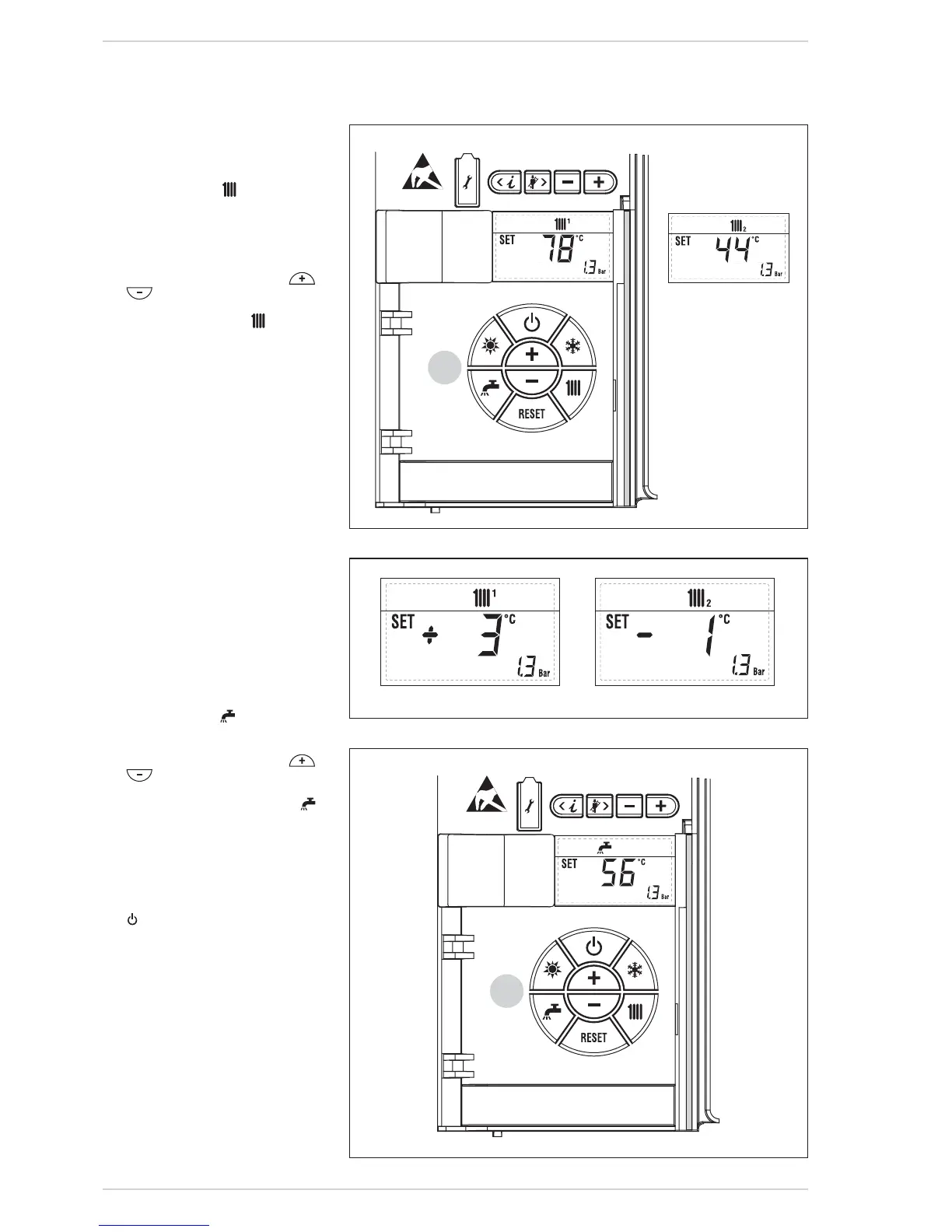
C.H. temperature (fig. 25)
To set the temperature of the water for
heating, press the key of the controls
(2). The first time the key is pressed, the
SET of heating circuit 1 is selected. The
second time it is pressed, the SET if
second zone fitted is selected. The
display will be as shown in the figure.
Change the values with the key
and
.
Standard visualisation will return to the
display by pressing the key
again, or
after 10 seconds if no key is pressed.
Regulation of the external sensor (fig.
25/a)
If an external sensor is installed, the
value of the output temperature is auto-
matically chosen by the system, which
quickly adjusts the environmental tem-
perature on the basis of the external
temperature.
If you wish to change the value of the
temperature, increasing or decreasing
that calculated automatically by the
electronic card, proceed as indicated in
the preceding paragraph.
The level of various correction of a value
of temperature proportional calculated.
The display will be as shown in fig. 25/a.
1.3.3 Regulation D.H.W.
temperature (fig. 26)
To set the desired temperature of the
D.H.W., press the key of the controls
(pos. 2). The display will be as shown in
the figure.
Change the values with the key
and
.
The display will return to the standard
visualisation by pressing the key
again, or after 10 seconds if no key is
pressed.
1.3.4 To switch off the boiler (fig. 24)
In the case of a short absence, press the
key of the controls (pos. 2).
The display will be as shown in the fig.
24.
In this way, leaving the electricity and
the fuel supply connected, the boiler is
protected from frost and from the pump
becoming jammed.
If the boiler is not used for a prolonged
period, it is advisable to disconnect the
electricity supply, by switching off the
main switch of the system, and to close
the gas tap and, if low temperatures are
expected, to completely empty the
hydraulic circuits to avoid pipes being
broken by the formation of ice in the
pipes.





 To Next Page