7
Summer
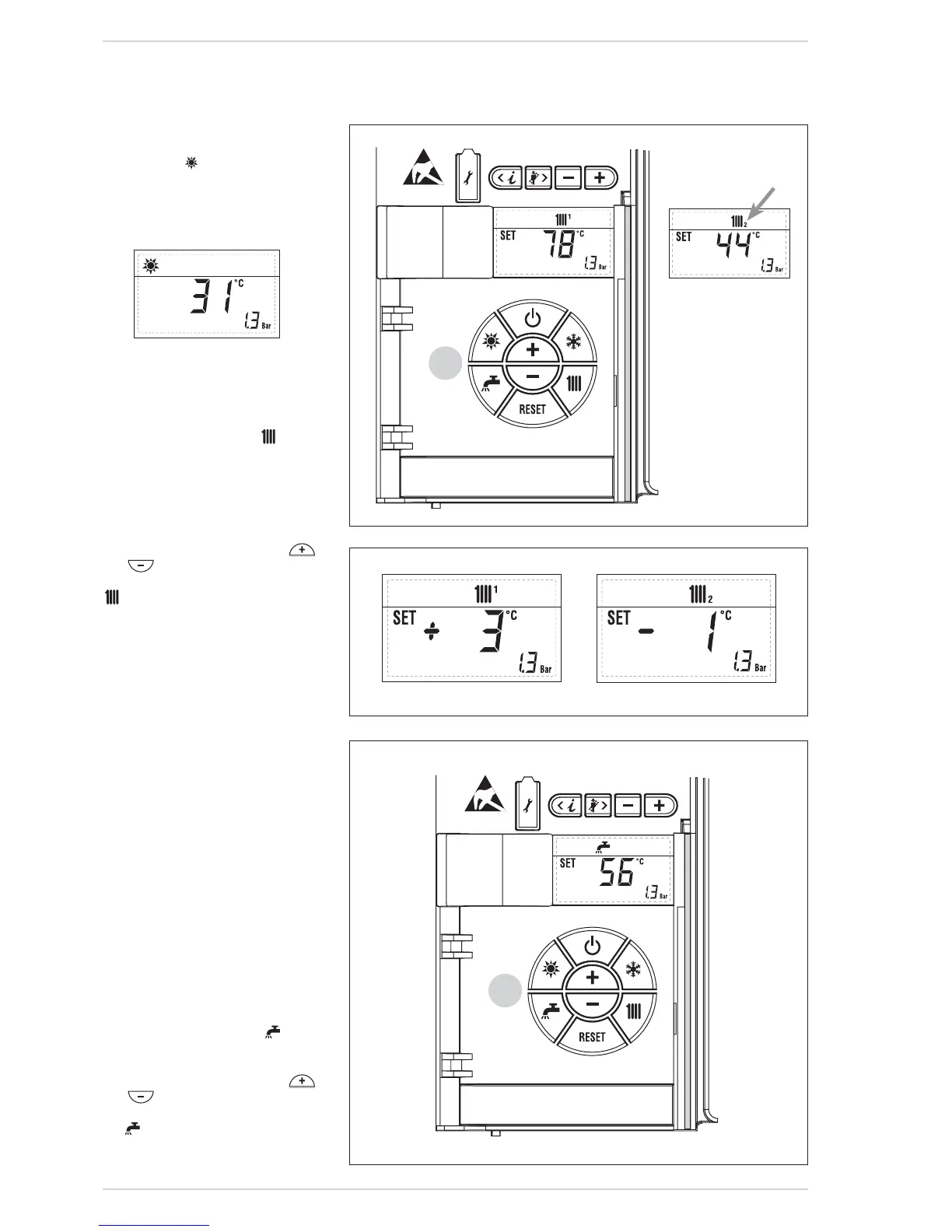
Press the key of the controls (pos.
2) to activate the summer mode func-
tioning (only the production D.H.W.).
The display will be as shown :
1.3.2 Regulation
C.H. temperature (fig. 25)
To set the temperature of the water
for heating, press the key of the
controls (2).
The first time the key is pressed, the
SET of heating circuit 1 is selected.
The second time it is pressed, the SET
if second zone fitted is selected. The
display will be as shown in figure 25.
Change the values with the key
and
.
The standard display will return If the
is pressed again, or after 10
seconds if no key is pressed.
Regulation of the external sensor
If an external sensor is installed, the
value of the output temperature is
automatically chosen by the system,
which quickly adjusts the environmen-
tal temperature on the basis of the
external temperature.
If you wish to change the value of the
temperature, increasing or decrea-
sing that calculated automatically by
the electronic card, proceed as indica-
ted in the preceding paragraph. The
level of various correction of a value of
temperature proportional calculated.
The display will be as shown in fig.
25/a.
1.3.3 Regulation D.H.W.
temperature (fig. 26)
To set the desired temperature of the
stored D.H.W., press the key of the
controls (pos. 2). The display will be as
shown in the figure 26.
Change the values with the key
and
.
The standard display by pressing the
key again, or after 10 seconds if no
key is pressed.



 To Next Page