6
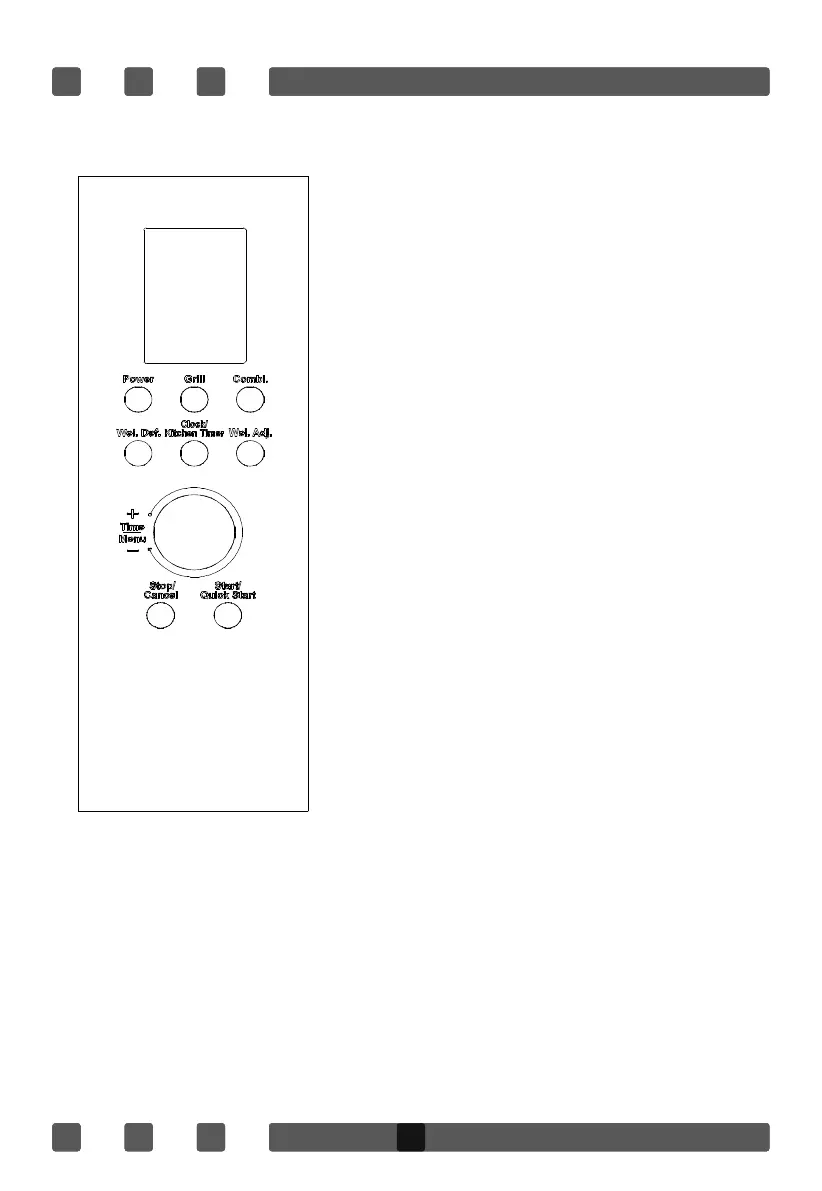
CONTROL PANEL
Display Screen
Cooking time, power, indicators and present time
are displayed.
Power
Press to select microwave Power.
Grill
Press to set a grill cooking program.
Combi.
Press to select one of two combination cooking
settings.
Wei. Def.
Press to select defrost program by the weight.
Clock/Kitchen Timer
Press to set the clock or to set the kitchen timer.
Wei. Adj.
Press to set the weight of defrost and auto
cooking program.
Time/Menu
Rotate to set cooking time or select auto-menu.
Stop/Cancel
Touch to stop cooking program or clear all
previous settings before cooking starts.
Start/Quick Start
Press to start cooking program or set quick start
cooking program.
H
H
O
O
W
W
T
T
O
O
S
S
E
E
T
T
T
T
H
H
E
E
O
O
V
V
E
E
N
N
C
C
O
O
N
N
T
T
R
R
O
O
L
L
S
S
SETTING THE CLOCK
This is a
12 and 24 hours clock. You can take the steps below to set the clock.
1. Press Clock/Kitchen Timer button for 3 seconds. “Hr 12” shows on the screen, press the button once if you
want to set 24 hours clock.
2. Rotate the Time/Menu dial until the correct hour is displayed.
3. Press Clock/Kitchen Timer button.
4. Rotate the Time/Menu dial until the correct minute is displayed.
5. Press Clock/Kitchen Timer button to confirm.
H
H
O
O
W
W
T
T
O
O
S
S
E
E
T
T
T
T
H
H
E
E
O
O
V
V
E
E
N
N
C
C
O
O
N
N
T
T
R
R
O
O
L
L
S
S
SETTING THE CLOCK
This is a 12 and 24 hours clock. You can take the steps below to set the clock.
1. Press Clock/Kitchen Timer button for 3 seconds. “Hr 12” shows on the screen, press the button once if you
want to set 24 hours clock.
2. Rotate the Time/Menu dial until the correct hour is displayed.
3. Press Clock/Kitchen Timer button.
4. Rotate the Time/Menu dial until the correct minute is displayed.
5. Press Clock/Kitchen Timer button to confirm.
H
H
O
O
W
W
T
T
O
O
S
S
E
E
T
T
T
T
H
H
E
E
O
O
V
V
E
E
N
N
C
C
O
O
N
N
T
T
R
R
O
O
L
L
S
S
SETTING THE CLOCK
This is a 12 and 24 hours clock. You can take the steps below to set the clock.
H
H
O
O
W
W
T
T
O
O
S
S
E
E
T
T
T
T
H
H
E
E
O
O
V
V
E
E
N
N
C
C
O
O
N
N
T
T
R
R
O
O
L
L
S
S
SETTING THE CLOCK
This is a 12 and 24 hours clock. You can take the steps below to set the clock.
HOW TO SET THEE OVENN CONTROLS
SETTING THE CLOCK
This is a 12 and 24 hours clock. You can take the steps below to set the clock.
1. Press Clock/Kitchen Timer button for 3 seconds. “Hr 12” shows on the screen, press the
button once if you want to set 24 hours clock.
2. Rotate the Time/Menu dial until the correct hour is displayed.
3. Press Clock/Kitchen Timer button.
4. Rotate the Time/Menu dial until the correct minute is displayed.
5. Press Clock/Kitchen Timer button to confirm.


 To Next Page