12
OWNER’S MANUAL
DRUM MODULE OPERATION
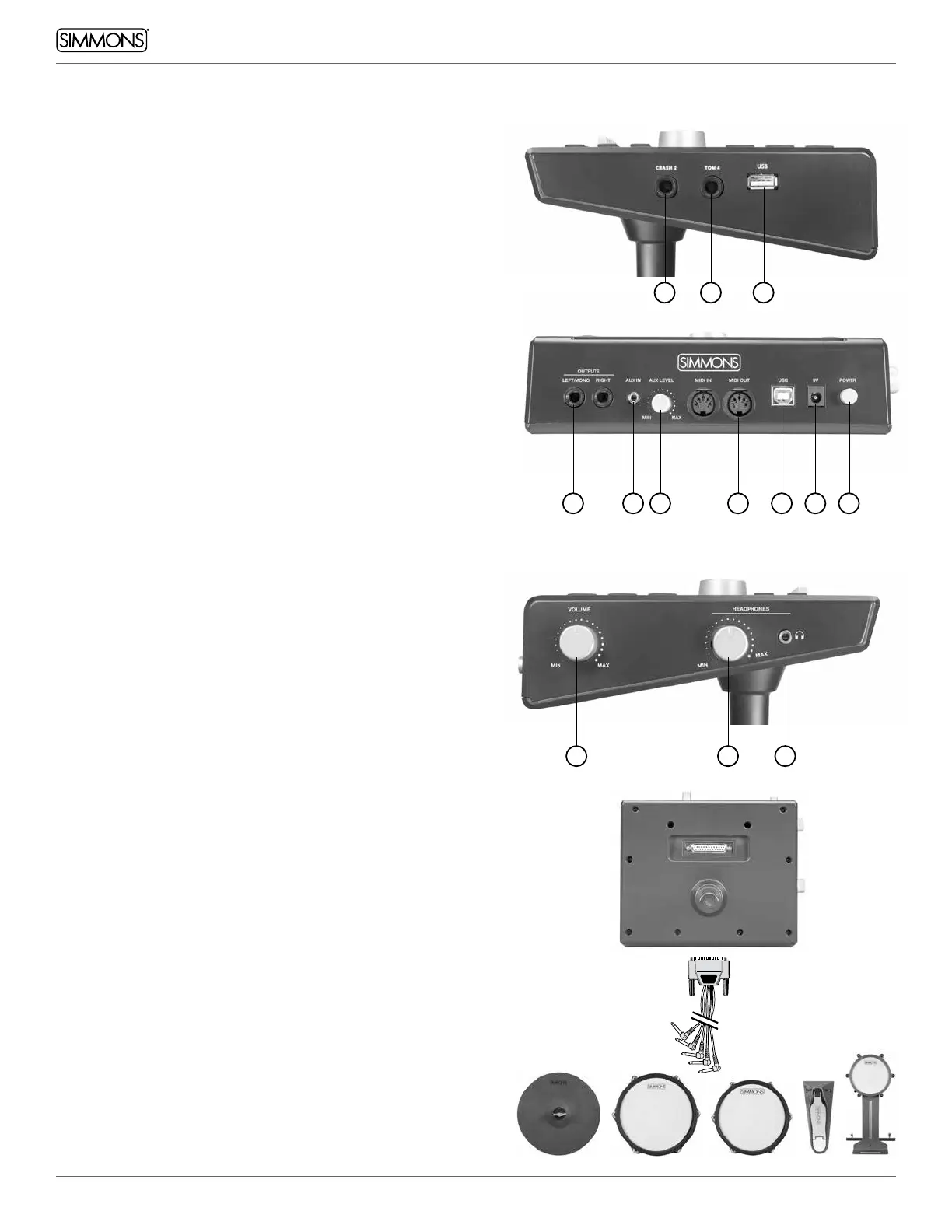
RIGHT SIDE PANEL
1. Crash 2: ¼” stereo input jack for attaching an additional crash
cymbal
2. Tom 4: ¼” stereo input for attaching an additional Tom pad
3. USB: USB host input for connecting a USB flash drive for sample
loading and song storage
REAR PANEL
4. Outputs: Stereo line outputs for connecting to a monitor system.
If working in mono, use the Left/Mono output
5. Aux In: 1/8” stereo input for connecting a smartphone, tablet,
or other sound source. It plays through the outputs and
headphone out
6. Aux Level: Adjusts the volume of the Aux In
7. MIDI: MIDI Input and Output for connecting to computer
recording systems and triggering external sounds
8. USB: USB device input for connecting the module to a PC,
tablet, or smartphone.
9. 9V: Power input for the included power adapter
10. Power switch: Hold for a few seconds to turn the power on or off
LEFT SIDE PANEL
11. Volume: Controls the volume coming from the line outputs
12. Headphone level: Controls the level going to the headphones
13. Headphone output: 1/8” Stereo jack for connecting headphones
BOTTOM PANEL
DB25 Serial Connection Jack for the pad trigger cables.
MULTI-PIN JACK INPUT
Using the provided cables, connect the 1/4” jacks to the
corresponding drum pads, cymbal pads and kick pad. The pin
connection will attach to the serial port of the sound module.
(See illustration.)
Note: The sound of the hi-hat pad is controlled by the hi-hat
pedal. Similar to a real drum kit, the hi-hat pad functions as
an open hi-hat’ when the pedal is released. When the pedal is
pressed down, it functions as a ‘closed hi-hat’.
1
11 12 13
4
2
5
3
6 7 8 9 10



 To Next Page