The Simmons SD550 Electronic Drum Kit is a comprehensive electronic drum set designed for musicians seeking a versatile and high-quality drumming experience. It features a custom sound library, variable attack response, and S500 Series pads, ensuring a dynamic and expressive performance.
Function Description:
The SD550 Electronic Drum Kit serves as a complete electronic percussion instrument, allowing drummers to play, practice, record, and customize their drum sounds. The core of the system is the SD550 Sound Module, which houses a vast array of drum voices, keyboard voices, drum kits, and songs. It supports various modes of operation, including Kit Mode for sound customization, Song Mode for playing and editing songs, Utility Mode for system settings, and a Record Mode for capturing performances. The module is designed for easy integration with external audio equipment, MIDI devices, and computers, expanding its functionality for recording, sequencing, and live performance.
Important Technical Specifications:
- Polyphony: 64 voices, allowing for complex and layered drum sounds without voice drop-out.
- Sounds:
- Drum Voices: 328
- Keyboard Voices: 43
- Drum Kits: 25 Preset / 10 User, offering a wide range of styles from classic to modern.
- Songs: 50 Preset / 10 User, providing diverse musical backings for practice and performance.
- Effects:
- Reverb: Hall1, Hall2, Room1, Room2, Room3, Stage1, Stage2, Plate, Delay, Echo, Off.
- Chorus: Chorus1, Chorus2, Chorus3, Chorus4, Feedback, Flanger, Short Delay, Flanger2, Flanger3, Celeste1, Celeste2, Celeste3, Off. These effects allow for extensive sound shaping and atmospheric enhancements.
- Trigger Inputs:
- 1 x Kick, Single Zone
- 1 x Snare, Dual Zone (9" Dual zone Snare mesh drum)
- 8" Single zone Tom pads
- 10" Single zone Hi Hat pad
- 10" Single zone Crash Cymbal pad with Choke
- 12" Single zone Ride Cymbal pad
- 1 x Hi-Hat pedal. These inputs ensure accurate and responsive triggering from the pads.
- Hardware:
- Drum Rack and mounts
- Kick pedal / Trigger module
- 10" Dual zone Snare mesh drum
- 8" Single zone Tom mesh drums
- 10" Single zone Hi Hat pad
- 10" Single zone Crash Cymbal pad with Choke
- 12" Single zone Ride Cymbal pad
- 1 x Hi-Hat pedal. The physical components are designed for durability and realistic feel.
- External Connections:
- 1/8" Headphone Output for private practice.
- 2 1/4" Master Outputs for connecting to mixers or amplifiers.
- 1/8" TRS Aux input for connecting external audio sources like MP3 players.
- USB Connection for MIDI via computer, enabling seamless integration with DAWs and other MIDI software.
- Sequencer:
- Preset Songs: 25
- User Songs: 10
- Tempo: 20-280 BPM
- Click/Metronome: Click voice, Time Signature, Tempo, Interval, Volume. The sequencer facilitates practice and recording.
- Power: 9V, 600mA (AC Adapter).
- Weight: 37.04 lbs / 16.8 kg.
Usage Features:
- Custom Sound Library: The SD550 boasts a completely new sample set based on popular classic and modern kits, offering a rich and diverse sonic palette.
- Variable Attack Response: Playback is significantly improved with dynamic response according to hit velocity, combined with alternating sample playback by velocity zone, providing a more expressive and realistic drumming experience.
- S500 Series Pads: The pads feature increased sensitivity and greater isolation, particularly for the multi-zone snare pad, enhancing playability and reducing crosstalk.
- Intuitive Interface: The SD550 Sound Module's top panel includes dedicated buttons for Kit, Song, Utility, Play/Stop, Record, Click, Page, Tempo, Save, and +/- buttons, making navigation and parameter adjustments straightforward.
- MIDI Connectivity: The USB connector allows for direct connection to a computer without driver installation (Windows & MAC OSX), appearing as "SD550" for MIDI messages. This enables the module to receive and transmit MIDI data, enhancing its use with sequencers, expanders, and other controllers.
- AUX Input: An 1/8" TRS Aux input allows users to mix external audio sources (e.g., MP3 players) with the module's internal sounds, perfect for playing along to favorite tracks.
- Headphone Output: A dedicated 1/8" headphone output allows for silent practice, with independent volume control.
- Kit Editing: Users can edit various parameters of each voice within a kit, including voice index, volume, pitch, decay, pan, reverb level, and chorus level, and save these as user kits.
- Song Editing and Recording: The module allows for editing song parameters like accompaniment and drum volume, muting drum parts, and recording user songs. Recording settings include track selection (Drum or Accompaniment), "Together" play-along, "Syn Start" (recording starts on first hit), and "Pre Count" (measures before recording starts).
- Trigger Settings: Individual trigger parameters such as sensitivity, retrigger cancel, threshold, and curve can be adjusted for each pad, allowing for fine-tuning of the pad response to match individual playing styles. Crosstalk cancellation (X-Talk) is also adjustable to prevent unintended triggering between pads.
- Effects Control: Built-in Reverb and Chorus effects can be adjusted in Utility Mode, offering various types and levels to enhance the overall sound.
- Auto Power Mode: An optional auto power-off function can be enabled to shut down the module after 30 minutes of inactivity, conserving power.
- Factory Reset: The module can be reset to its factory settings, either for the current kit or all kits and module settings, providing a clean slate for customization.
Maintenance Features:
- Cleaning: The module should be cleaned with a dry, soft cloth. A slightly damp cloth can be used for stubborn grime, but alcohol or thinner should never be used. Vinyl objects should not be placed on the module to prevent discoloration.
- Power Management: Always turn the power switch OFF when the SD550 is not in use. Unplug the AC adapter from the outlet if the module will not be used for an extended period. Ensure the power is OFF before connecting or disconnecting cables to prevent damage.
- Environmental Care: Keep the drum kit away from direct sunlight, high temperature sources, and excessive humidity to prevent deformation, discoloration, or other damage.
- Electrical Safety: Protect the power cord from being walked on or pinched. Avoid plugging the AC adapter into outlets powering high-consumption appliances. Do not use multi-plug adapters, as this can reduce sound quality and cause operational errors. The apparatus should not be exposed to dripping or splashing liquids, and no objects filled with liquids should be placed on it.
- Interference: The module contains digital circuitry that may cause interference with radio or television receivers. If this occurs, move the SD550 further away from the affected equipment.
- Servicing: There are no user-serviceable parts inside the drum module. Do not attempt to open the sound module or modify its circuits or parts, as this will void the warranty. Refer all servicing to qualified service personnel, especially if the apparatus has been damaged, exposed to moisture, or is not operating normally.
- Transport: When moving the module, unplug all cables by gripping the plug firmly, not by pulling on the cable. Avoid dropping, bumping, or placing heavy objects on the module to prevent physical damage.

 Need help?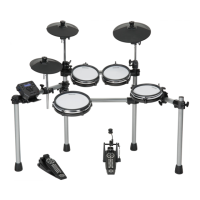

 To Next Page
 General










