www.simmonsdrums.net
15
The first name in electronic drums.
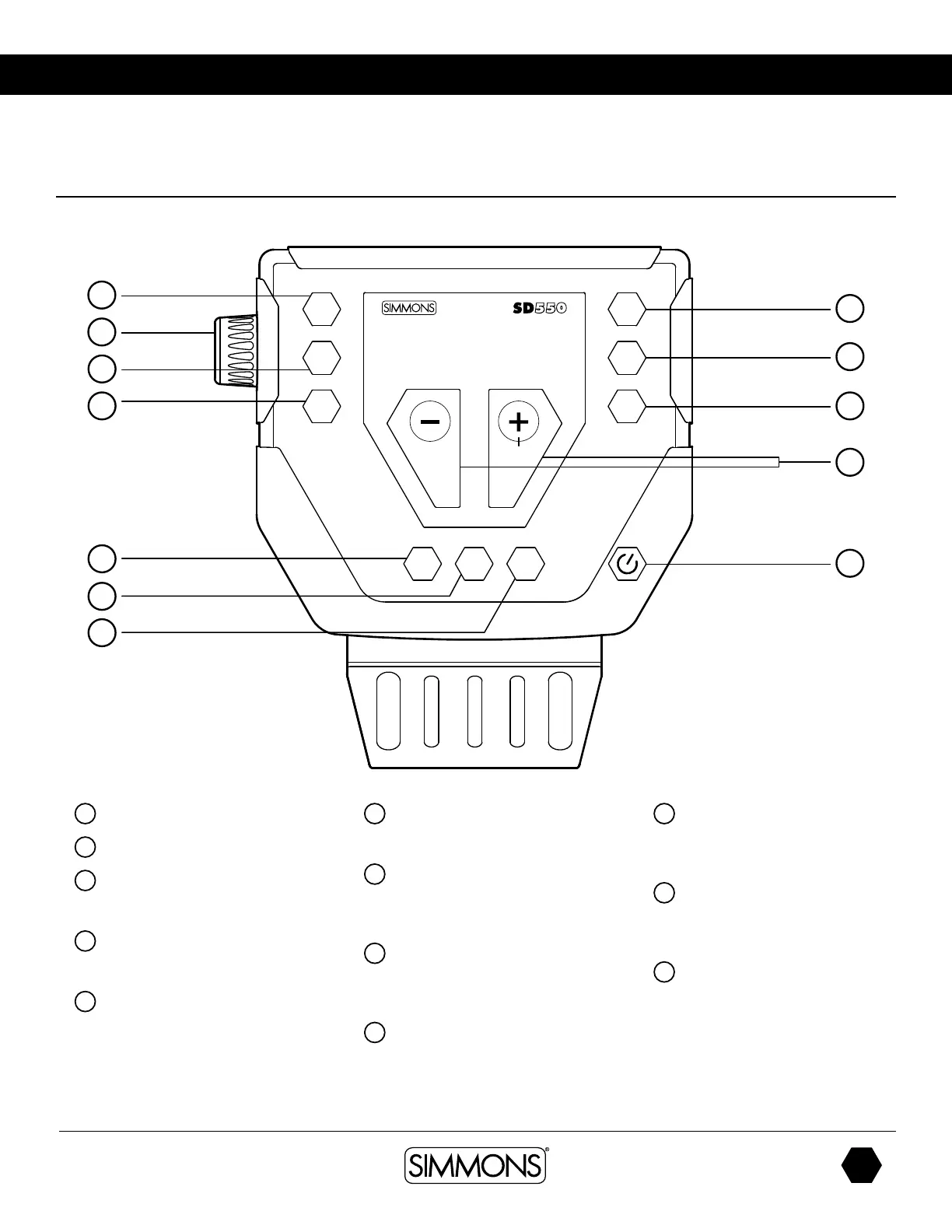
SD550 Drum Module Operation
Top Panel
1
Kit Knob
2
Volume Button
3
Song Button
Access Song Mode
4
Utility Button
Access Utility Functions
5
Play/Stop Button
Starts or Stops the playback
of a Song
6
Record Buttons
Used to enter the Record mode
7
Click
Turns the Click/Metronome
function on/off
8
Page Button
Move through the Editing pages
after each button push
9
Tempo
Adjusts tempo
10
Save
Enters the Save menu when
it is available
11
+/- Buttons
Adjust the current parameter
on the screen
12
Power Switch
This is a soft switch. To turn off, press
and hold the button for 5 secs.
1
2
3
4
5
6
7
SONG
START
MUTE
TEMPO/TAP
CLICK
UTIL
KIT VOICE REC/PLAY
8
9
10
12
11


 To Next Page