man-en-smx-rns02.docx
© 2020 SIMPLINX
Bridge WAN & LAN Port
In the Bridge WAN&LAN Port setting, enter the IP address of the device you want to create a
bridge.
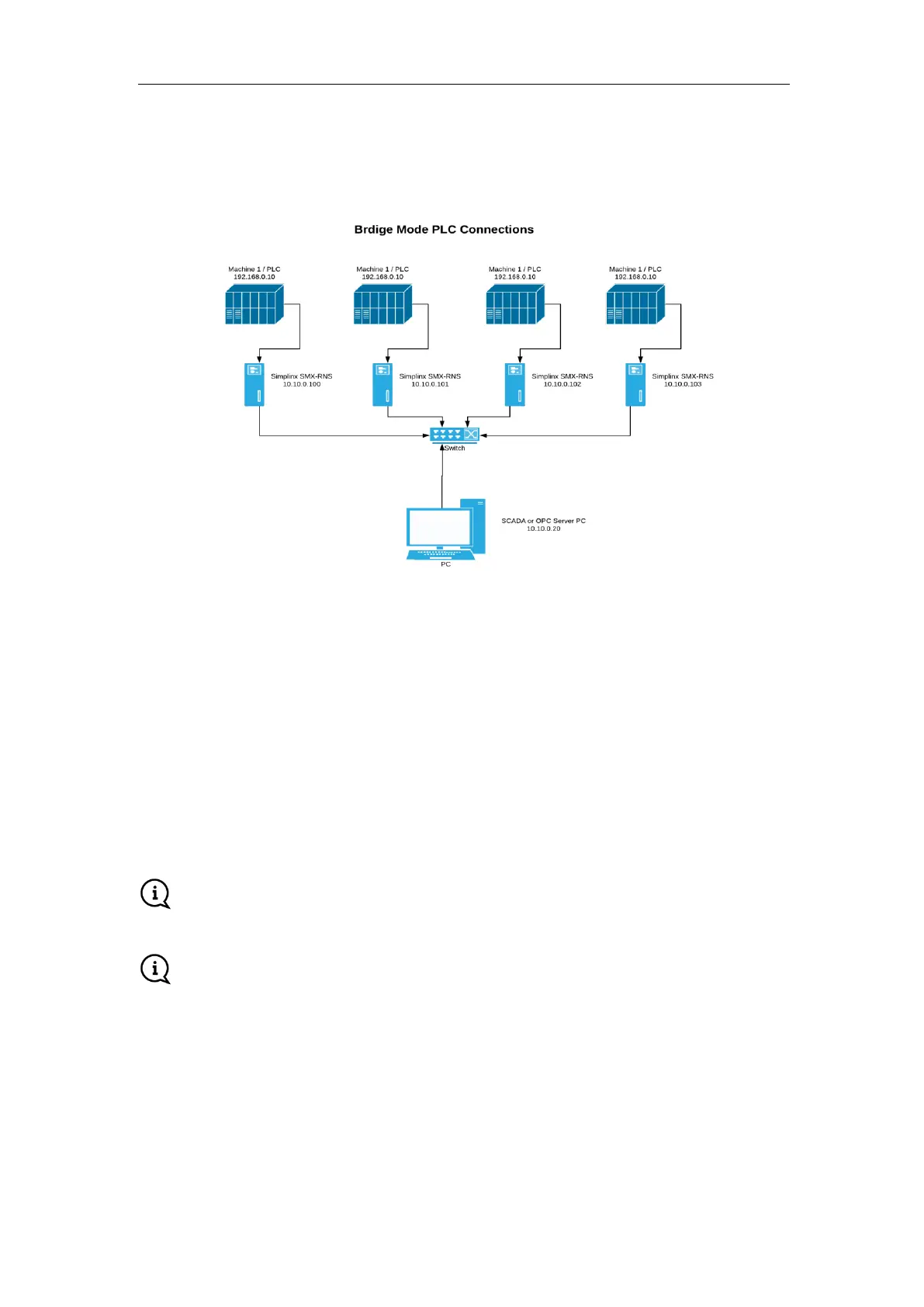
Turn off the "DCHP" option from the WAN settings page and enter the IP address, Mask and
Gateway values. Example above;
IP addresses: 10.10.0.100 - 101 - 102 - 103
MASK address: 255.255.255.0
Gateway address: 10.10.0.1
DNS address: 10.10.0.1
For Example; after activating Bridge Mode all connections you send to the IP address
"10.10.0.100" via PC will be transferred to PLC with the address "192.168.0.10" in the image
above.
Bridge WAN & LAN Port setting may prevent you to make a remote connection to the
device.
If you change these settings, you must restart the device for the new settings to take effect.



 To Next Page