5/6
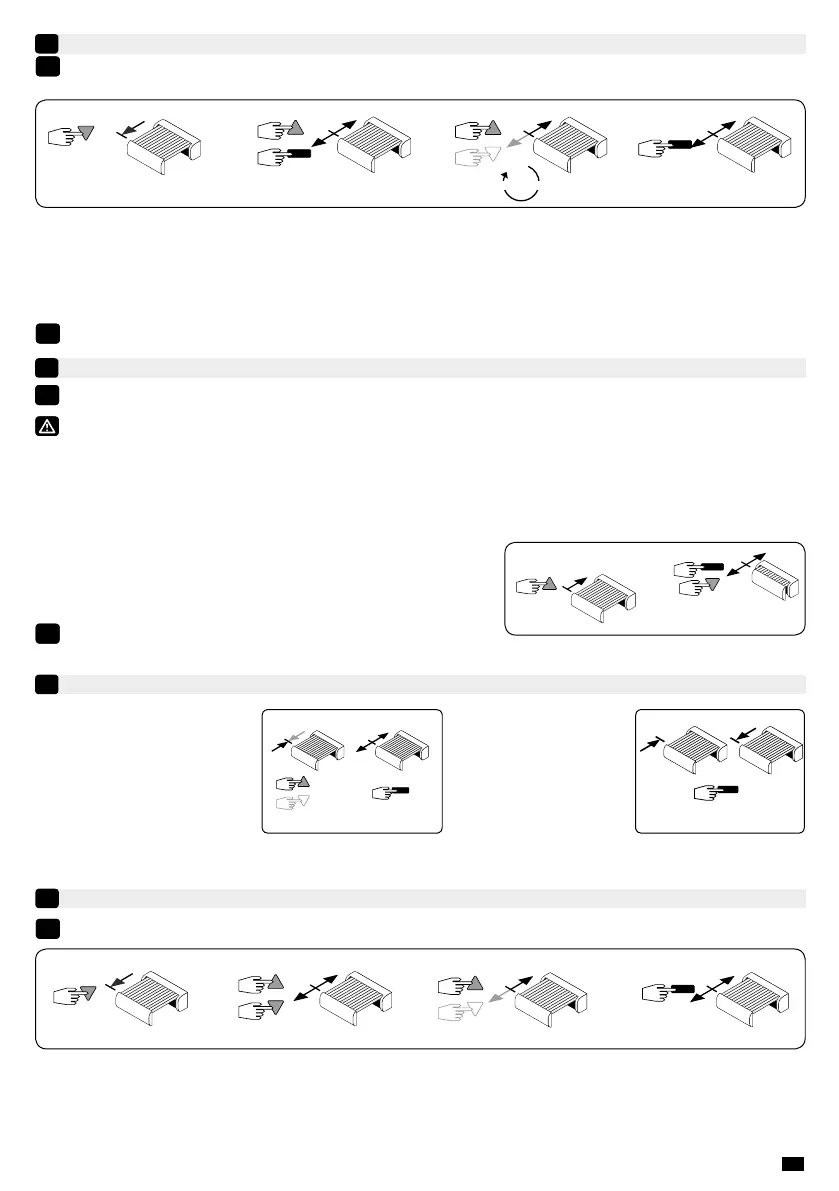
This function allows you to tighten the fabric each time the awning is lowered. To activate the function set the angle
between 11 and 180°. To disable the Back impulse, set the angle to 0°.
1- Move the motor to the Down end limit previously adjusted in §4.3 with the “Down” button.
2- Press simultaneously for 5 seconds the “Up” and “Stop” buttons, The motor will run for 0,5 second in one direction and
then in the other direction.
3- Adjust the angle of back impulse function (between 11 and 180°) with the “Up” and “Down” buttons.
4- Press 2s on the “Stop” button to conrm the adjustments. The motor will stop and will run for 0,5 second in one direction
and then in the other. The operation is completed.
“Back impulse” function
9
The «back inpulse» function is disable in the factory mode.
5s.
2s.
between 11° and 180°
1- 2- 3- 4-
This function enables the release of the fabric tension after the complete closing of the box awning.
For safety reasons, this function can only be activated or deactivated by the individual control point in 3 situations:
- After the settings conrmation and before programming the rst control point.
- After programming the rst control point and during the next 4 cycles.
- After a single power outage and during the next 4 cycles.
To activate or deactivate this function, the procedure is the same:
1- Retract the awning using the Up button.
2- Press simultaneously the Stop and Down buttons for 5 seconds. The
motor will stop and will run for 0,5 second in one direction and then in the
other. The operation is completed.
“Back release” function for casette awning.
10
Recording / controling / deleting intermediate position
11
5s.
The «back release» function is disable in the factory mode.
2s.
5s.
1-
2- 3- 4-
Re-adjustement of the down end limits
12
1- Move the motor to the down end limit previously set in §4.3 with the “Down” button.
2- Press simultaneously for 5 seconds the “Up” and “Down” buttons, the motor will run for a half a second in one direction
and then in the other direction.
3- Adjust the new position with the “Up” and “Down” buttons.
4- Conrm the new position by pressing 2 seconds the “Stop” button. The motor will run for a half a second in one direction
and then in the other direction. The new end limits setting is memorized.
1- 2-
5 s.
Recording:
- Move the motor to the wanted
position.
- Press 5 seconds on the “Stop”
button. The motor will run for 0,5
second in one direction and then in
the other.
0,5 s.
Control:
- Press the “Stop” button for
0,5 second. The motor runs
to the intermediate position.
Deleting :
- Position the motor on the intermediate position. Press 5 seconds on the “Stop” button, the intermediate position is deleted.
With the T5E-SP Hz / T6E-SP Hz motor, there is no re-adjustment of the up limit.
i
i
i
i
i



 To Next Page