EasyManua.ls Logo

Singer 1411 - Page 30

Singer 1411
41 pages
Print Icon
To Next Page IconTo Next Page
To Previous Page IconTo Previous Page
Loading...
SEWING
BUTTONHOLES
(continued)
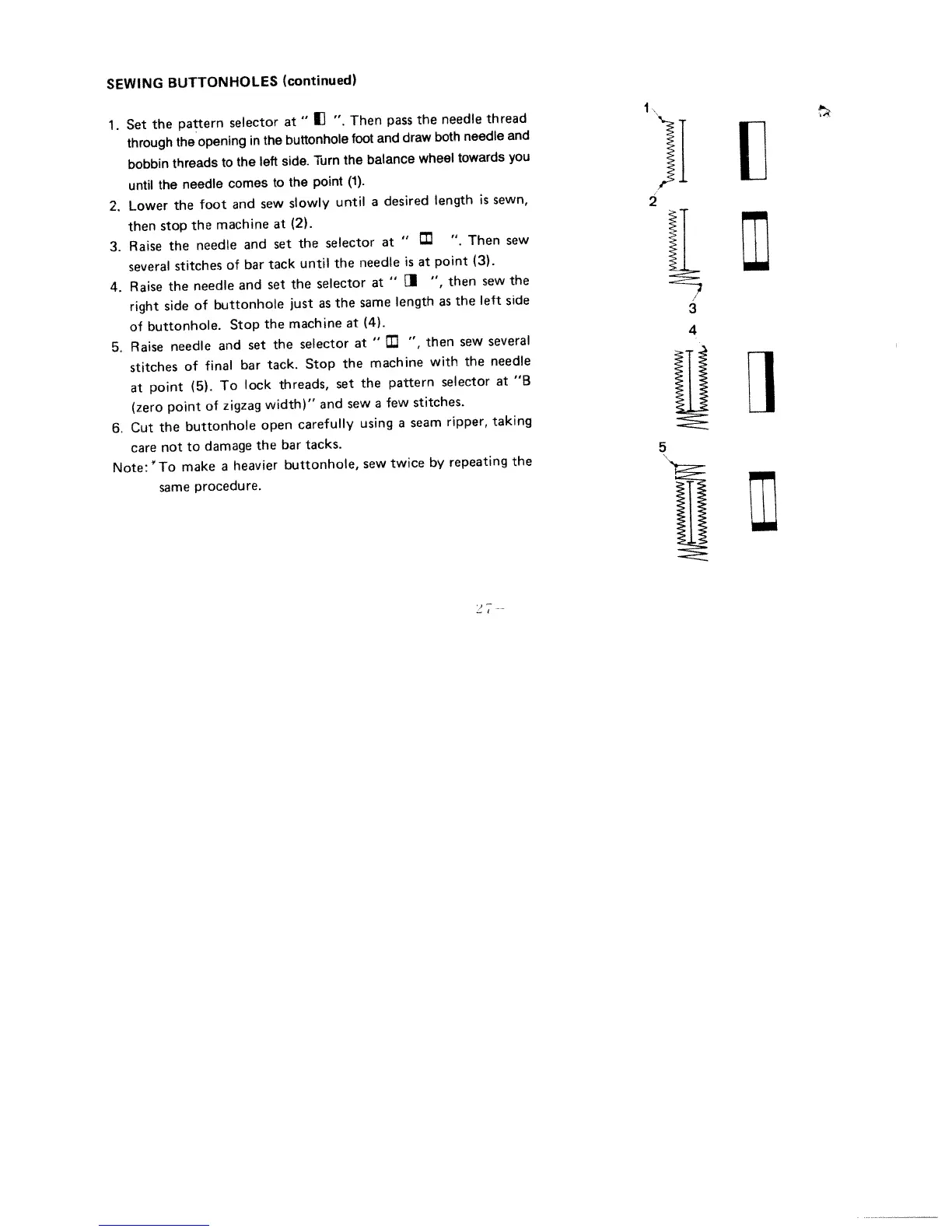
1.
Set
the
pattern
selector
at
II
“.
Then
pass
the
needle
thread
through
the
opening
in
the
buttonhole
foot
and
draw
both
needle
and
bobbin
threads
to
the
left
side,
Turn
the
balance
wheel
towards
you
until
the
needle
comes
to
the
point
(1).
2,
Lower
the
foot
and
sew
slowly
until
a
desired
length
is
sewn,
2
then
stop
the
machine
at
(2).
3.
Raise
the
needle
and
set
the
selector
at
“.
Then
sew
several
stitches
of
bar
tack
until
the
needle
is
at
point
(3).
4.
Raise
the
needle
and
set
the
selector
at
1
“,
then
sew
the
right
side
of
buttonhole
just
as
the
same
length
as
the
left
side
of
buttonhole.
Stop
the
machine
at
(4).
5.
Raise
needle
and
set
the
selector
at
“,
then
sew
several
stitches
of
final
bar
tack,
Stop
the
machine
with
the
needle
at
point
(5).
To
lock
threads,
set
the
pattern
selector
at
“B
(zero
point
of
zigzag
width)”
and
sew
a
few
stitches.
6.
Cut
the
buttonhole
open
carefully
using
a
seam
ripper,
taking
care
not
to
damage
the
bar
tacks.
5
Note:
To
make
a
heavier
buttonhole,
sew
twice
by
repeating
the
same
procedure.

Other manuals for Singer 1411

Related product manuals