EasyManua.ls Logo

Singer 1640 - Removin G Bobbin Case; Removin G Needle Plate

Singer 1640
34 pages
Print Icon
To Next Page IconTo Next Page
To Previous Page IconTo Previous Page
Loading...
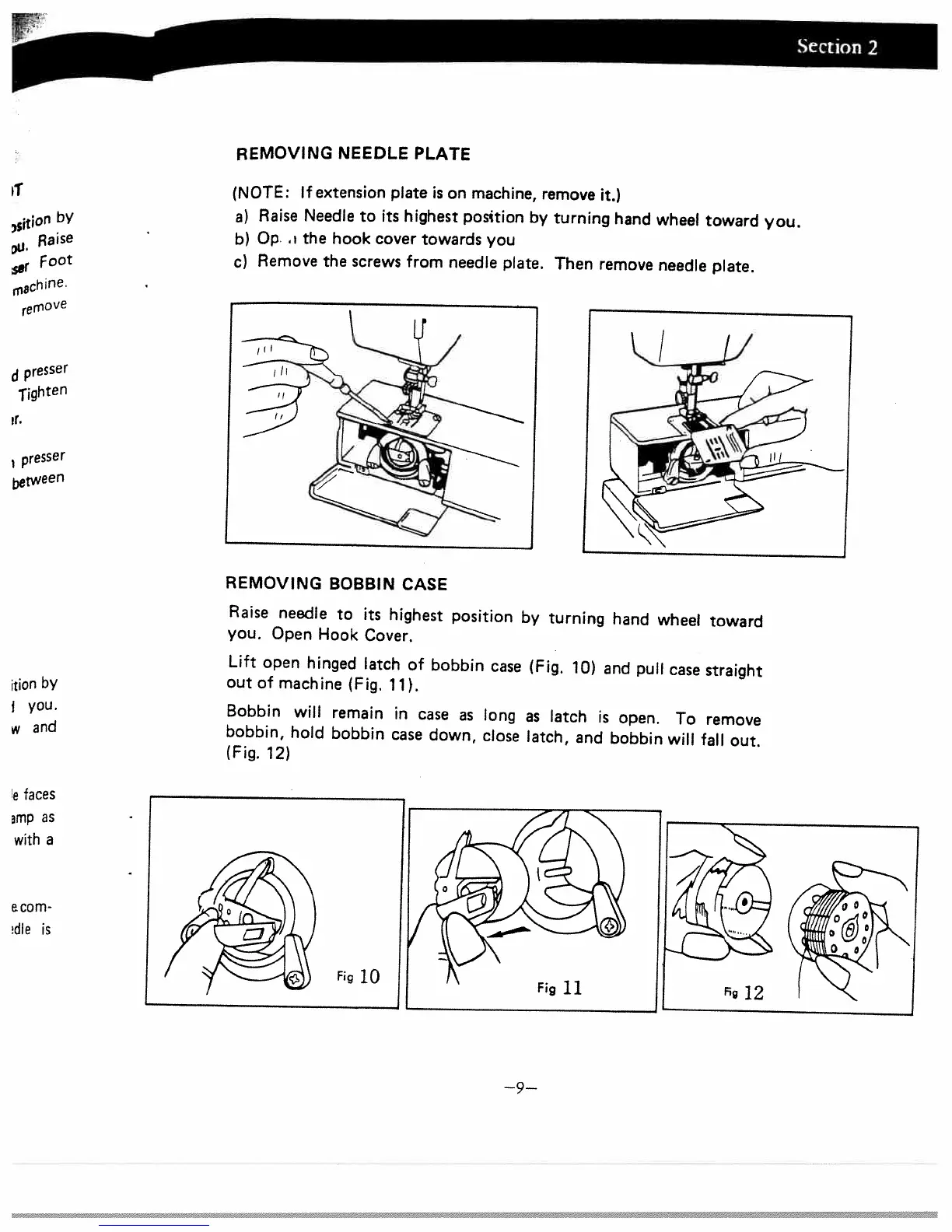
REMOVING
BOBBIN
CASE
Raise
needle
to
its
highest
position
by
turning
hand
wheel
toward
you.
Open
Hook
Cover.
Lift
open
hinged
latch
of
bobbin
case
(Fig.
10)
and
pull
case
straight
out
of
machine
(Fig.
11).
Bobbin
will
remain
in
case
as
long
as
latch
is
open.
To
remove
bobbin,
hold
bobbin
case
down,
close
latch,
and
bobbin
will
fall
out.
(Fig.
12)
REMOVING
NEEDLE
PLATE
(NOTE:
If
extension
plate
is
on
machine,
remove
it.)
a)
Raise
Needle
to
its
highest
position
by
turning
hand
wheel
toward
you.
b)
Op
.
the
hook
cover
towards
you
c)
Remove
the
screws
from
needle
plate.
Then
remove
needle
plate.
,
5
ltiOfl
bY
Raise
Foot
remove
d
pre5
jghtefl
r.
presser
,tween
itiOfl
by
j
you.
w
and
e
faces
mp
as
with
a
a
corn
dle
is
—9—

Related product manuals