EasyManua.ls Logo

Singer 251-2 - Regulating Stitch Length

Singer 251-2
44 pages
Print Icon
To Next Page IconTo Next Page
To Previous Page IconTo Previous Page
Loading...
From the library of Superior Sewing Machine & Supply LLC - www.supsew.com
16
TO
REGULATE
THE
LENGTH
OF
STITCH
CAUTION: DO NOT ATTEMPT
TO
CHANGE
STITCH
LENGTH
WHILE
MACHINE
IS
RUNNING.
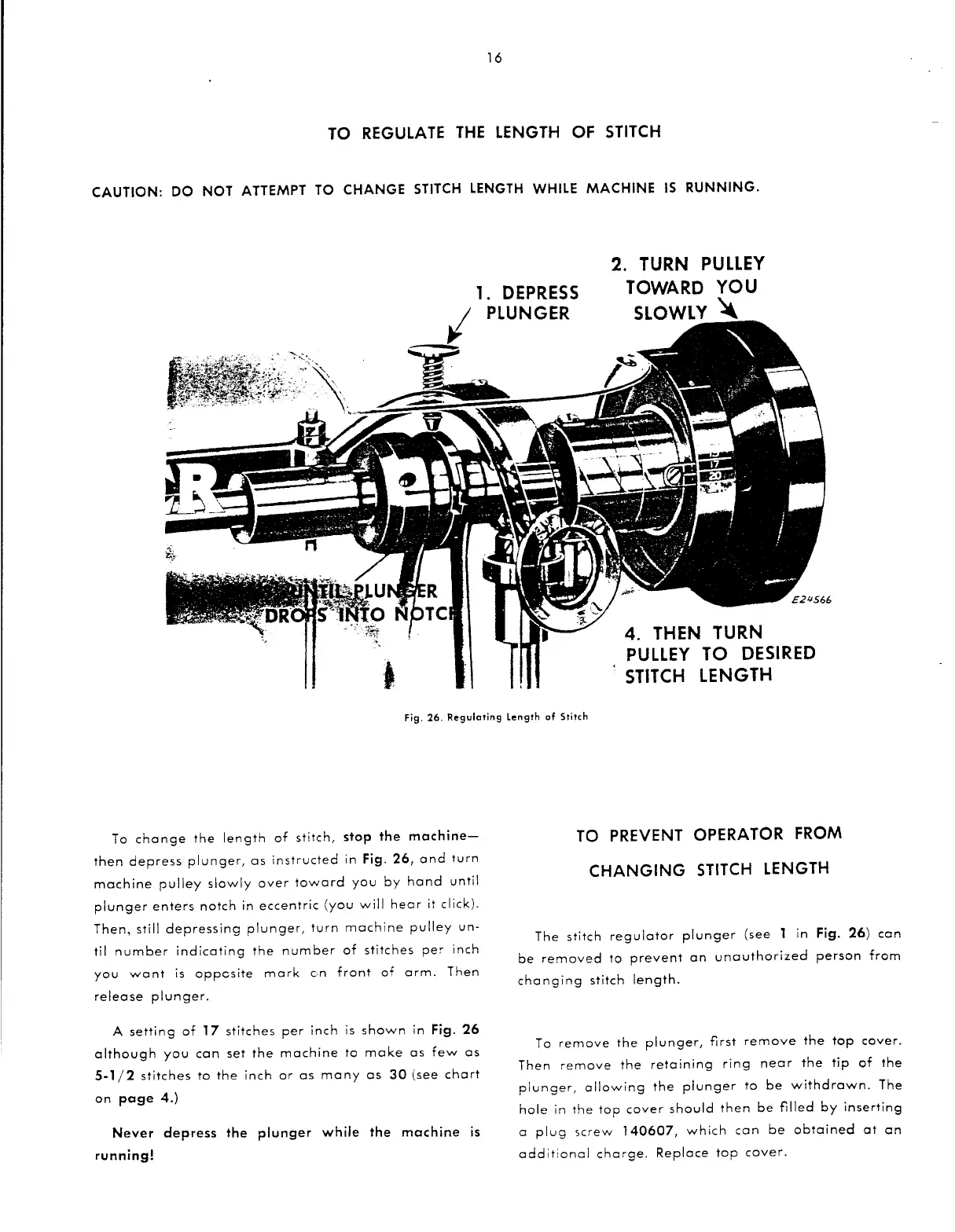
1.
DEPRESS
I
PLUNGER
c----
2.
TURN
PULLEY
TOWARD
YOU
SLOWLY~
4.
THEN
TURN
PULLEY
TO
DESIRED
STITCH
LENGTH
Fig.
26.
Regulating
length
of
Stitch
To
change
the
length
of
stitch,
stop the
machine-
then
depress
plunger,
as
instructed
in
Fig.
26,
and
turn
machine
pulley
slowly
over
toward
you
by
hand
until
plunger
enters
notch
in
eccentric
(you
will
hear
it
click).
Then,
still
depressing
plunger,
turn
machine
pulley
un-
til
number
indicating
the
number
of
stitches
pe~
inch
you
want
is
oppcsite
mark
en
front
of
arm.
Then
release
plunger.
A
setting
of
17
stitches
per
inch
is
shown
in
Fig.
26
although
you
can
set
the
machine
to
make
as
few
as
5-1
/2
stitches
to
the
inch
or
as
many
as
30
(see
chart
on
page
4.)
Never
depress the
plunger
while
the
machine
is
running!
TO PREVENT OPERA TOR FROM
CHANGING
STITCH LENGTH
The
stitch
regulator
plunger
(see
1
in
Fig.
26)
can
be
removed
to
prevent
an
unauthorized
person
from
changing
stitch
length.
To
remove
the
plunger,
first
remove
the
top
cover.
Then
remove
the
retaining
ring
near
the
tip
of
the
plunger,
allowing
the
plunger
to
be
withdrawn.
The
hole
in
the
top
cover
should
then
be
filled
by
inserting
a
plug
screw
140607,
which
can
be
obtained
at
an
additional
charge.
Replace
top
cover.

Related product manuals